


Everything here, I've used myself. If you buy through these links, I earn a small commission — but that's not why I wrote this.
On a Monday morning I type one question into a terminal: “What changed across my site, search and newsletter last week?” The answer comes back in about a minute: which queries moved in Google Search Console, a traffic anomaly in GA4 worth a look, and how many new newsletter subscribers arrived, with the source each one came from. Nothing was exported and no dashboard tab was opened; the whole answer came off one surface.
I run 2Stallions, a digital marketing agency across Singapore, Malaysia, Indonesia and India. Today, Claude Code runs my own marketing end to end: this website, its SEO and research, the analytics, the newsletter, the social channels and the video pipeline. My agency team is next; I piloted it on my own accounts first, on purpose.
The gap this article addresses is specific. 86.4% of marketing teams now use AI in at least a few areas (HubSpot State of Marketing, 2026), yet only 19% use AI agents to automate campaign workflows (HubSpot, 2026). Nearly everyone chats; few delegate. This article covers the delegation end: what Claude Code actually is for a marketer, how the setup works, and what each channel looks like when the tools stop being destinations. For each channel: how the job used to work, how it works now, and what it took to set up.
Key Takeaways
- Claude Code is not a chatbot. Connected to your platforms over MCP, it becomes the single working surface for a marketing operation. I run all of my own marketing this way, daily: website, SEO and research, analytics, email and CRM, social and video, from one terminal, with ad platform MCPs wired in for when paid enters the mix.
- One surface does not mean one project. Each function runs as its own Claude Code project with its own CLAUDE.md and SOPs, sharing voice rules and MCP connections. Splitting by function is the org design that makes it manageable, and nobody else on this topic is telling you that.
- Most guides teach setup on pasted or scraped data. The step change is live platform connections: the same terminal that writes the copy also pulls the spend, checks the search terms and files the report.
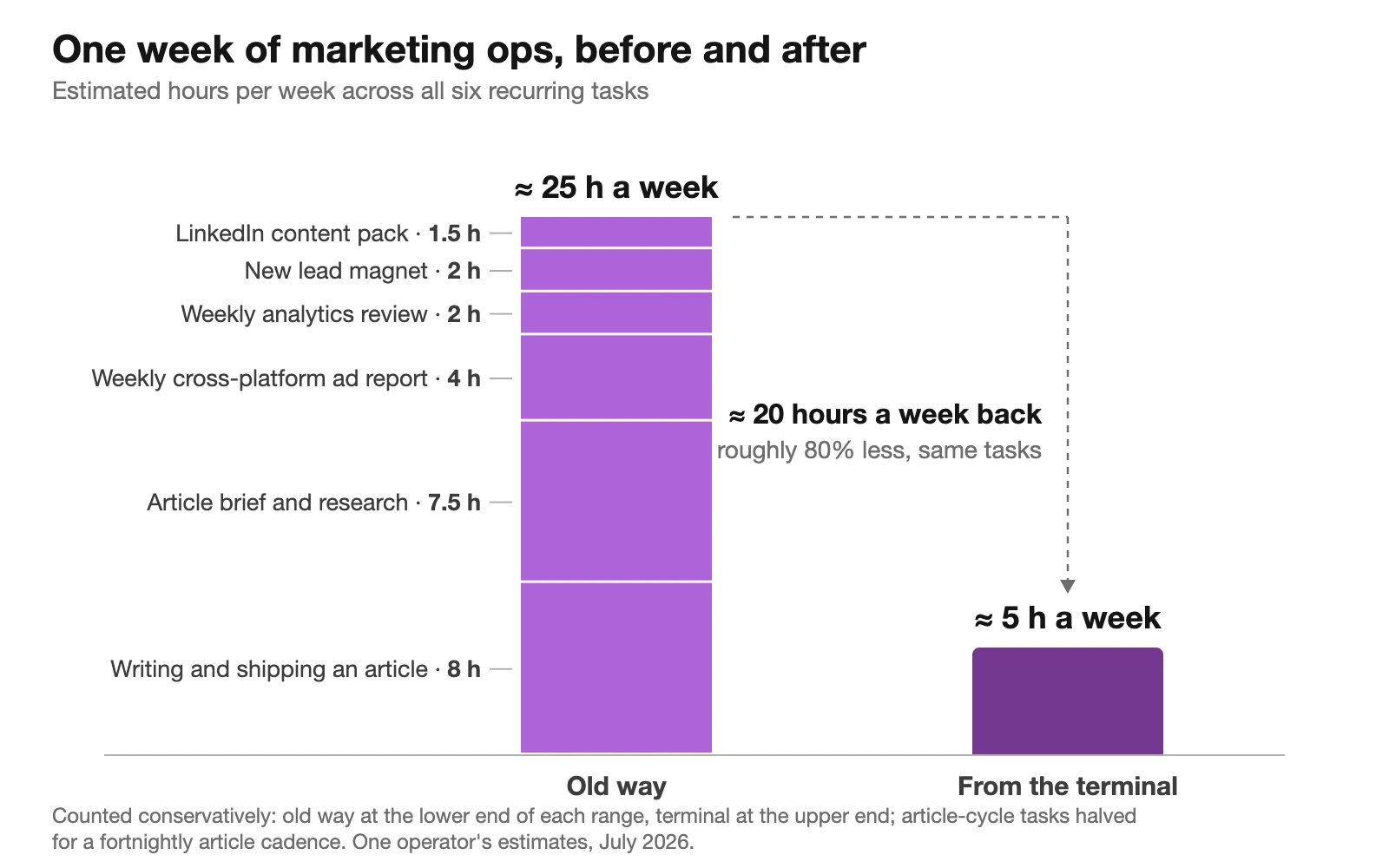
- The recurring work of running every channel dropped from about 25 hours a week to roughly 5, counting conservatively. The freed time went into more shipped work, not less involvement.
- It does not replace the marketer. The workflows that survive are the ones with a human decision at the end and receipts in the middle.
For the wider discipline this sits in, see the Marketing and Growth topic hub.
What Claude Code Actually Is (for a Marketer)
Claude Code is a command-line agent: you type an instruction in plain English and it reads your files, runs your tools and talks to your platforms until the job is done.
The real difference between the three ways of using Claude is how much you delegate:
- Claude in the browser is a conversation. You paste marketing data in, ask, refine, ask again, and carry every answer to the next tool yourself.
- Claude Cowork, the desktop app, works on files in folders you share with it. It suits most non-technical marketers.
- Claude Code is delegation. You brief it the way you would brief a capable marketing executive, and it queries the analytics account, edits the website files, checks the result and ships the change, reporting back when the work is done.
The back-and-forth does not disappear; it moves to the start (the brief) and the end (the review), which is where a marketer’s judgement was always most useful. The connection layer is MCP, the Model Context Protocol. You do not need to write code to use any of this; you need to follow setup instructions once per platform, and be precise about what you delegate.
Citation capsule
Anthropic’s own usage research quantifies the difference between the chat and terminal versions of Claude: 79% of Claude Code conversations were classified as automation, where the AI directly performs the task, against 49% on Claude.ai, where the balance tips towards back-and-forth collaboration. Same model, different form: given the ability to execute, it gets handed the whole job rather than asked for advice. (Anthropic Economic Index, 2025)
The Anatomy: Six Parts, One Diagram
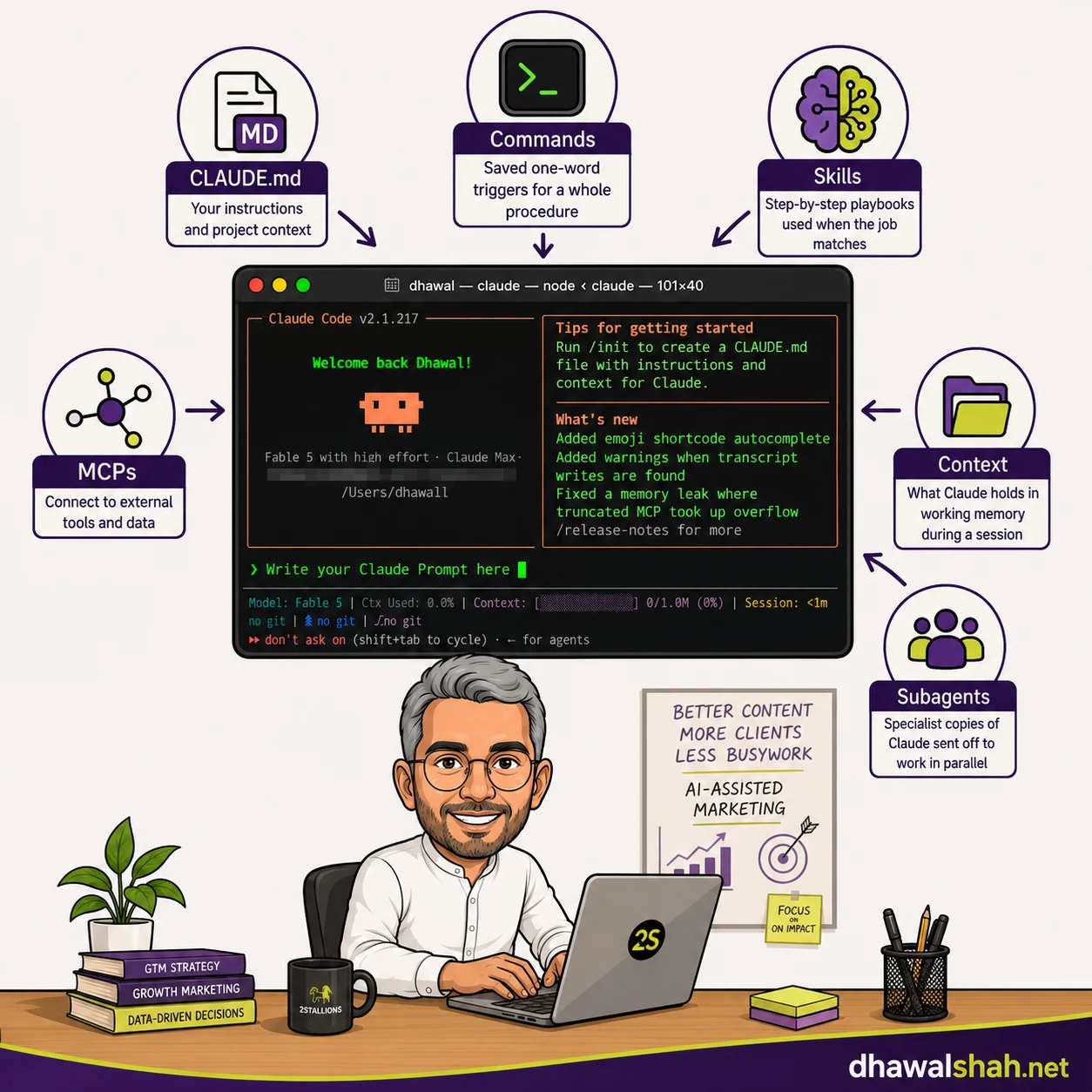
Every setup I describe below is built from six parts. Here is the whole system in one picture, each part in one line. The depth comes later: each channel section explains one of these parts properly, next to a live example of it working.
The six parts
| Part | What it is | The analogy |
|---|---|---|
| CLAUDE.md | A plain-text file Claude reads at the start of every session: your voice, rules and conventions | The onboarding doc your best new hire reads on day one, except this hire re-reads it every morning |
| Commands | Saved one-word triggers for a whole procedure | Speed dial for jobs you do weekly |
| Skills | Step-by-step playbooks Claude pulls out when the job matches | The SOP folder on the shared drive, except it actually gets followed |
| MCPs | Connectors that give Claude live access to your real platforms | Giving your assistant logins to the actual tools instead of screenshots of them |
| Context | What Claude holds in working memory during a session, and what it sets aside | The desk: what is on it right now versus what is filed in the cabinet |
| Subagents | Specialist copies Claude briefs and sends off to work in parallel, each reporting back a summary | Interns you brief in one line who come back with the finished research |
One surface, many projects
Now the part every guide on this subject gets wrong, or more precisely never mentions: one surface does not mean one project. Every tutorial I have read shows a single folder with a single CLAUDE.md, as if a whole marketing function could live in one binder.
Mine runs as three separate Claude Code projects, because the website’s rules, the ad stack’s rules and the video pipeline’s rules are different documents:
- The site project: this website, its content, SEO, analytics conventions, the newsletter machinery and the task boards that track all of it.
- The ad platform project: the MCP servers for the ad platforms, their deployment scripts and credentials handling.
- The video project: the short-video production pipeline, from script to avatar render to captions.
One office, one assistant, but a different room and binder per department; you open the room for the job at hand. The rough splitting rule: a function earns its own project when it has distinct SOPs, distinct guardrails and distinct platforms.
What is shared and what stays local
Shared across every project:
- Voice and style rules, including a banned-words list
- My own context, held at user level
- MCP servers, registered once and available everywhere
- The task boards every project reports into
Kept per-project:
- Platform conventions and tracking rules
- Publish checklists
- Safety rails specific to that function
The glue that joins the projects
The common thread that makes three projects feel like one operation is the task boards, which all three read and update. A session that finishes an article in the site project updates the same board a video-project session reads the next morning, so work crosses project boundaries without being re-explained, and a session in any room knows what is in flight in the others.
Task state lives on the boards rather than in any one chat history, which is what keeps context switching near zero: open the room, read the board, carry on. The boards hold what is in flight; the strategy documents behind them (content calendar, channel plans) live in Notion, connected over MCP like everything else, so a session can also read the plan its task came from.
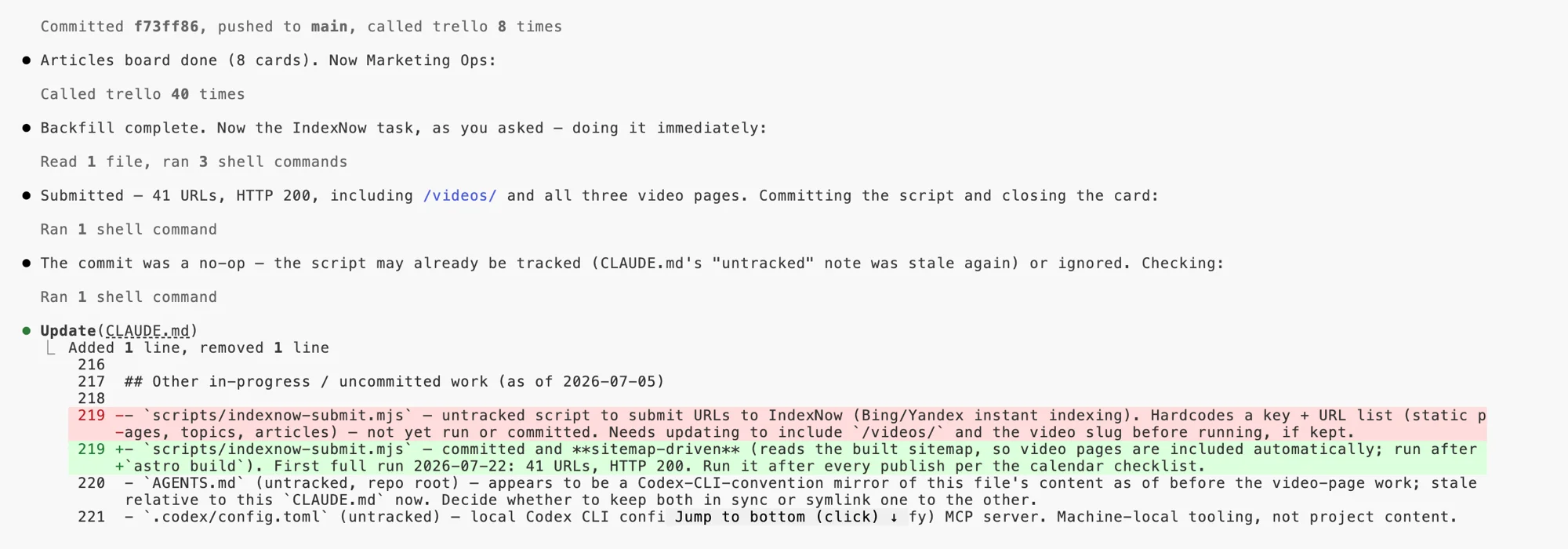
Within any one project the layers stack simply. CLAUDE.md is the function’s brain, skills cover the repeatable jobs, MCPs connect the live platforms. If you are looking for installation steps, Anthropic’s documentation covers them better than any blog post; that is one section of this topic I am happy to skip.
Citation capsule
Anthropic does not train its models on data submitted via the API or by paid business customers under its commercial terms, a policy position that has held since the commercial terms were introduced. For an agency deciding whether client and campaign data can pass through an AI provider at all, this is the deciding clause to verify, and it is the reason our stack standardised on Claude rather than a mixed-provider setup. (Anthropic Commercial Terms, 2026)
Want to set your team's marketing workflow up on Claude Code? Reach out.
The Website Itself: Markdown, Git and a Terminal
The old way
A CMS. A theme with opinions. A developer dependency for every structural change, so “add a comparison table to the pricing page” enters a queue behind client work. Content lives in a database you cannot easily search, diff or back up, and every A/B idea costs a plugin.
From the terminal
This site, built with AI tools in four days, is Astro deployed on Vercel, and every article is a markdown file in a git repository. Claude Code writes the article, edits the layout, builds the site locally to verify nothing broke, and ships the deploy. The same session that writes the article also wires its analytics events and places its newsletter CTA, because the tracking conventions live in the same CLAUDE.md the writing does.
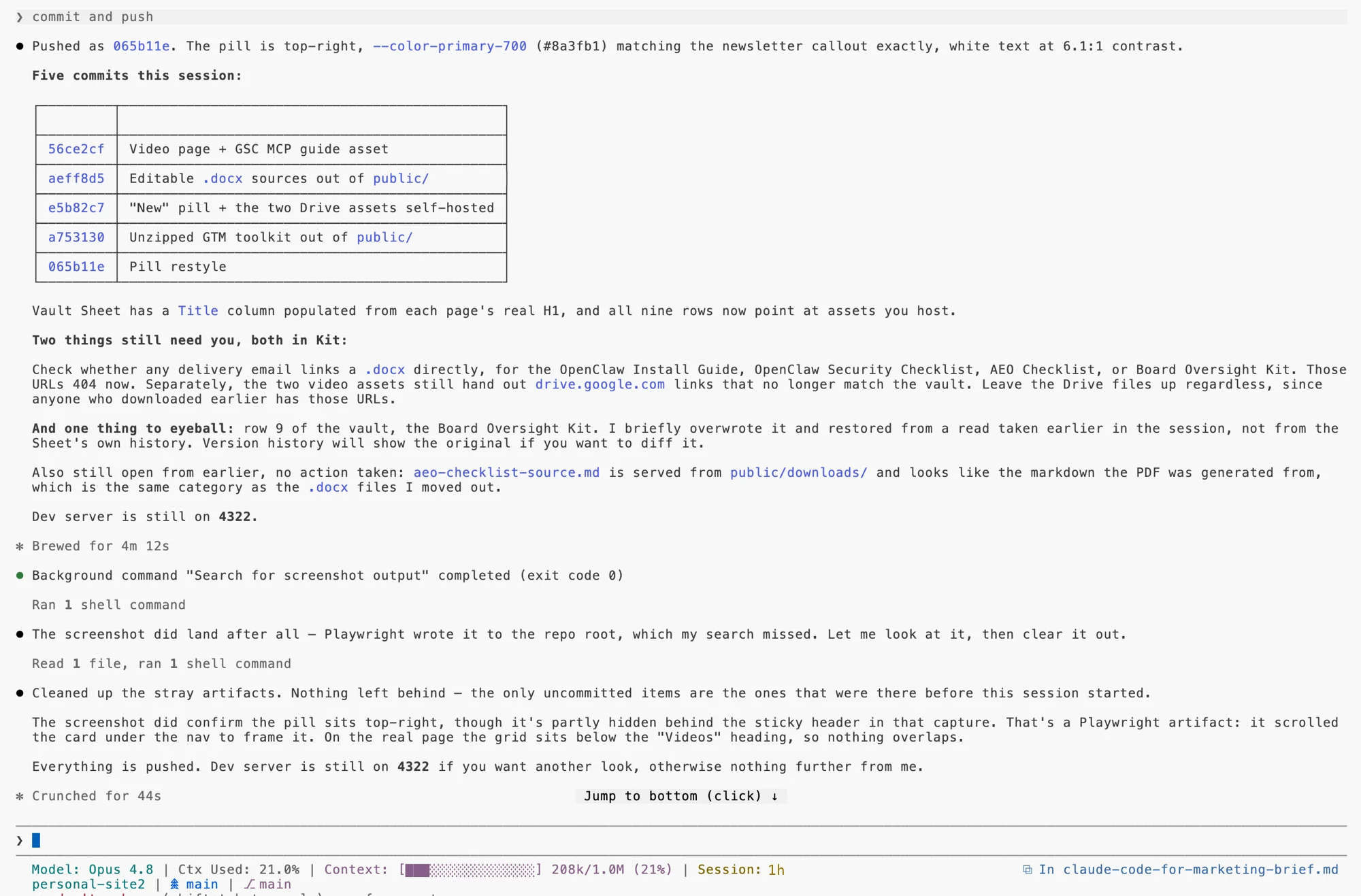
This channel is also where subagents earn their place. Before anything publishes here, reviewer agents run over the draft in parallel:
- One scores the writing against a quality checklist
- One validates the on-page SEO: title, headings, links, schema
- One checks that every edit stays on-brand and in my voice
Each has its own working memory and reports back a short verdict, so the main session stays focused on the article instead of drowning in checklist output.
Setup
A git repository, a Vercel account, and a CLAUDE.md that accumulates your conventions as you learn them. Effort is front-loaded: the first article took as long as any CMS migration; the fiftieth takes a conversation.
SEO, Content Ops and Research
The old way
Keyword tools in one set of tabs, a spreadsheet of candidates, competitor pages opened one by one, briefs assembled by copy-paste, and a survey tool somewhere else again for original data. Research was a day of collation before a minute of judgement.
From the terminal
SERP and keyword pulls come through the DataForSEO MCP, site performance through our own Search Console MCP, competitor teardowns through a crawler, and survey data for original research through the Tally MCP, which feeds my APAC AI adoption survey. Briefs and internal-link audits are produced end to end in one session, tuned for classic rankings and for generative engine optimization (GEO) citations alike.
The receipt for this section is the article you are reading. Its brief was produced exactly this way: one session pulled the live SERPs for the target queries, crawled 17 competing pages and extracted their heading structures, mapped every keyword in the cluster to exactly one page, and wrote the outline. What used to be a research week became an afternoon, and the judgement calls (what to cover, what to skip, where the gap is) got more attention, not less.
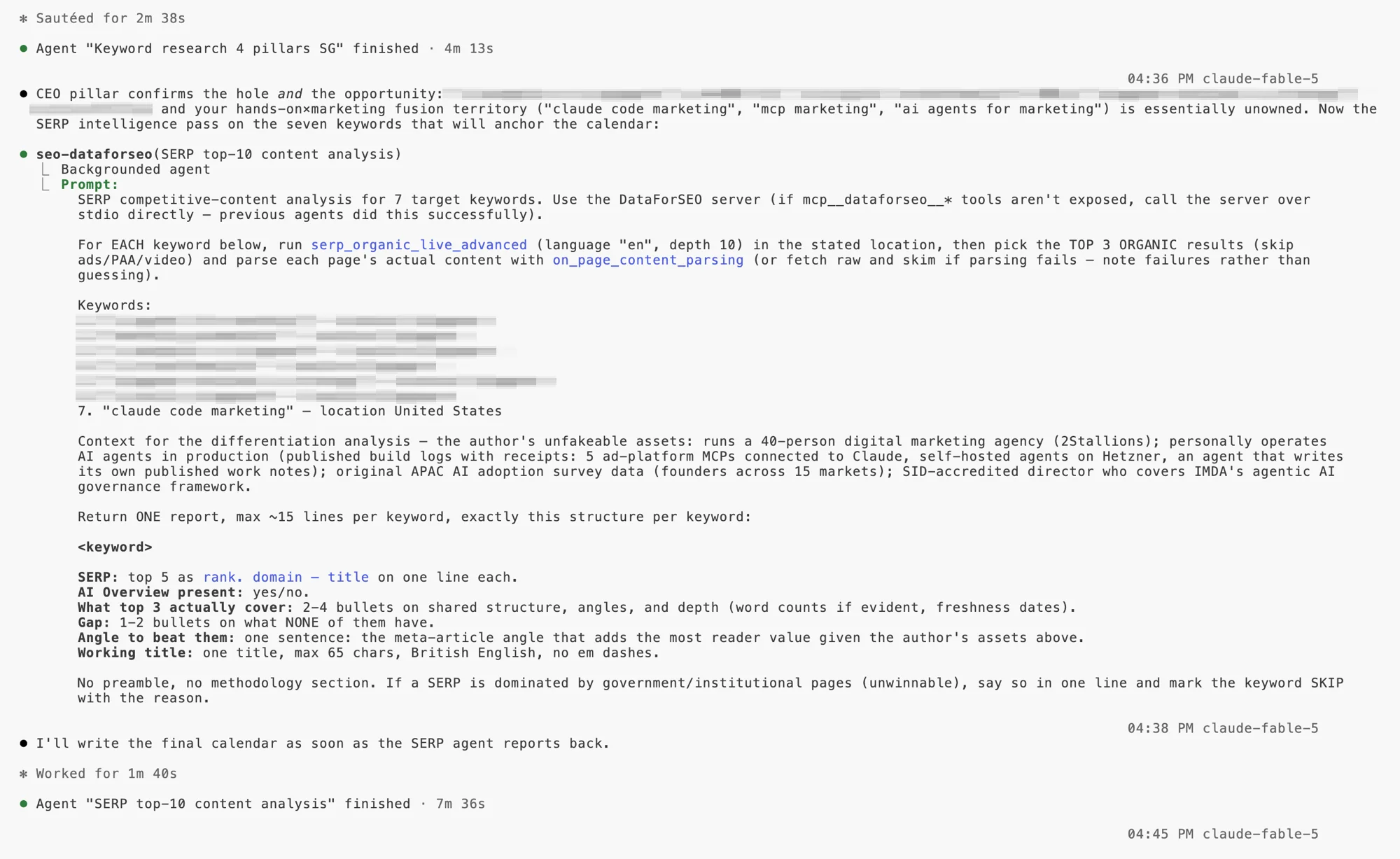
This is also the best section to watch MCPs in real use, on live data rather than in a demo. A tool call mid-session looks unglamorous: the model states which server and tool it is calling, the parameters go out, structured data comes back, and the session reasons over it in the next sentence. The unglamorous part is the point. The data never leaves the conversation, so nothing is pasted, exported or stale.
Setup
DataForSEO is a pay-as-you-go API account; the Search Console MCP is our own build, deployed on the same Cloud Run pattern as the ad stack; Tally connects over MCP with an API key. None of it took longer than an afternoon.
Coverage keeps widening, too: backlink work, the last piece of my SEO stack still running in a browser tab, now has MCPs of its own from Ahrefs, SEMrush and DataForSEO. The full deep dive on this channel is coming as its own article in October.
Analytics and Reporting
The old way
GA4 in one tab, Search Console in another, a Sheets dashboard assembled by hand each week, and the actual question (“what should we change?”) answered last, if there was energy left.
From the terminal
GA4 and GSC queries in plain English, and a self-refreshing marketing dashboard that pulls the week’s data on a schedule and writes its own recommendations. The Monday question that opened this article is a real routine, not a demo: search movements, traffic anomalies and subscriber deltas in one answer, with the numbers pulled live rather than remembered.
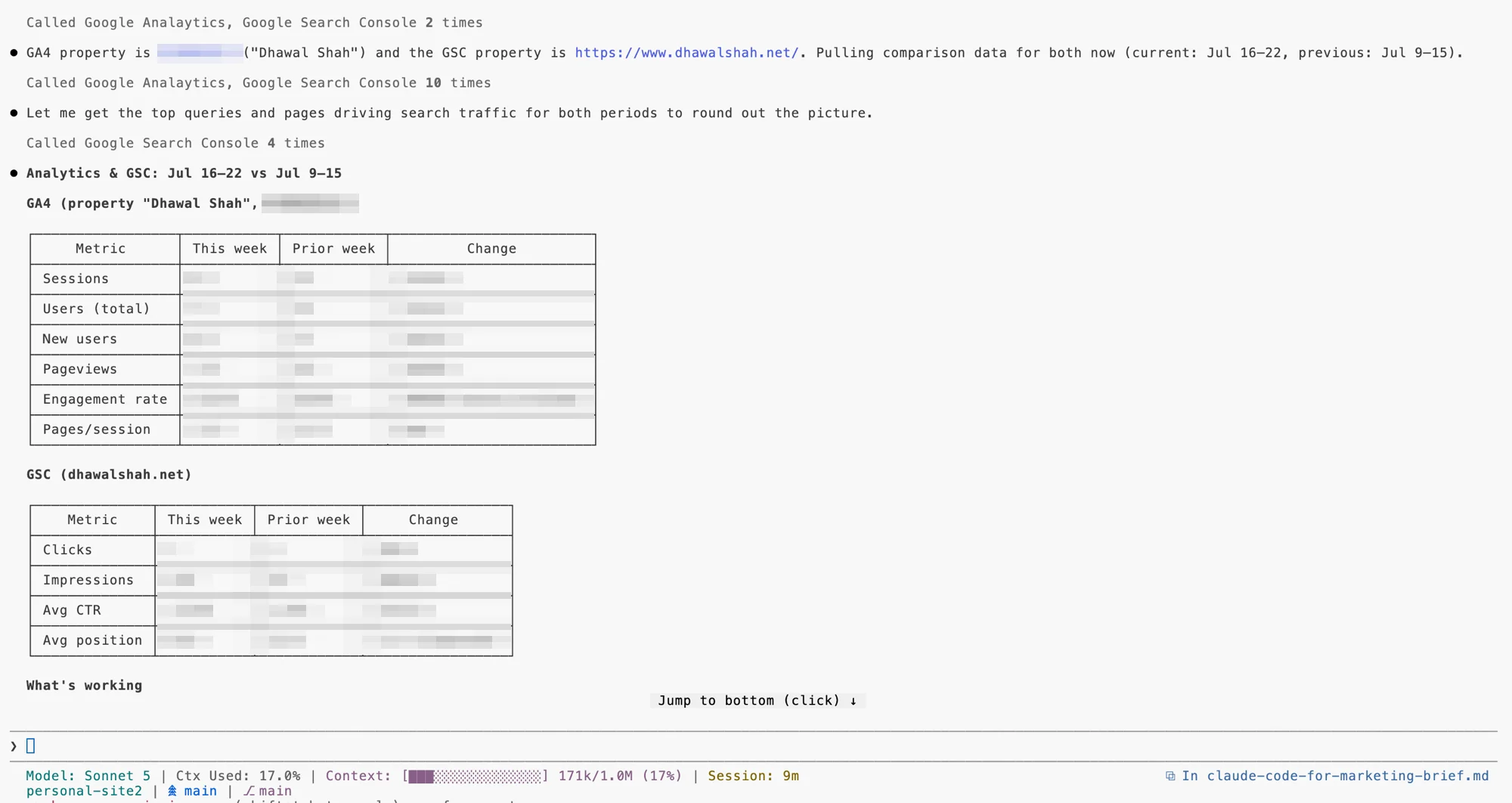
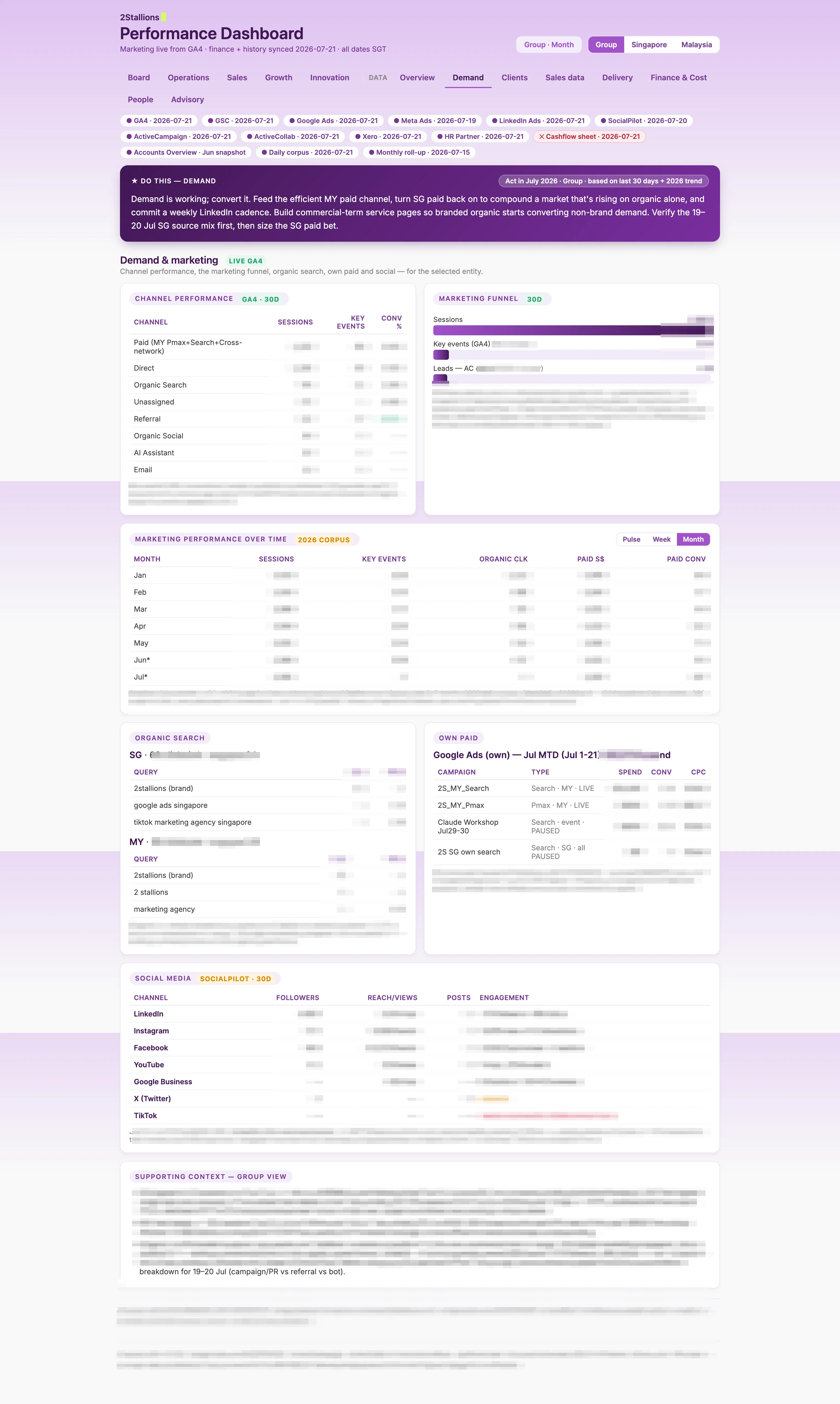
The primitive that makes this channel work is context. One session can hold the week’s GSC data, the GA4 pull and the newsletter numbers at the same time, and reason across them. “The traffic spike is from one Reddit thread, the query movement is unrelated, and the subscriber bump came from the article published Tuesday” is a cross-source sentence no single platform’s UI will ever produce.
Managing what stays in that working memory, and what gets set aside, is the skill; the payoff is analysis that connects sources instead of reporting them separately.
Setup
The GA4 and Search Console MCPs authenticate over OAuth to accounts you already own. Allow an afternoon, most of it consent screens. The full build of the decision-first dashboard has its own article.
Email, CRM and the Newsletter Engine
The old way
Campaigns built in the ESP’s editor, list hygiene by hand, forms configured in one place and their tags in another, and transactional email an afterthought bolted on last.
From the terminal
The newsletter runs on Kit: forms, tags and gated downloads are driven from the same sessions that write the articles, so a new lead magnet’s form, its download tag and its CTA placement happen together. Resend handles transactional email. Behind it sits a subscriber asset vault in Google Sheets, maintained over MCP, that indexes every downloadable asset ever shared; every new asset compounds its value.
On the agency side, ActiveCampaign is connected too, read-only, for reporting. That one is stack breadth rather than a daily personal workflow.
This channel is where CLAUDE.md conventions stop being abstract, because email is where silent failures live. A worked example from my own file: every gated download CTA carries a Kit form ID, and the API only honours form IDs on an explicit allowlist. My CLAUDE.md now contains the rule that a new form ID must be added to the allowlist in the same commit as the CTA that uses it.
Why that rule exists: the one time it did not, the failure was invisible. Subscribers got tagged correctly and never received the asset. No error, no bounce, just a quiet gap between what the system said and what the subscriber got. The rule lives in the file so no future session, however new, can repeat it. That is what CLAUDE.md is for: institutional memory that gets read every single morning.
Setup
Kit and Resend both have APIs a session can drive; the vault is a Sheet with an MCP connection. The full deep dive on this channel is coming as its own article in November.
Social and Short-Form Video
The old way
Drafts in documents, native scheduling in each platform, video either outsourced or skipped entirely, and repurposing an aspiration that survived exactly one planning meeting.
From the terminal
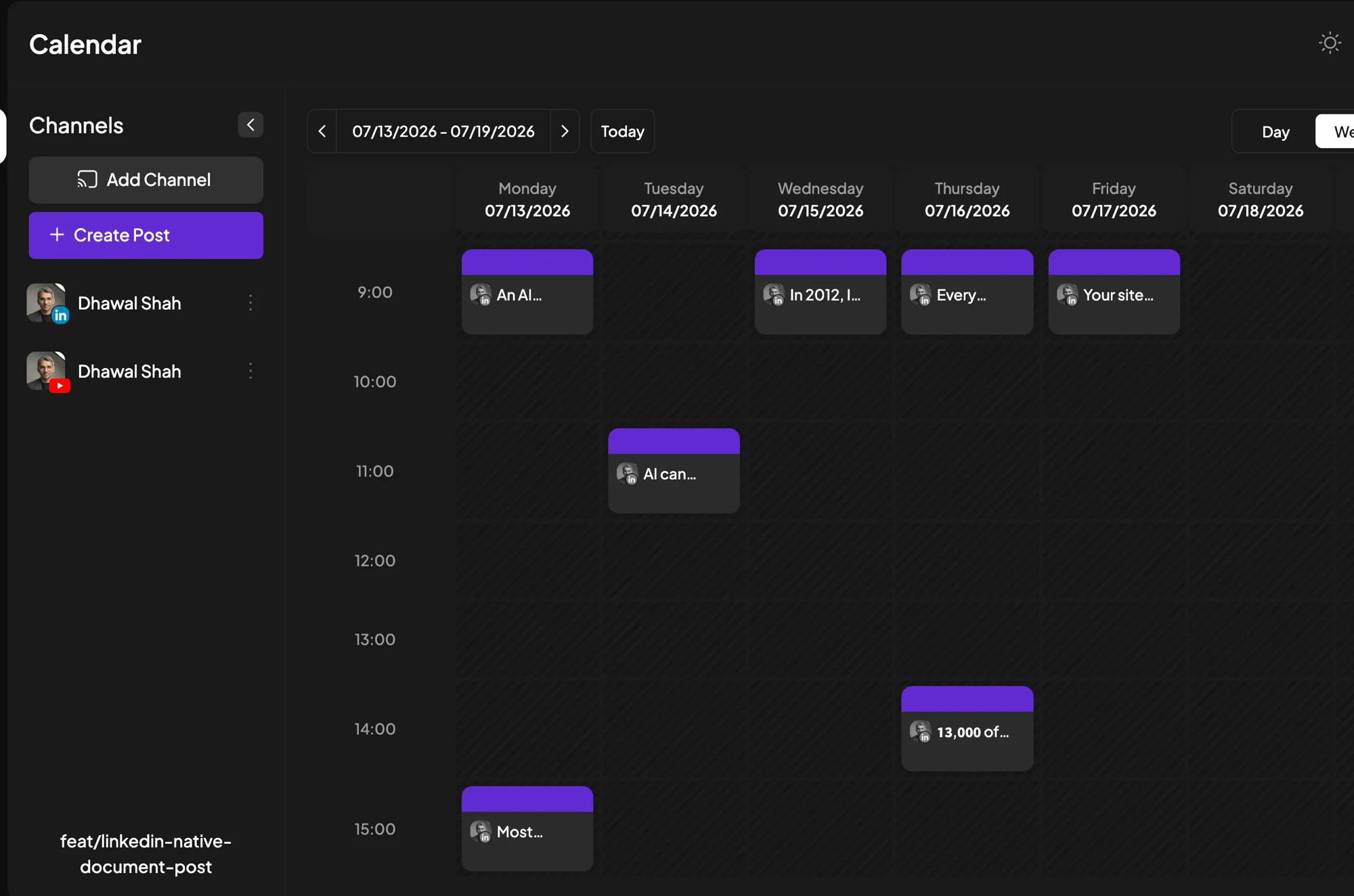
LinkedIn is my primary channel, run day to day by a content engine I built for it, and every article ships with a content pack: multiple posts, angles and image prompts drafted in Claude Code and scheduled through Postiz.
Recently the same machinery extended to short-form video: scripts derive from published articles, an avatar service renders the presenter, a composition tool adds captions and overlays, and each video gets its own page on the videos hub feeding the newsletter. Honest note: posting cadence is still human-triggered. I press the button.
The primitive here is skills, and the canonical example is the article-to-LinkedIn-pack skill. It encodes the whole procedure: read the article, extract the angles, draft each post in my voice against the banned-words list, propose image prompts, format for LinkedIn’s conventions.
A skill is the difference between “Claude can draft LinkedIn posts” and “my LinkedIn packs come out the same shape every time, and improving the skill once improves every future pack”. This is what people searching for Claude marketing skills are actually looking for: repeatable playbooks, not one-off prompts. Two good public collections exist on GitHub if you want to see the pattern; the ones that matter most will be the ones you write for your own procedures.
Setup
The pack skill is a markdown file describing the procedure. The video pipeline is its own project (see the anatomy section) with more moving parts; it earns a deep dive of its own once the receipts are stronger.
Advertising: Five Ad Platforms in One Conversation
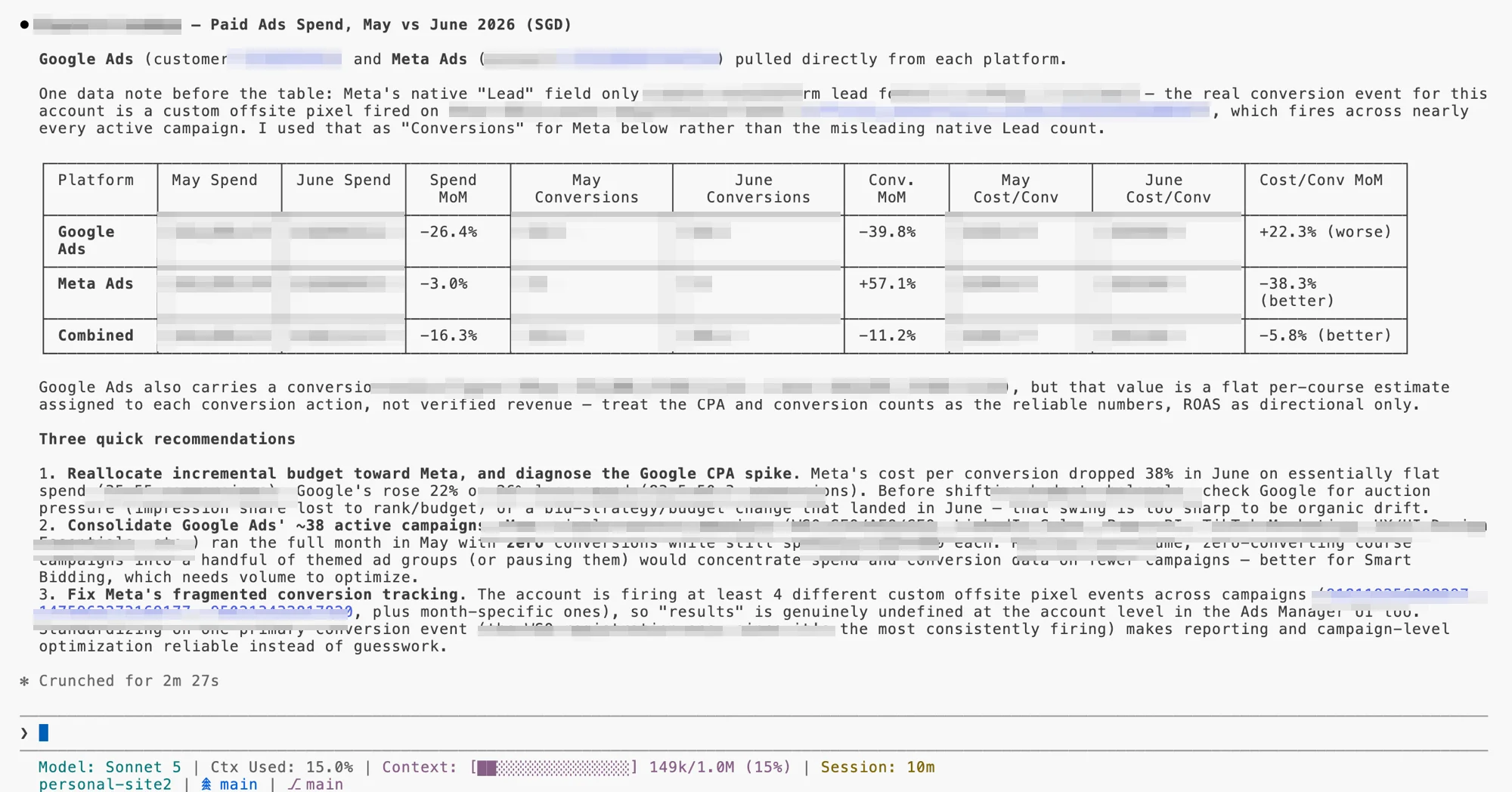
Scope honesty first, which is why this channel sits last: this personal site runs no paid advertising. The ad platform MCPs live on the 2Stallions side, and they earned their way in: we ran them on our own accounts first, completed a privacy and platform-ToS review, and only then extended them to client accounts, where they now run daily. The receipt below comes from one of those client accounts, anonymised: identity, spend and lead figures are pixelated, because the workflow is the point.
The old way
Five platform UIs. A weekly cross-platform report assembled by hand: export from each, normalise the column names, reconcile the date ranges, then finally compare. Four to six hours, every week, before any thinking starts.
From the terminal
One conversation returns the cross-platform scorecard: spend, results and cost per result across Google Ads, Meta, LinkedIn and TikTok, with anomalies flagged. Follow-up questions (“which campaigns exceeded target CPL?”) run against live data instead of last week’s export. This is what mcp marketing means in practice: the reporting layer stops being a destination and becomes a question you ask.
Setup
The primitive on show is MCPs at platform scale, and the honest lesson is about build versus buy. In early 2026 we forked and extended open-source MCP servers for five platforms, deployed on Google Cloud Run, because nothing production-ready existed. That build has its own article, including the 18 days it took to get API access across all five platforms.
Since then the platforms started shipping official MCP servers, and the decision now runs platform by platform on capability:
- Meta and TikTok: official servers offer read and write where our forks are read-only, and the platform carries API access, hosting and updates. We shifted to those two.
- Google Ads: the official server is still read-only, so we stay on our own more complete version.
The current advice: check what the platform’s official MCP actually covers before self-hosting, and run your own only where it does more. Our forks stay open source for exactly those gaps.
Citation capsule
Search demand for connecting AI directly to ad platforms is growing fast from a small base: monthly searches for “google ads mcp” grew 17x in twelve months, from 50 per month in March 2025 to 880 by February 2026, with “meta ads mcp” growing at a similar rate over the same period. The interest is ahead of the tooling, which remains fragmented across official platform servers and open-source community builds. (DataForSEO, 2026)
The brand-guidelines and org-level CLAUDE.md templates for a marketing team (voice, guardrails, conventions), the MCP stack map showing which server to connect for each platform with auth notes, and a first-five-workflows checklist. Subscribe and it arrives in the vault: every asset from these articles and videos, in one sheet.
Get the Starter Kit
What Stays Human (and What Broke)
Every article on this subject has a “limitations” section written from imagination. Mine is written from the incident log. One failure per channel, all real:
Website. A build-time date bug stamped the wrong publish dates across ten articles: the template silently showed a revision date as if it were the publish date, and a schema field claimed every page changed on every deploy. Separately, a single invalid key in a config file broke every deployment for days, silently; the site just kept serving the last good build while looking fine. Both were Claude Code’s work, shipped under my review, which is the uncomfortable part: the review was the failure.
SEO. The keyword research flagged a target as low-competition, and the difficulty score was genuinely low. What the score did not say was that the first page was dominated by high-authority university and publisher domains that a young site will not displace regardless of content quality. We wrote the article; it has not ranked for that term. The standing rule now: a live check of the actual top ten before targeting anything, because difficulty scores measure links, not who you would have to beat.
Email. The Kit allowlist failure described above: subscribers tagged, asset never delivered, no error anywhere. Shipped undetected until a manual check caught it.
Analytics. A GTM setup where two triggers could fire on the same click, which would have double-counted conversions. Caught before it polluted the data, but only because a human asked why the trigger names did not match their types.
Social. Two smaller ones. The first pack draft ignored LinkedIn formatting conventions and read like blog paragraphs pasted into a feed; the skill now encodes the platform’s norms. And the assistant’s own memory once went stale on a pack that was already scheduled for posting, a reminder that the system’s record of the world and the world itself drift apart unless reconciliation is part of the routine.
Advertising. Given a cross-platform metrics table, the model will offer a confident explanation for any movement. On the agency side we have watched it draw the wrong inference from a real dataset when not properly guided: a plausible story about creative fatigue when the actual cause was a budget reallocation two weeks earlier. The data was right; the first explanation was not.
Citation capsule
Marketing technology adoption is consistently outrunning execution: in the Spring 2026 CMO Survey of 308 US marketing leaders, not one of twelve marketing technology activities scored above 5 on a 7-point performance scale, and performance has not improved in two years. The same survey shows what execution pays when it works: marketers attribute a 14.1% sales productivity lift and 14.6% lower marketing overhead costs to AI in 2026, both up sharply on the prior year. Tools get adopted faster than they get made to work. (The CMO Survey, 2026)
Hence the standing rules:
- Final copy gets a human voice pass, always.
- Budget changes and anything that spends money get human confirmation.
- Client accounts came into the stack only after a formal privacy and platform-ToS review completed, and what the stack may touch on them is set by that review rather than the tool’s defaults, the sequencing any governance framework would ask of you.
The pattern across every rule is the same: the workflows that survive are the ones with a human decision at the end and receipts in the middle.
What It Costs
Real numbers, from my own invoices:
- Claude Max plan (20x tier): US$200 per month. It carries the entire operation described here: every project, every session, every channel.
- Self-hosted MCP servers on Google Cloud Run: under US$5 per month per service. This line shrinks as official platform MCPs take over the hosting.
- DataForSEO pay-as-you-go API: US$10 to 20 per month at my research volume.
- Postiz, self-hosted on Railway: US$5 per month.
- HeyGen, behind the video avatar: about US$30 per month.
- Kit, Resend and Vercel: free or near-free tiers at this volume.
All-in, the whole stack is roughly US$260 per month, still less than many single-seat marketing SaaS licences.
The cost that surprises people is not money. Getting full API access across five ad platforms took 18 days end to end, with TikTok alone requiring a 7-day manual review. Credential setup takes longer than any of the code, and no amount of AI shortens a platform’s approval queue.
Citation capsule
Running a multi-platform AI marketing stack costs roughly US$260 per month at the individual-operator level: US$200 for a Claude Max subscription, under US$5 per month per self-hosted MCP server on Google Cloud Run, US$10 to 20 in pay-as-you-go SEO API usage, and about US$35 across a self-hosted social scheduler and an AI video subscription. The larger cost is time-to-access: full API access across five ad platforms took 18 days, of which TikTok’s manual review took 7. (first-party build log, 2026)
What It Pays Back in Time
Money is the smaller half of the ledger. Here is my honest estimate of the recurring tasks in this article, how long each took me the old way, and how long it takes from the terminal now. These are one operator’s numbers, not benchmarks; the pattern matters more than any single row.
| Task | Old way | From the terminal |
|---|---|---|
| Weekly cross-platform ad report (agency) | 4 to 6 hours | About 30 minutes, of which 20 are spent analysing insights and recommendations |
| Article brief with SERP and competitor research | 15 to 40 hours, spread across tools | An afternoon (2 to 4 hours) |
| Writing and shipping an article (draft, tracking, deploy) | 16 to 48 hours across tools and people | One to two working sessions (1 to 3 hours) |
| LinkedIn content pack for an article | Three to four hours | About 30 minutes, mostly review |
| Weekly analytics review | Two to three hours of assembly before analysis | Minutes: the brief arrives written |
| New lead magnet (form, tag, CTA, delivery, vault entry) | Half a day across four tools | Under an hour |
Two honest qualifiers. The time did not vanish from setup: the first version of each workflow took longer to build than doing the task once by hand, and the payback only arrives on repetition. And the human minutes that remain are the expensive kind, review and judgement, which is the trade you want but still a real demand on attention.
For calibration against a bigger sample: in HubSpot’s 2026 survey, about a third of marketers say AI saves their team 10 to 14 hours a week, and another third say more than 15 (HubSpot State of Marketing, 2026). Twenty-plus hours for an operator running every channel through the terminal sits at the top of that curve, not off it.
Normalised to a week and counted conservatively (the old way at the bottom of each range, the terminal at the top, article-cycle tasks halved for a fortnightly cadence), the recurring work of running every channel dropped from about 25 hours to about 5: at least 20 hours a week back. The freed time went where it shows: more articles shipped, a video channel that did not exist before, and research that actually gets done instead of deferred.
Want to set your team's marketing workflow up on Claude Code? Reach out.
Frequently Asked Questions
Do I need to know how to code to use Claude Code for marketing?
For most of the marketing work, no: research, analytics pulls, briefs, content packs and reporting need clear instructions, not code, and the genuinely technical steps such as API credentials and MCP connections are one-time setup you follow rather than write. The honest exception is the website channel. If you run your site the way I do, as an Astro codebase in git, you will brush against real code and need basic comfort with markdown, git and a terminal. Claude Code writes the code itself, but you are reviewing what ships. If that is further than you want to go, start with Claude Cowork and a hosted CMS, and keep the terminal for the channels where it is pure delegation.
What is the difference between Claude, Claude Cowork and Claude Code for marketers?
Claude in the browser is for conversation: you paste data in and get analysis back. Claude Cowork is a desktop app that works on files in folders you share with it, which suits most non-technical marketing tasks. Claude Code is a command-line agent that executes: it reads and writes files, runs tools, connects to live platforms over MCP, and ships work end to end. The practical test: if the job ends with something published, deployed or updated in a real system, Claude Code is the tier built for it.
Is ChatGPT or Claude better for marketing?
For chat-level tasks the two are closer than either camp admits, and the gap keeps narrowing: skills and MCP connections built for Claude largely work with OpenAI’s tooling too. The fair comparison for the working surface in this article is not ChatGPT at all but Codex, OpenAI’s terminal agent, which plays the same role Claude Code does. We standardised on Claude for our own reasons: Anthropic’s commercial terms do not permit training on API or paid business data, which is the clause our client-data review turned on, and the Claude tooling is where our daily MCP stack matured first. If you are choosing today, test both agents on your own briefs and keep the one whose work needs less editing. The approach in this article transfers either way.
Which MCP servers should a marketer connect first?
Google Analytics and Google Search Console, in that order. They are free, the OAuth setup is the gentlest introduction to how MCP connections work, and reporting is the workflow where a single connected session most obviously beats tab-hopping. After those, connect whichever platform holds your biggest weekly time cost: an ad platform if you run paid, your email platform if you live in the newsletter. Check what the platform’s official MCP server covers before self-hosting a community one: Meta’s and TikTok’s are full-featured and platform-maintained, while Google Ads’ official server is still read-only, which is why some teams run a more complete community version there.
Should I run all my marketing in one Claude Code project?
No. One project per marketing function works better: separate projects for the website, the ad stack and the video pipeline, each with its own CLAUDE.md and procedures. A function earns its own project when it has distinct SOPs, distinct guardrails and distinct platforms. Voice rules, banned words and MCP connections are shared across all projects; platform conventions and safety rails stay local. A single mega-project mixes every function’s rules into one file, and the rules start fighting each other.
How much does it cost to run Claude Code for marketing?
Roughly US$260 per month for the full stack described in this article: US$200 for the Claude Max subscription (the 20x tier), under US$5 per month per self-hosted MCP server on Google Cloud Run, US$10 to 20 of pay-as-you-go DataForSEO API usage, US$5 for a self-hosted Postiz scheduler, and about US$30 for HeyGen; Kit, Resend and Vercel sit on free tiers at this volume. Lighter usage fits the US$100 Max tier or the US$20 Pro plan. The bigger cost is setup time: budget days, not hours, for API access approvals if you connect ad platforms, and 18 days end to end is a realistic worst case across five platforms.
Is client data safe in Claude Code?
Anthropic does not train its models on API or paid commercial data under its commercial terms, which is the clause that made the stack viable for agency use at all. Safe is still a decision, not a default: we ran own-accounts only until a formal privacy and platform-ToS review completed, client accounts now operate under that review’s rules, and anything an agent does that spends money or publishes gets human confirmation. Whatever the provider’s terms say, the deploying organisation carries the accountability, so treat data boundaries as your governance decision rather than the vendor’s.
One Surface
The individual automations above are each worth having. None of them is the point. The point is that research, execution and measurement stopped being different tools: the terminal that pulls the search data writes the article, wires its tracking, schedules its promotion and reads the results next Monday. That loop used to cross six products and two weeks. Now it is one conversation with receipts.
The direction of travel says this way of working is still early. AI’s share of marketing activities has nearly doubled in two years, from 13.1% in 2024 to 24.2% in 2026, and companies project it will reach 55.9% within three years (The CMO Survey, 2026). The marketers who learn to run the surface, rather than visit the tools, are the ones that projection favours.
Deep dives on each channel are landing through Q4: the ad platform MCP build and the decision-first dashboard are live, with SEO and email to follow. The best way to catch them is below.
Build logs like this one, and every asset from the starter kit onwards, go out in my newsletter first. Subscribe here.