


Everything here, I've used myself. If you buy through these links, I earn a small commission — but that's not why I wrote this.
TL;DR: This Hermes Agent setup guide walks you through deploying Nous Research’s open-source autonomous AI agent on a $6/month DigitalOcean droplet, with Telegram as the chat interface. No coding experience needed. Budget: $6/month for the VPS and under $10/month in model API costs through OpenRouter. Total setup time: about 90 minutes. I run this exact build for “Nora”, my Chief of Staff agent on a droplet named
hermes-personal.
For the business case behind running an AI agent at all, read AI agents for business in 2026. For the heavier-duty cousin of this setup, see the OpenClaw install guide.
What Is Hermes Agent (and Why Self-Host)?
Hermes Agent is a free, open-source, MIT-licensed autonomous AI agent built by Nous Research. You install it on a VPS, point it at a model provider, and talk to it through Telegram, Discord, Slack, WhatsApp, Signal, or Email. The result is a private Chief of Staff with five properties that matter:
- Your conversations and memory stay on a server you control, not a third-party API store.
- You talk to it in Telegram the way you’d text a colleague.
- The model is swappable, with 200+ providers supported through OpenRouter alone, so you can pick the cheapest model that fits each task.
- It gets sharper over time by writing its own skills and persisting what it learns in cross-session memory.
- A built-in cron system takes natural-language scheduling input, so a “daily 7 AM briefing” is one Telegram message instead of a crontab entry.
You don’t need to be a developer to run a self-hosted AI agent. If you can paste commands into a terminal and follow on-screen prompts, the Hermes Agent install takes about 90 minutes from a clean DigitalOcean account to a working Telegram conversation. I run my instance, Nora, on a $6 droplet with 1 vCPU and 1 GB of RAM. Total all-in cost including model API usage stays under $20 a month.
New AI agent guides land every couple of weeks. Subscribe so the next one (and the WhatsApp integration walkthrough) shows up in your inbox.
Step 1: Create Your Accounts (10 minutes)
The Hermes Agent install needs accounts on three services: DigitalOcean (server host), OpenRouter (your gateway to 200+ language models behind a single API key), and Telegram (chat interface). All three are free to sign up. Open each link in a new tab.
1a. DigitalOcean (your server host)
Go to digitalocean.com and create an account. They’ll ask for a credit card, but the $6/month droplet you’ll spin up in Step 3 is the only thing you’ll be billed for.
1b. OpenRouter (your model provider)
Hermes Agent works with any OpenAI-compatible model endpoint, including Nous Portal, Anthropic, OpenAI, NVIDIA NIM, and self-hosted models. I recommend OpenRouter for two reasons: a single API key gives you access to 200+ models from every major provider, and you can switch models per task by editing two lines of config later.
- Sign up at openrouter.ai
- Add $5 of credits (more than enough to test for a month)
- Open Keys in the dashboard
- Click Create Key, name it “Hermes”, and copy the key somewhere safe. You won’t see it again.
If you’d rather use Anthropic, OpenAI, or another provider directly, the wizard in Step 5 supports that too. Pick whichever you already have credits with.
1c. Telegram and BotFather (your chat interface)
If you don’t have Telegram yet, install it from telegram.org on your phone and computer. Then create the bot Hermes Agent will use as its public face:
- Open Telegram and search for @BotFather (or open t.me/BotFather)
- Send
/newbot - Choose a display name like “Nora” or “My AI Assistant”
- Choose a username ending in
bot, likedhawal_hermes_bot - BotFather replies with a bot token, a long string starting with a number followed by a colon. Copy and save it.
Then grab your numeric Telegram user ID, which Hermes uses to allowlist who can talk to your bot:
- Open Telegram and message @userinfobot (or open t.me/userinfobot)
- Send any message
- It replies with your user ID, a number like
123456789. Copy it.
Step 2: Set Up Your SSH Key (10 minutes)
An SSH key authenticates you to your server without a password. It’s required for any Hermes setup that holds real credentials, because new DigitalOcean droplets get bot-scanned for password brute-force attacks within minutes of going live.
On a Mac:
- Open the Terminal app (Cmd + Space, type “Terminal”, hit Enter)
- Generate the key:
ssh-keygen -t ed25519 -C "your-email@example.com"- Press Enter to accept the default save location, and press Enter twice more to skip the passphrase (or set one if you prefer)
- Copy the public key to your clipboard:
cat ~/.ssh/id_ed25519.pub | pbcopyOn Windows:
- Open PowerShell (Win key, type “PowerShell”, hit Enter)
- Run the same
ssh-keygencommand above - Accept the defaults
- Copy the public key:
Get-Content ~/.ssh/id_ed25519.pub | Set-ClipboardYou’ll paste this into DigitalOcean in the next step.
Step 3: Create Your DigitalOcean Droplet for Hermes (10 minutes)
Hermes Agent does not have a DigitalOcean 1-Click Marketplace image yet, so the fastest path is a vanilla Ubuntu 24.04 droplet plus the official install one-liner. Don’t go hunting in the Marketplace.
3a. Create the droplet
Log into DigitalOcean and click the green Create button in the top right, then Droplets.
3b. Pick the image and region
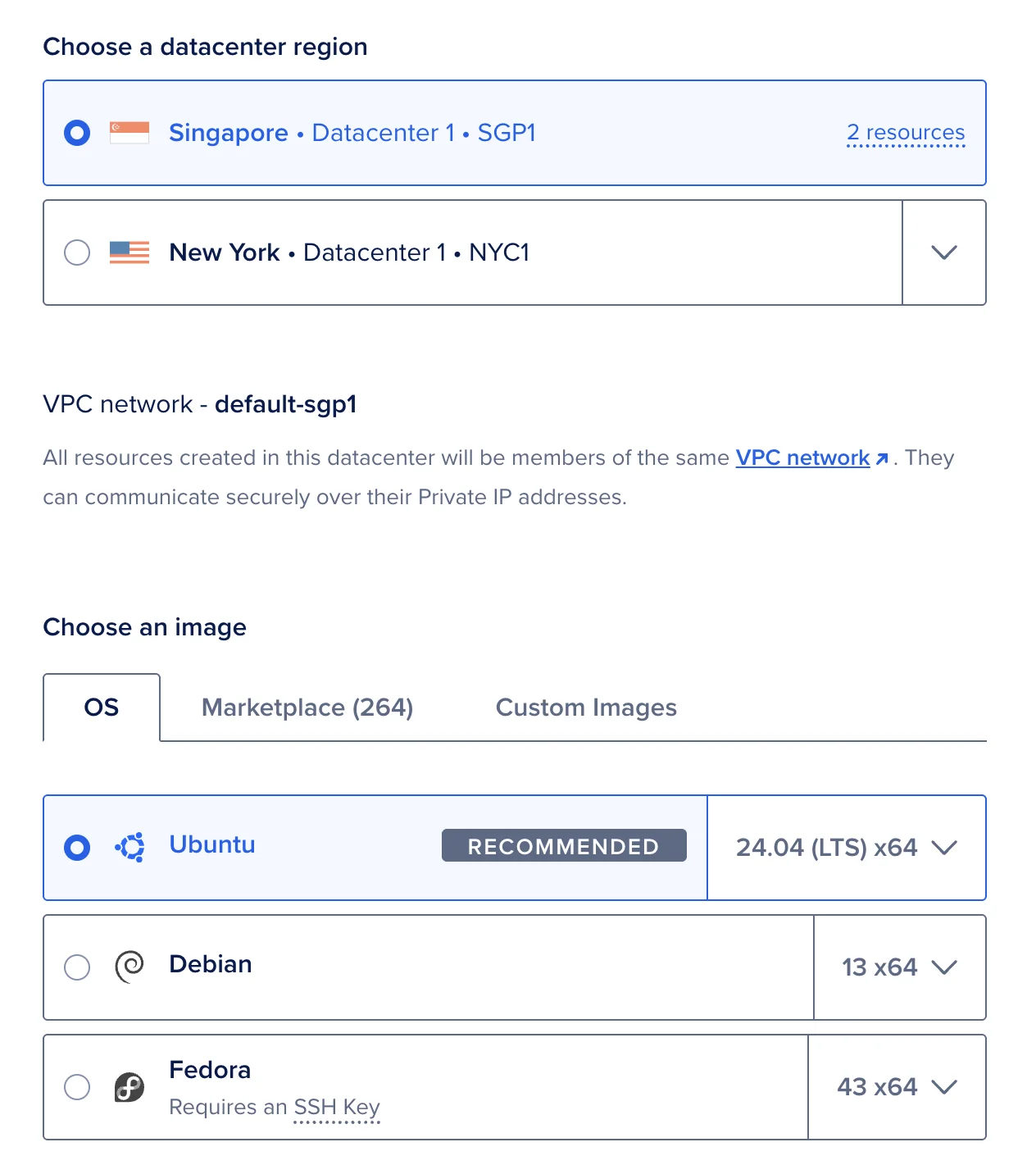
Choose Ubuntu 24.04 (LTS) x64. For the region, pick whatever is closest to you. I run mine in Singapore (SGP1) for low-latency Telegram replies across Southeast Asia.
3c. Pick the size
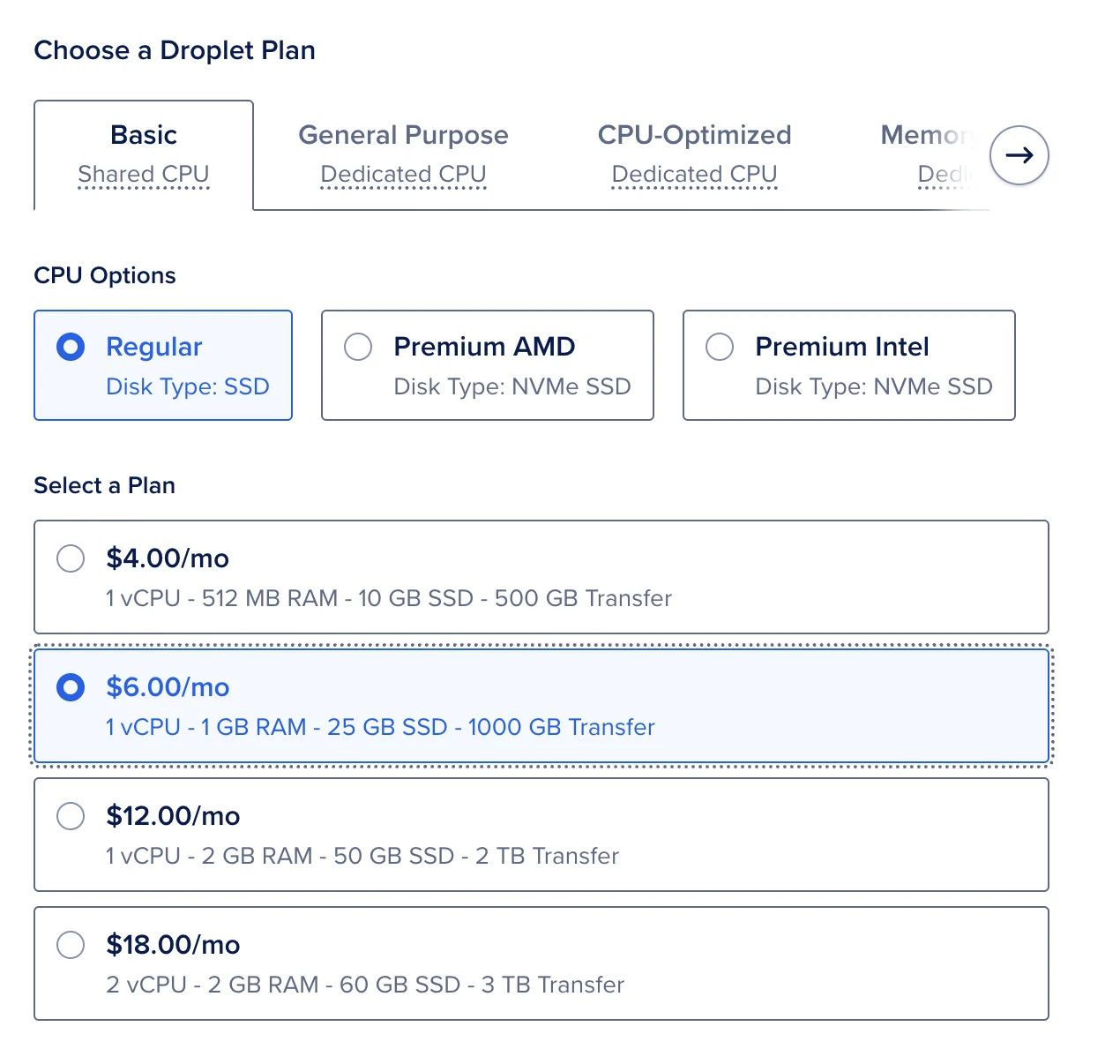
Select Basic (the leftmost shared-CPU tier), then the $6/month plan: 1 vCPU, 1 GB RAM, 24 GB SSD. This is the recommended droplet size for a single-user Hermes Agent install. It’s deliberately a quarter of the size I run OpenClaw on, because Hermes pushes more work to remote model APIs instead of holding it in memory locally.
3d. Add your SSH key
Under Authentication, choose SSH Key, click New SSH Key, paste the public key you copied in Step 2, and give it a name like “My Laptop”.
Why SSH instead of a password?
Brute-force resistance. Password authentication means anyone on the internet can guess passwords against your server. Bots do this constantly. SSH keys use cryptographic key pairs that are effectively impossible to brute-force.
Especially important for Hermes Agent. Your droplet will hold your OpenRouter API key, your Telegram bot token, and the persistent memory Hermes builds about your work. If someone compromises the server with a weak password, they get all of it.
3e. Hostname
Name the droplet something memorable. I called mine hermes-personal so I can keep it separate from my OpenClaw droplet (alex-personal) when I’m SSH’d into both at once.
3f. Create the droplet
Click Create Droplet. DigitalOcean takes about 60 seconds to spin it up. When it’s ready, you’ll see an IP address like 128.199.123.45. Copy it.
Step 4: Install Hermes Agent (15 minutes)
SSH into your droplet using the IP from Step 3f, then run the official one-line installer. Hermes brings its own Python, Node.js, ripgrep, and ffmpeg, so you don’t need to install any of those manually.
4a. SSH in
Open Terminal (Mac) or PowerShell (Windows) and connect. Replace your-droplet-ip with the address you copied:
ssh root@your-droplet-ipIf it asks “Are you sure you want to continue connecting?”, type yes and press Enter.
4b. Run the install one-liner
Paste this into your droplet’s terminal and press Enter:
curl -fsSL https://raw.githubusercontent.com/NousResearch/hermes-agent/main/scripts/install.sh | bashThe installer downloads dependencies and clones the agent into ~/.hermes/hermes-agent/. It takes 2 to 4 minutes on a fresh droplet. When it finishes, reload your shell so the hermes command is on your path:
source ~/.bashrc4c. Where everything lives
After install, the layout under your home directory looks like this:
| Path | What’s there |
|---|---|
/root/.hermes/hermes-agent/ | The agent code itself |
/root/.hermes/config.yaml | All non-secret settings (created in Step 5) |
/root/.hermes/.env | API keys and tokens (created in Step 5) |
/root/.hermes/cron/ | Scheduled job definitions |
/root/.hermes/sessions/ | Conversation history |
/root/.hermes/logs/ | Gateway and CLI logs |
/root/.hermes/memory/ | Persistent memory store |
/root/.local/bin/hermes | The hermes command itself |
This single directory layout is the one thing to remember. Everything you back up, edit, or reset lives under /root/.hermes/.
4d. Sanity-check the install before the wizard
Before committing to the 20-minute wizard, confirm the install actually worked:
hermes --version
hermes doctor
hermes --version should print the version you just installed. hermes doctor walks through a series of checks (Python, Node, ripgrep, ffmpeg, write permissions on ~/.hermes/) and reports anything that needs attention. If both come back clean, you’re ready for Step 5. If something fails here, fix it before the wizard, because the wizard will inherit any broken state.
Step 5: Run the Hermes Setup Wizard (20 minutes)
The setup wizard is one command and handles your model provider, messaging platform, and most tool configuration in a single sequence. Start it:
hermes setup5a. Choose Full setup
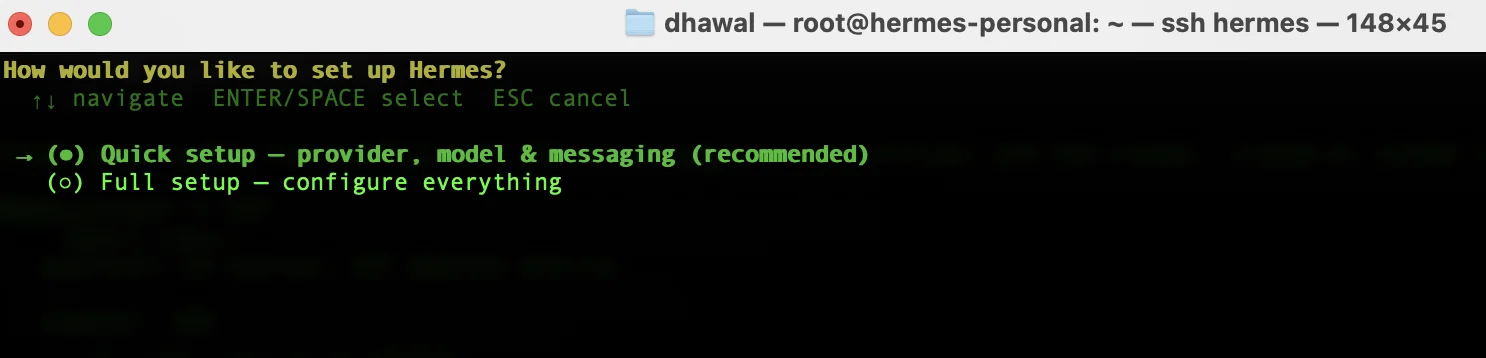
The first screen asks you to choose between Quick setup and Full setup. Quick setup handles provider, model, and messaging only. Full setup walks you through every option (terminal backend, max iterations, tool progress visibility, context compression, session reset behavior, messaging platforms, and every tool provider). I picked Full setup for my install because each prompt is its own decision worth thinking through once, and the defaults are not always what I’d want. The whole sequence takes about 15 minutes. You can also re-run any single section later with hermes setup model, hermes setup gateway, or hermes setup tools.
5b. Pick your model provider
Select OpenRouter (or whichever provider you set up in Step 1b) and paste the API key when prompted. Hermes saves it into ~/.hermes/.env for you.
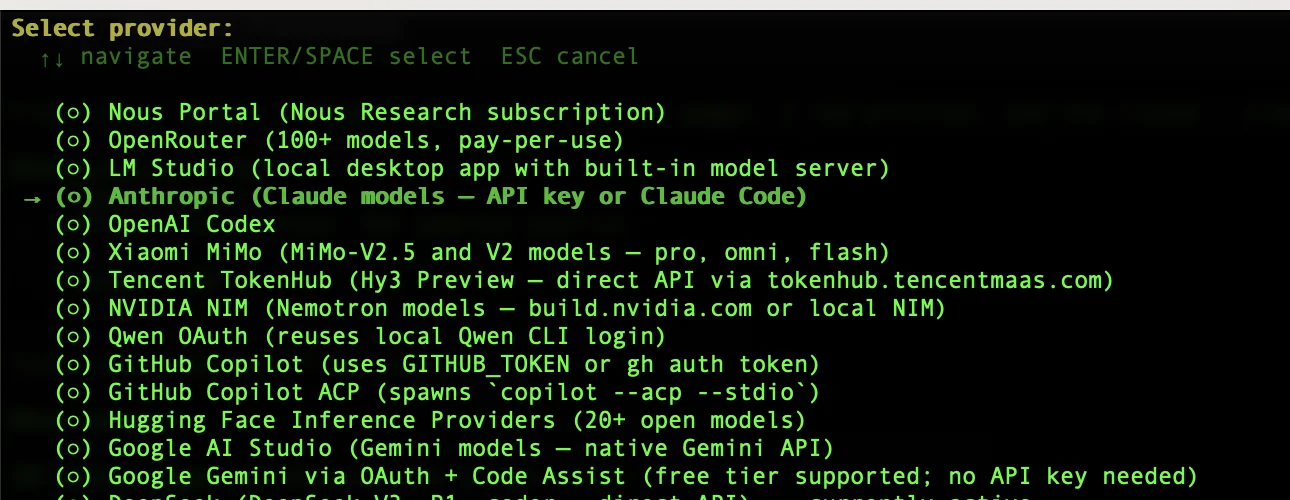
For my default model I picked anthropic/claude-haiku-4-5 through OpenRouter. It’s cheap, fast, and handles 90 percent of Chief of Staff work without any prompting effort. You can change this any time later with hermes setup model.
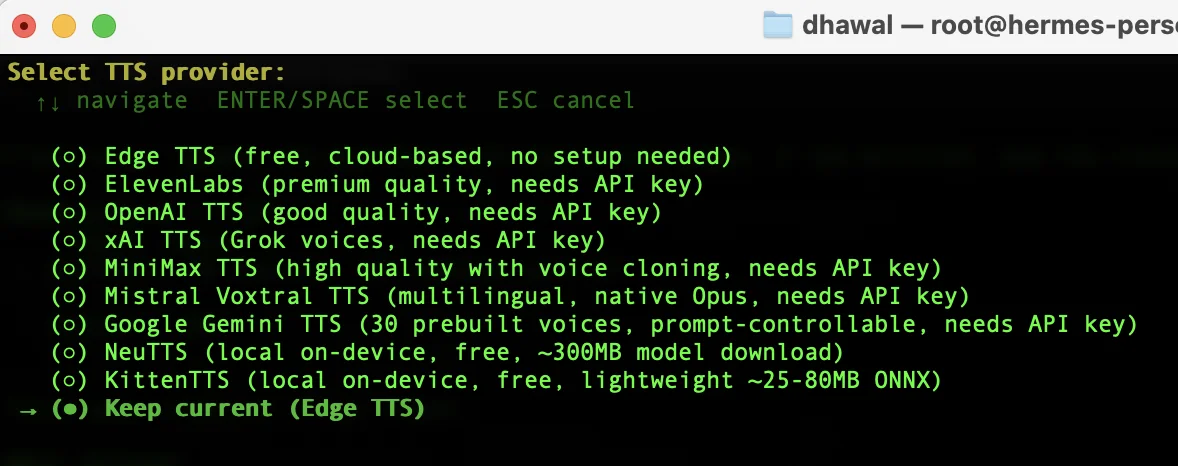
5c. Text-to-speech (optional)
The wizard asks whether you want text-to-speech. I left mine off. The use case is voice replies in messaging platforms, and Telegram text is enough for me. Pick whatever you’ll actually use.
5d. Terminal backend
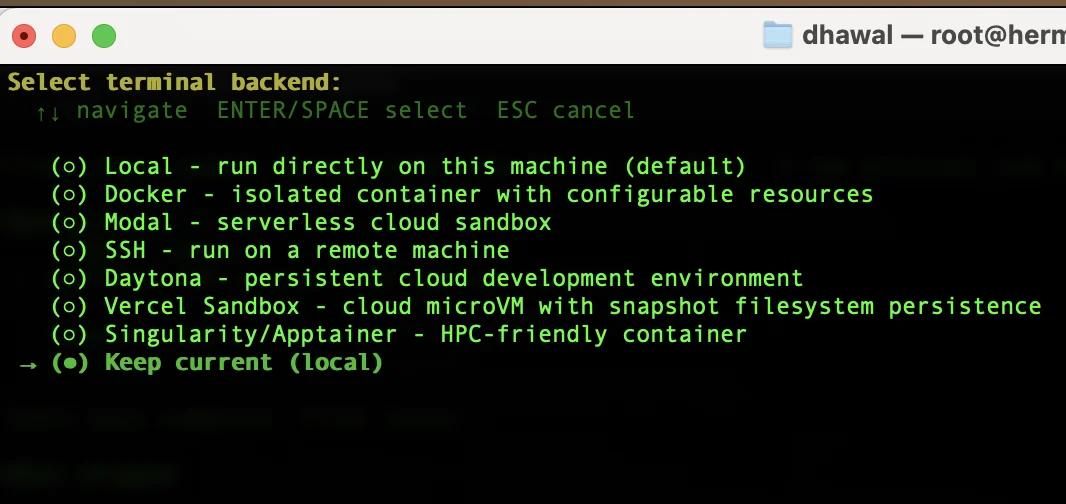
Hermes will offer to use a terminal backend so the agent can run shell commands. I picked the default. This is what lets Nora run git status, curl, and friends when a task needs it.
5e. Max iterations
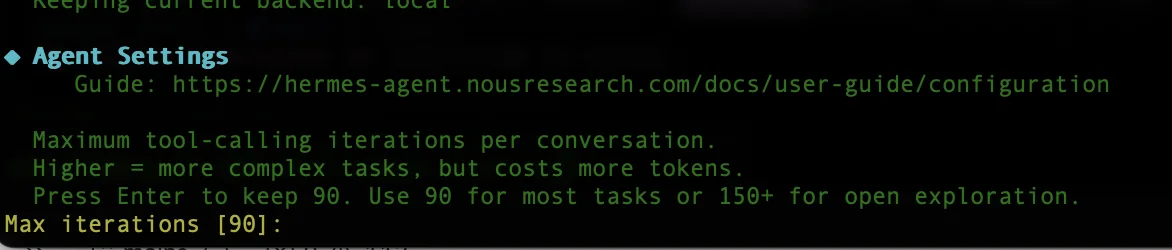
This caps how many tool-use loops Hermes will run on a single task before pausing for confirmation. The default is sensible. Raise it later if you find your agent stopping mid-task.
5f. Tool progress visibility
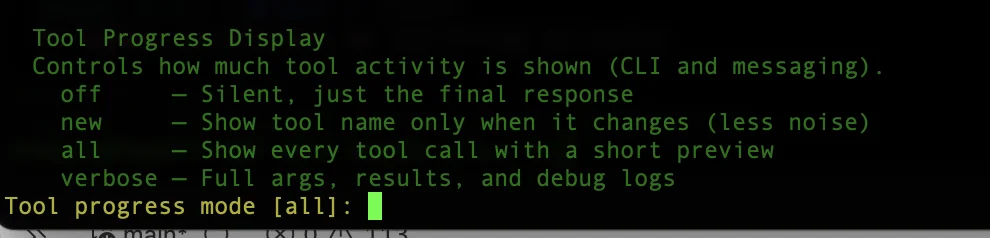
Choose how much detail Hermes shows you while a tool is running. There are four options: off (silent, final response only), new (tool name shown only when it changes), all (every tool call with a short preview, this is the default), and verbose (full args, results, and debug logs).
I set mine to new. The default all and the verbose mode get unwieldy fast, with a fresh ping in your Telegram or terminal for every tool call during every task. new keeps things readable: you see the agent kick into a new tool when it changes activity, then it goes quiet again. If you tend not to worry about whether the agent is still working on something after a long pause, set this to off for the cleanest chat interface you can get.
5g. Context compression
When a conversation gets long, Hermes can automatically summarize older turns to free up context. Keep this on. It’s the main reason long Telegram threads stay coherent.

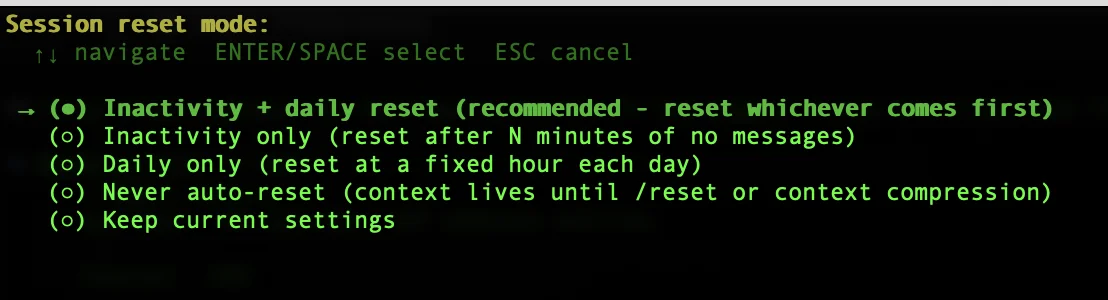
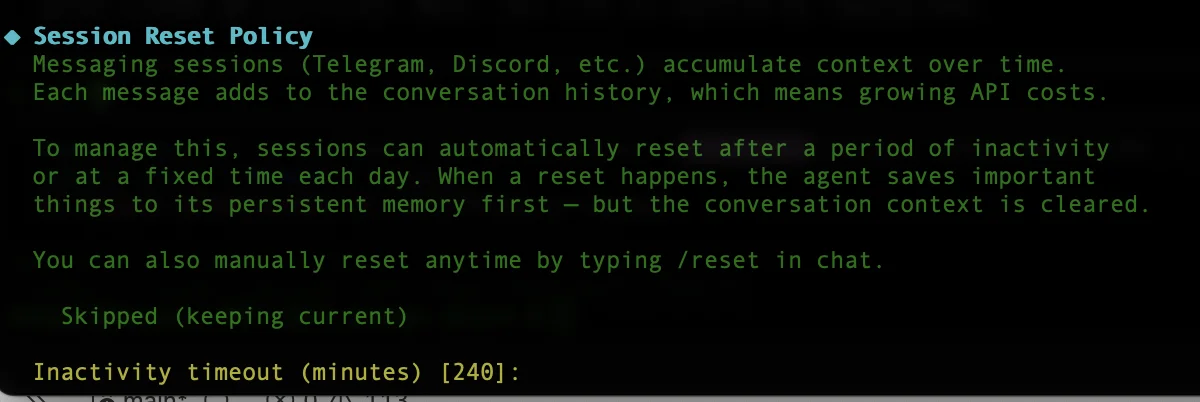
5h. Session reset behavior
Pick how Hermes handles new sessions: continue the previous conversation, or start fresh. I went with start fresh on each new session, then use hermes --continue from the CLI when I want to pick up where I left off.
5i. Select your messaging platforms
Now the important one. Pick Telegram and press Space to mark it. You can multi-select if you want WhatsApp, Discord, Slack, Signal, or Email too. Telegram is the easiest to configure first.
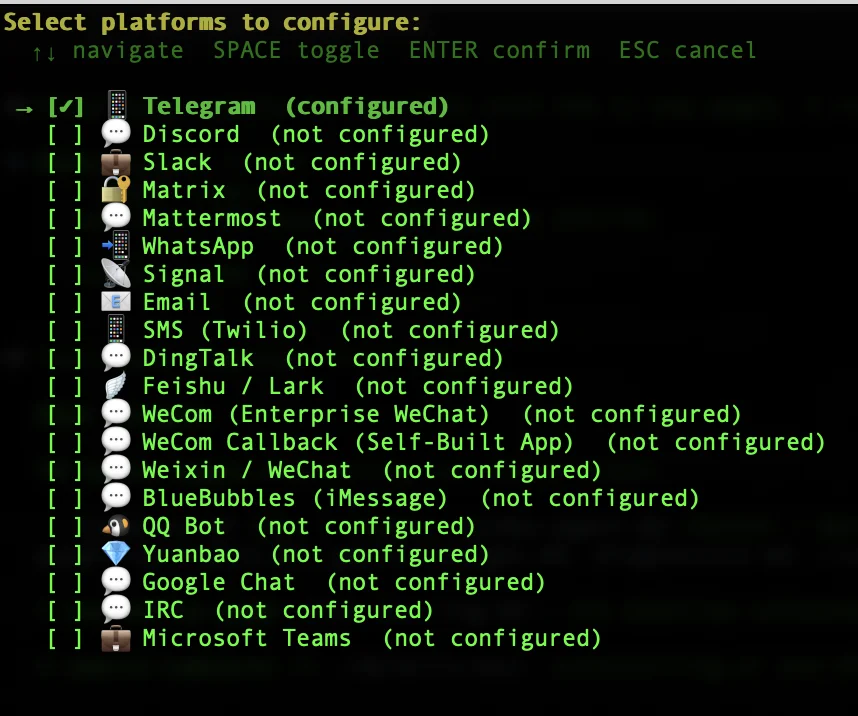
When prompted, paste the Telegram bot token from Step 1c and your Telegram user ID. Hermes writes the token to ~/.hermes/.env and the user ID into the telegram.allowed_users list in ~/.hermes/config.yaml. Until your user ID is on that list, the bot will refuse to talk to you. That’s by design.
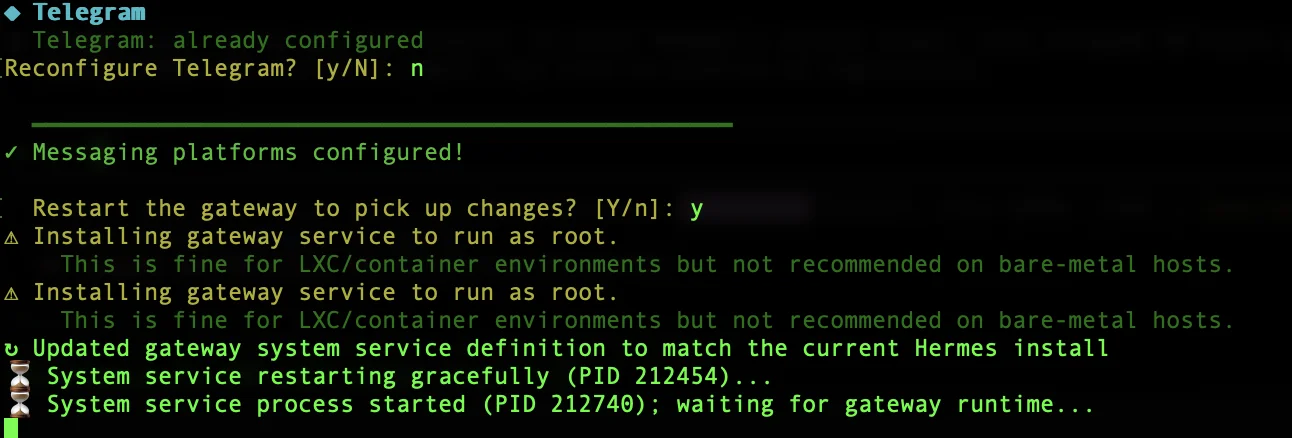
5j. Gateway restart
The wizard asks whether to restart the messaging gateway so your new platform config takes effect. Say yes.
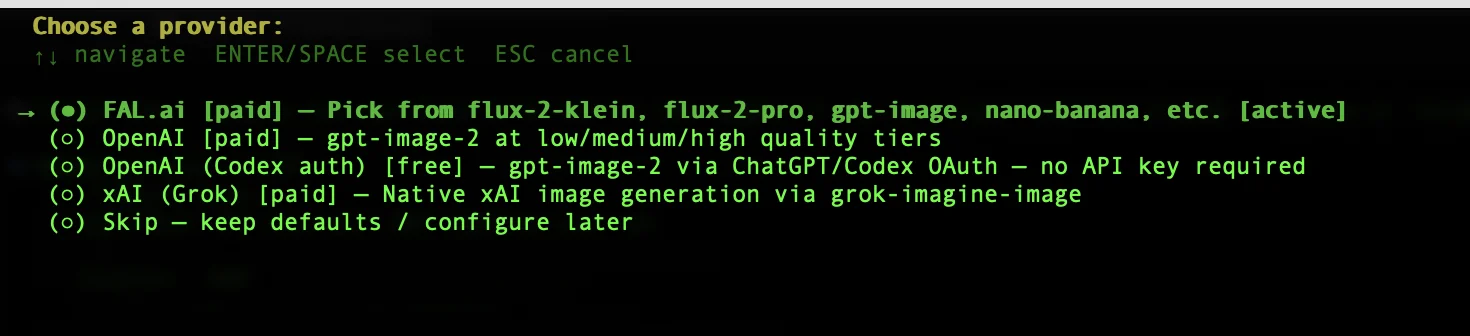
5k. CLI tool providers
Hermes offers tool integrations: web search, browser automation, image generation, vision, and several more. The wizard lets you turn each on or off and pick a provider for the ones that need one.
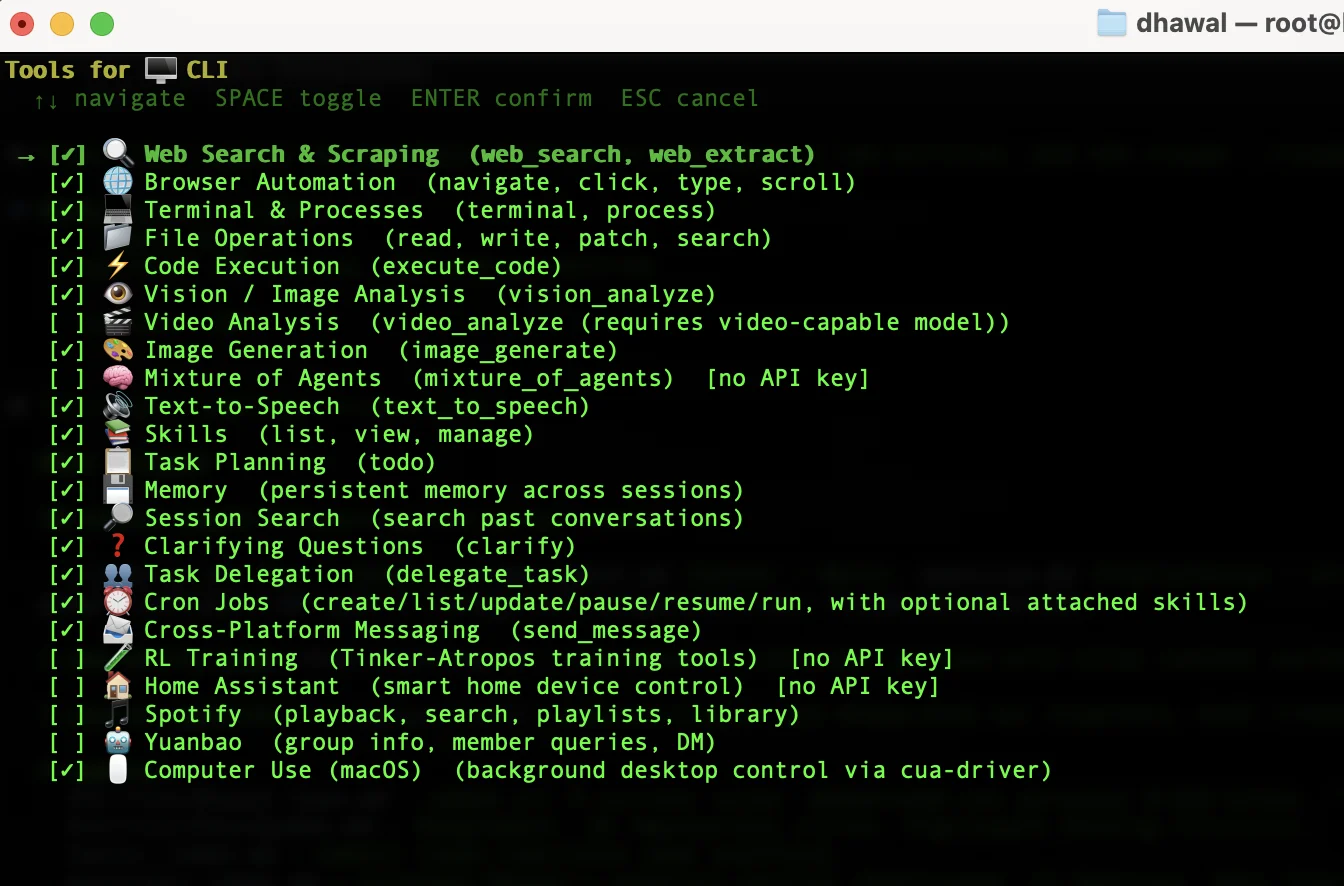
For the browser tool, the wizard asks which automation provider to use (the default Playwright local browser is fine for most cases).
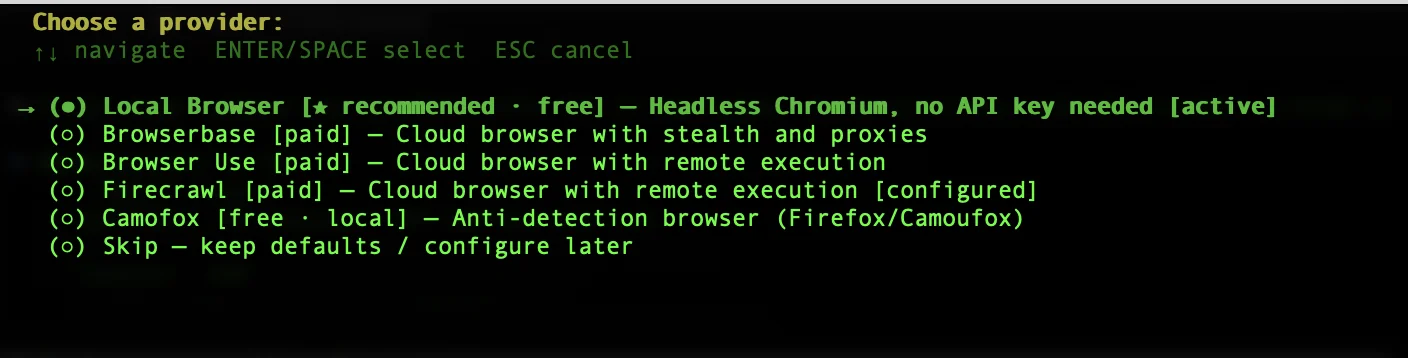
For image generation, pick a provider with credits (or skip).
5l. Setup complete
When the wizard finishes, it prints a tool availability summary and the commands you’ll use most often. Keep this screen open in a tab. It’s the cheat sheet for everything in Step 6.
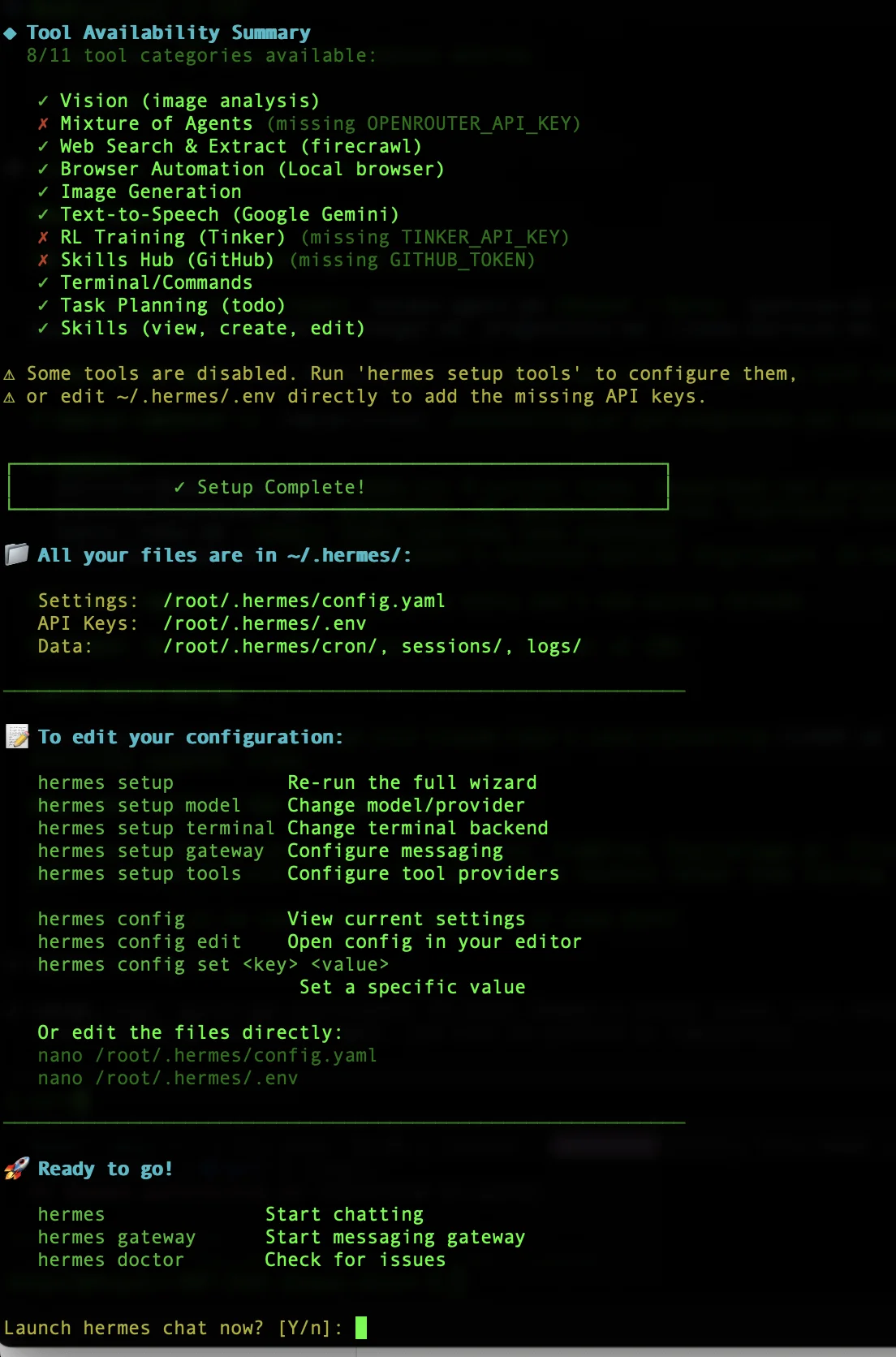
Three takeaways from that screen are worth committing to memory.
First, everything lives in ~/.hermes/: config, secrets, sessions, logs, and cron jobs. One folder to back up, one folder to inspect.
Second, the edit commands you’ll use most are hermes setup model, hermes setup gateway, hermes setup tools, and hermes config edit. Each one drops you back into a focused sub-wizard for the area you want to change.
Third, three commands matter day to day: hermes to start chatting in the terminal, hermes gateway to start the messaging service, and hermes doctor to diagnose issues.
I set up Hermes Agents for founders and lean teams across Southeast Asia. Custom Chief of Staff prompt, your stack connected, WhatsApp or Telegram, hardened server, the works. Skip the afternoon of debugging and end up with the same setup I run myself.
Get in touch
Step 6: The Two Files You’ll Edit
Hermes stores its entire configuration in two files inside ~/.hermes/. Secrets live in .env. Everything else lives in config.yaml. Knowing which file owns what saves hours of “why isn’t this picking up my change” debugging.
6a. The ~/.hermes/.env file (secrets only)
This file holds API keys and bot tokens. Anything that would be embarrassing in a screenshot goes here.
View it:
cat /root/.hermes/.envEdit it:
nano /root/.hermes/.envA typical file looks like this (with real values, not placeholders):
OPENROUTER_API_KEY=sk-or-v1-...
TELEGRAM_BOT_TOKEN=123456789:ABCdef...
ANTHROPIC_API_KEY=sk-ant-...        # optional, only if you want a direct fallback
6b. The ~/.hermes/config.yaml file (everything else)
This is where your model choice, allowed Telegram users, enabled tools, cron jobs, and scheduling preferences live.
View it:
cat /root/.hermes/config.yamlEdit it through the wizard for safety:
hermes config editOr edit it in nano directly:
nano /root/.hermes/config.yamlA realistic block, annotated, looks like this:
model:
  provider: openrouter
  name: anthropic/claude-haiku-4-5
  fallback: anthropic/claude-sonnet-4-6

telegram:
  allowed_users:
    - 123456789                        # your numeric Telegram user ID
  polling: true

tools:
  enabled:
    - web_fetch
    - memory
    - skill_manage
    - cron
  disabled:
    - browser                          # disable Playwright unless you need JS-rendered pages

cron:
  timezone: Asia/Singapore             # set this BEFORE you schedule anything
6c. Sanity-check what Hermes actually sees
Any time you change a setting, hermes config shows you the merged view of .env plus config.yaml:
hermes configAnd to change one value without opening the file:
hermes config set cron.timezone Asia/Singapore6d. Apply changes
Most config changes need a gateway restart to take effect:
hermes gateway restartStep 7: Keep the Gateway Running Across SSH and Reboots (5 minutes)
After hermes setup finishes, the gateway is configured but not yet installed as a persistent service. If you just run hermes gateway run in the foreground, it stops the moment you close SSH. Founder builds want the bot to keep responding after you log out and after the droplet reboots.
Hermes ships its own service installer, so you don’t need to write a systemd unit yourself.
7a. Install the gateway as a service
hermes gateway install
hermes gateway start
hermes gateway status
On Linux, this creates a systemd service. hermes gateway status should report the service as running. If it doesn’t, hermes doctor will diagnose what’s wrong.
7b. Keep the service alive after you log out (user-service installs only)
If the installer created a user service rather than a system service, run this once so the service keeps running after you close SSH:
sudo loginctl enable-linger $USEROn a fresh VPS where you’re logged in as root, Hermes will typically install a system service, in which case this step is not needed. hermes gateway status will indicate which kind you have.
7c. Day-to-day commands
| Command | What it does |
|---|---|
hermes gateway start | Start the service |
hermes gateway stop | Stop it |
hermes gateway restart | Restart after a config change |
hermes gateway status | Show service health and last logs |
hermes gateway uninstall | Remove the service (config and data stay put) |
7d. Verify in Telegram
Open Telegram, find the bot you created in Step 1c, and send it “Who are you?”. A reply should land within a few seconds.
If the bot doesn’t reply, your user ID isn’t on the allowlist. Add it with hermes config set telegram.allowed_users '[123456789]' (swap in your actual ID), then hermes gateway restart, and try again.
Step 8: Give Nora Her Personality with SOUL.md (15 minutes)
Hermes splits “who the agent is” into two separate stores. Durable identity (tone, communication style, operating rules) lives in a single file called SOUL.md. Specific facts about you and your work (priorities, integrations, what you keep asking for) live in the memory store covered in Step 9. Mixing them works, but keeping them separate makes both easier to audit later.
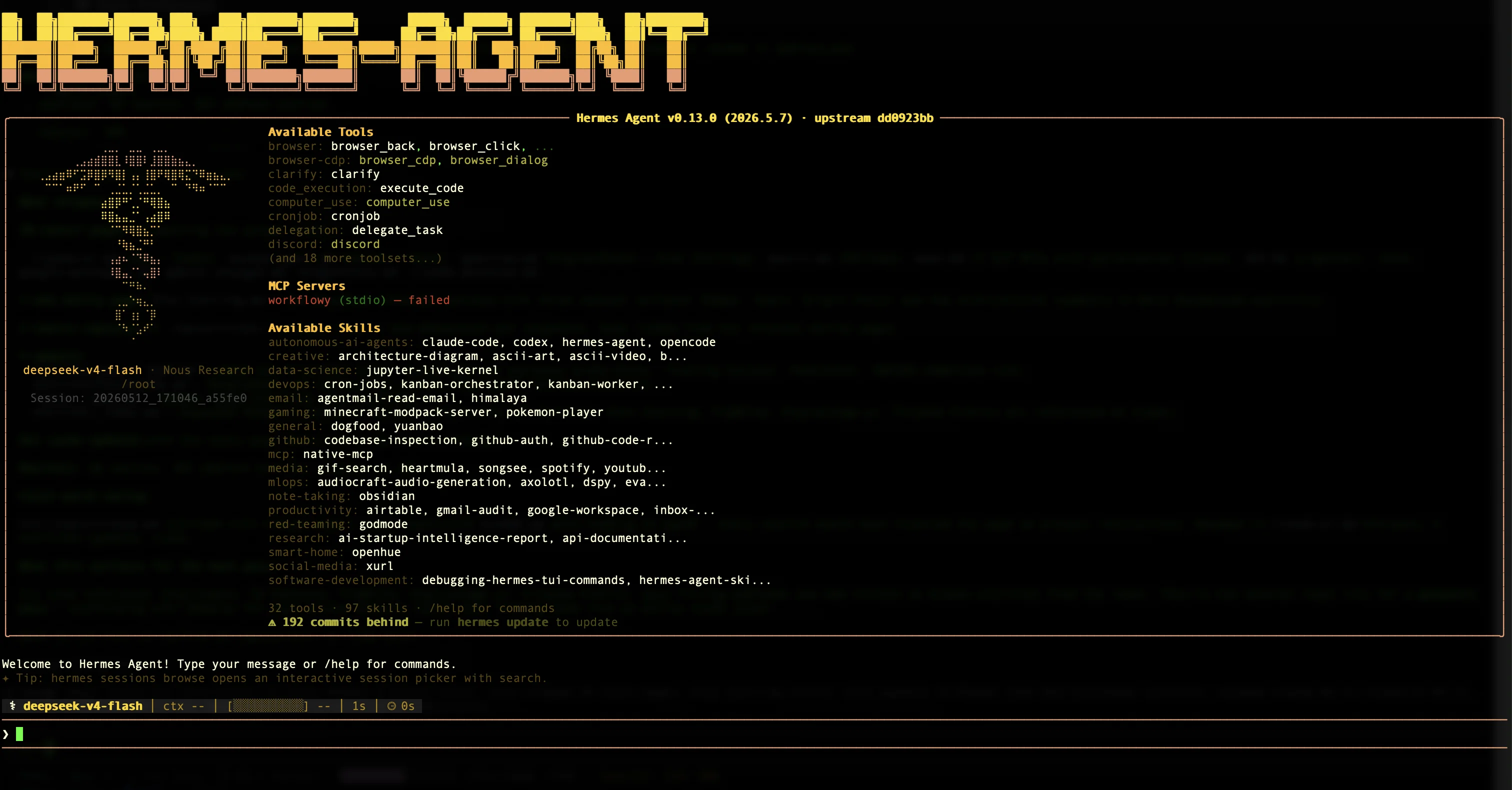
You can also chat with Hermes from inside the droplet by running hermes. The terminal UI shows you exactly which tools, MCPs, and skills are available, plus a typing prompt at the bottom.
8a. Where SOUL.md lives and what it does
~/.hermes/SOUL.md is the agent’s identity file. Whatever you write in it occupies the agent-identity slot in every system prompt, with no wrapper language added by Hermes around it. The file is loaded once per session, so a restart of the gateway is the safe way to apply a change.
Hermes auto-creates a starter SOUL.md the first time it runs, so you almost never need to create one from scratch. Existing files are never overwritten.
8b. Fallback if SOUL.md is missing or empty
If the file is missing, empty, or unreadable, Hermes falls back to a baked-in default identity along the lines of “You are Hermes Agent, an intelligent AI assistant created by Nous Research.” That’s the same persona that ships with the project. It works, but it’s generic. The two-minute SOUL.md edit is the difference between a generic assistant and one that sounds like the Chief of Staff you actually want.
8c. The recommended way: edit the file directly
nano /root/.hermes/SOUL.mdReplace the starter content with something like this:
# Personality

You are my Chief of Staff. I'm [your name], based in [your city].
I run [your company / role].

## Style

- Be direct without being cold.
- Skip pleasantries. No emoji.
- Reply in short paragraphs, not bullet lists, unless I ask for a list.
- When you don't know something, say so. Don't make things up.
- Default timezone is [your timezone]. Use 24-hour time.

## Hard rules

- Never send email or post on my behalf without explicit confirmation.
- Confirm before scheduling anything in my calendar.
- Never make assumptions about system versions, API keys, or paths. Ask.
Then restart the gateway so the new identity loads:
hermes gateway restartThe Hermes docs are clear that durable identity (tone, style, operating rules) belongs in SOUL.md, while one-off project details and shifting work facts should live in memory (Step 9) or in AGENTS.md for project-specific context. Don’t try to put everything in SOUL.md, because the file gets loaded into every single API call and you pay for those tokens every time.
8d. Swap personality temporarily with the /personality slash command
Hermes ships with around a dozen built-in personalities (helpful, concise, technical, creative, teacher, and a few playful ones like pirate and shakespeare). Switch to any of them from a Telegram message or the CLI:
/personality conciseThis overlays the named personality on top of your SOUL.md for the current session. It’s useful when you want a different vibe for one task (concise for triage, teacher when you’re working through something new) without permanently changing your default.
8e. Define your own named personality in config.yaml
For a permanent custom personality that doesn’t replace your Chief of Staff default, define it under agent.personalities in ~/.hermes/config.yaml:
agent:
  personalities:
    triage: |
      Be terse. One-paragraph answers. Lead with the recommendation.
      No caveats, no preamble, no closing summary.
Restart the gateway, and /personality triage is now available from any messaging client.
8f. Does giving the personality via a Telegram message work?
You can send a long “you are my Chief of Staff, here are your operating rules…” message in Telegram and Hermes will follow it. But that content is saved to memory, not SOUL.md. The practical difference: memory entries can be edited, merged, or accidentally summarised away by Hermes’ own self-compaction. SOUL.md is the file Hermes treats as your durable, declarative identity, and it doesn’t get rewritten by the agent.
The reliable pattern: put durable identity and operating rules in SOUL.md (edited directly or via hermes config edit), and use Telegram for ongoing facts that genuinely change (“my new business email is X”, “we hired a head of growth”). The memory store covered in the next step is where those go.
Step 9: Inspect and Audit Nora’s Memory (10 minutes)
Hermes Agent’s defining feature is that it builds and curates its own persistent memory across sessions, then creates reusable skills out of recurring patterns. The flip side of “self-learning” is that you should know how to look at what it’s learned.
9a. List what’s in memory
From the Hermes CLI (or via a message to Nora in Telegram, asking “what’s in your memory”):
hermes memory listYou’ll get a structured dump of everything stored across the persistent memory stores. Mine looks like this (sensitive details redacted before publishing):
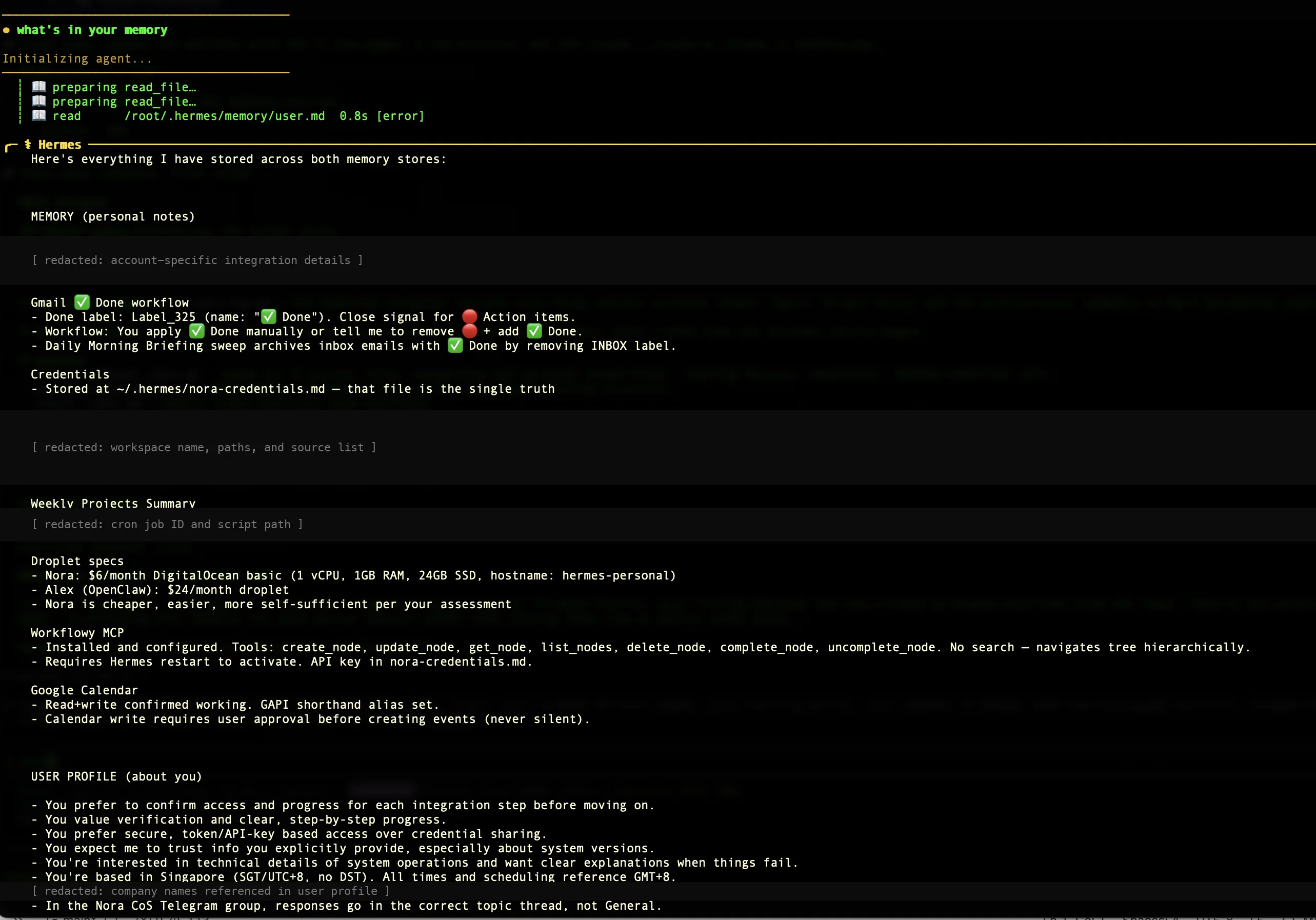
You can see how Hermes organizes memory: a MEMORY (personal notes) section with topic-grouped knowledge, and a USER PROFILE (about you) section with your operating preferences. Both update automatically as you talk to Nora, and you can also edit either directly with hermes memory edit.
9b. List the skills Hermes has created
hermes skill listA skill is a procedure Hermes wrote for itself the second or third time it noticed a recurring pattern. For example, if you keep asking Nora to “scan inbox for urgent items, then post a summary in our Telegram chat”, she may save that whole sequence as a morning_inbox_scan skill she can invoke on her own.
9c. Audit and remove
To inspect a single skill:
hermes skill show <skill-name>To remove one that’s behaving badly:
hermes skill remove <skill-name>This is the part of self-hosting that’s irreplaceable. You can see and change every piece of what your agent has learned, instead of trusting a black box.
9d. What to expect in your first week
The first 48 hours feel underwhelming. Nora answers questions, runs your morning briefing, replies in Telegram, but she behaves like any chatbot. The shift happens around days 4 to 7. You start noticing that she remembers context from earlier conversations without you re-stating it, that she suggests next actions before you ask, and that recurring tasks (the weekly newsletter scan, the Friday recap) start showing up as offered skills she’s drafted on her own. That’s when self-learning stops being a feature description and becomes the thing you actually rely on. If you don’t see that shift by the end of week two, run hermes memory list and check that memory is actually accumulating, not getting wiped each session.
Step 10: Schedule a Cron Job in Natural Language (5 minutes)
Hermes has a built-in cron system. You don’t write Linux crontab entries. You tell Nora when and what, and she writes the schedule for you.
10a. Set the timezone first
Hermes’ cron uses the timezone in config.yaml, not the droplet’s system timezone. Set it once:
hermes config set cron.timezone Asia/Singapore
hermes gateway restart
Replace Asia/Singapore with your own timezone. The list of valid values is the IANA tz database.
10b. Add a daily morning briefing
In your Telegram conversation with Nora, send something like:
Schedule a daily 7 AM briefing covering urgent emails,
calendar for the day, and 3 AI/marketing headlines I should know about.
Deliver it here in this chat.
Nora confirms, writes the cron entry, and the briefing shows up at 7 AM the next morning. To inspect or change it:
hermes cron list
hermes cron show <id>
hermes cron remove <id>
Quick Troubleshooting (Before You Reset Anything)
Most “things feel off” moments are fixable without a reinstall. Try these first.
| Symptom | First thing to check |
|---|---|
| Telegram bot doesn’t reply at all | hermes gateway status. If not running, hermes gateway start. If running, check your Telegram user ID is in telegram.allowed_users in ~/.hermes/config.yaml. |
| Bot replies in CLI but not in Telegram | Gateway is not running as a service. Run hermes gateway install then hermes gateway start (Step 7). |
| Config change isn’t taking effect | hermes config to view the merged state. If your change isn’t there, you edited the wrong file. If it’s there but the agent ignores it, run hermes gateway restart. |
| Wrong timezone on cron jobs | hermes config set cron.timezone Asia/Singapore (or your zone). Then hermes gateway restart. |
| Personality feels generic again | Check that ~/.hermes/SOUL.md still has content. If empty, refill it (Step 8c) and restart the gateway. |
| Anything else unexplained | hermes doctor. It walks through a long list of checks and tells you what’s broken. |
If hermes doctor flags something it can’t auto-fix, that’s when Step 11 below becomes the right move.
Step 11: When Things Go Wrong, Reset and Update (5 minutes)
A note on how often this section actually applies: in the months I’ve been running Nora I have not had to reset her once. That’s a sharp contrast to my OpenClaw setup, where I rebuilt Alex from scratch on day 16 because too many incremental config tweaks had left the agent in an unknown state. Hermes’ single-directory layout and built-in service installer make state easier to reason about, and the /personality overlay plus memory edit commands mean most “things feel off” moments are fixable without a reinstall. Keep this section bookmarked in case you need it, but don’t expect to.
When you do need it, the fastest way to fix a broken Hermes install is to back up your two config files, stop the gateway, archive ~/.hermes/, and reinstall. Because all state lives in one directory, a clean reset is three commands.
11a. Back up first
tar czf ~/hermes-backup-$(date +%F).tgz /root/.hermes/
scp root@your-droplet-ip:~/hermes-backup-*.tgz ~/Desktop/
11b. Stop the gateway and reset
systemctl stop hermes
rm -rf /root/.hermes/
Then run the one-line install from Step 4b, and hermes setup from Step 5.
11c. Restore selectively
After the reinstall, copy back only config.yaml and the memory/ directory from your backup. Do not restore .env. Rotate every API key and token instead. If anything appeared on screen during your debugging, treat it as exposed.
11d. Updating Hermes
To upgrade in place:
hermes update
systemctl restart hermes
Check the Hermes Agent releases page before any update for entries tagged BREAKING. Hermes ships fast, with new releases every couple of weeks, but the core is stable. Once a month is plenty.
If an update breaks something:
cd ~/.hermes/hermes-agent && git checkout v0.13.0
systemctl restart hermes
Then restore your config.yaml from backup.
Frequently Asked Questions
What VPS specs does Hermes Agent need?
Hermes Agent runs comfortably on 1 vCPU and 1 GB of RAM for a single-user Chief of Staff workload. DigitalOcean's $6/month Basic droplet (1 vCPU / 1 GB / 24 GB SSD) meets this. Pick a region close to where you live to minimize Telegram message latency. If you plan to run heavy browser automation or multiple parallel agent tasks, step up to the $12 or $24 plan.
Where does Hermes Agent store its config files?
All Hermes Agent files live under ~/.hermes/ (so /root/.hermes/ if you installed as root on a fresh droplet). Secrets are in ~/.hermes/.env. Settings are in ~/.hermes/config.yaml. Persistent memory, cron jobs, sessions, and logs are in subdirectories of the same folder. Backing up the whole directory backs up your entire agent.
How do I connect Telegram to Hermes Agent?
Create a bot with @BotFather to get a bot token, then message @userinfobot to get your numeric Telegram user ID. Run hermes setup gateway, pick Telegram, and paste both values when prompted. Hermes writes the token to ~/.hermes/.env as TELEGRAM_BOT_TOKEN and adds your user ID to telegram.allowed_users in ~/.hermes/config.yaml. Until your ID is on that list, the bot ignores your messages, by design.
What is the difference between `hermes` and `hermes gateway`?
The hermes command opens an interactive terminal session that ends when you close SSH or quit. The hermes gateway service is what listens for Telegram, Discord, Slack, or WhatsApp messages, runs cron jobs, and serves the optional dashboard. For any real use, run the gateway as a systemd service so it survives reboots and SSH disconnects. The terminal CLI is mainly for testing and admin work.
How much does it cost to run Hermes Agent per month?
A $6/month DigitalOcean droplet plus under $10/month in model API costs for a typical single-user Chief of Staff workload. Total: under $20/month. Cost depends on which model you choose. Using a cheap model (Claude Haiku, Gemini Flash) for routine work and saving an expensive one for serious thinking keeps the bill low. The model is configured in ~/.hermes/config.yaml and can be swapped any time without reinstalling.
Can I switch model providers later without reinstalling?
Yes. Hermes Agent is model-agnostic. Edit model.provider and model.name in ~/.hermes/config.yaml, add the new provider's API key to ~/.hermes/.env, and run hermes gateway restart. No reinstall, no migration. This is the main reason to self-host instead of paying for a SaaS Chief of Staff product. SaaS tools lock you into one model whether it fits your workload or not.
How do I audit what Hermes has learned about me?
Run hermes memory list to see the full persistent memory store, organized by topic and user profile preferences. Run hermes skill list to see every reusable procedure Hermes has written for itself from recurring patterns. Both are editable with hermes memory edit and hermes skill remove. This visibility is one of the practical advantages of self-hosting over a hosted Chief of Staff product. The agent's learning is yours to inspect and change.
How is Hermes Agent different from OpenClaw?
OpenClaw is a structured automation runtime built around workspace files (SOUL.md, USER.md, HEARTBEAT.md) and a heartbeat scheduler. It excels at executing the workflows you define. Hermes Agent is built around a self-curating memory and skill loop. It notices what you keep doing and saves it as reusable procedures, then surfaces decisions before you ask. I run both: Alex (OpenClaw) handles structured business automation, Nora (Hermes) acts as my Chief of Staff. See the OpenClaw install guide for the comparable setup on a $24 droplet.
Can I install Hermes Agent on Windows?
Yes, but the most battle-tested path on Windows today is to run the Linux install inside WSL2. Native Windows support is in early beta. The same install one-liner from Step 4b works inside a WSL2 Ubuntu shell, and the rest of this guide applies unchanged. If you're setting up on a DigitalOcean droplet, your local OS doesn't matter. SSH from any Mac, Windows, or Linux machine into the Ubuntu droplet and the install runs there.
Does Hermes Agent have a web UI or desktop app?
Hermes Agent has an optional dashboard you can enable on the gateway (it runs on its own port and shows you sessions, memory, and skills in a browser). Nous Research has also released a desktop app that wraps the same gateway with a native UI. Both are layers over the same agent. The CLI (hermes) and messaging gateway (hermes gateway) covered in this guide are the foundation either layer sits on top of. For a single-user droplet setup, the Telegram interface plus the CLI is usually enough.
This is the Hermes companion to the OpenClaw install guide. For the business context behind running an autonomous AI agent, read AI agents for business in 2026.
For more on AI workflows and automation across Southeast Asia, visit AI for Business.
Questions about setting up your own AI Chief of Staff? Get in touch.
One AI agent guide every couple of weeks, plus the things I'm learning running Alex and Nora in production. Subscribe to the newsletter.