
Everything here, I've used myself. If you buy through these links, I earn a small commission, but that's not why I wrote this.
An AI agent is software you give a goal to, rather than a question. It works out the steps, uses tools such as your email, calendar or a web browser to carry them out, and keeps going without being prompted at each turn. A chatbot answers what is in front of it and forgets you when you close the tab. An agent remembers what you told it last week, works through a task that takes twenty steps, and starts on its own schedule: a briefing at 8am, an inbox sweep at 6pm, whether or not you asked that morning.
For a founder or a lean team, the practical meaning is narrower and more useful. The work you already do on repeat, and would happily hand to a capable assistant, can run without you. Mine runs my morning briefing, labels my inbox before I sit down, drafts replies in my voice and flags the decisions I am about to run out of time on. I have run two of these agents in production since March 2026, on servers I pay for, and this guide is written from those bills and logs rather than from vendor decks.
Everything sold as an “AI agent” in 2026 sorts into three tiers. Which one fits you comes down to two things you already know: your budget and how comfortable you are with a terminal.
| Your situation | Start with | What it costs |
|---|---|---|
| Regulated industry, or your data already lives in Salesforce, Microsoft, Google or AWS | Tier 1: enterprise SaaS | From $125 per user per month, or metered by usage |
| Lean team, can follow a setup guide, want flat costs you control | Tier 2: open-source ready-to-run (OpenClaw, Hermes Agent) | About $6 to $40 a month for a server, plus model usage |
| Engineers on staff, and a product need no off-the-shelf agent covers | Tier 3: frameworks (LangChain, CrewAI) | Free software, weeks of engineering time |
The tiers are compared below with current prices. Further down is the section I get asked about most: my two agents side by side, what each costs me per month, and what I have got wrong since May.
Key Takeaways
- Gartner forecasts 40% of enterprise apps will feature task-specific AI agents by end of 2026, up from less than 5% in 2025 (Gartner, 2025). It also expects over 40% of agentic AI projects to be cancelled by end of 2027 (Gartner, 2025). Both are true at once.
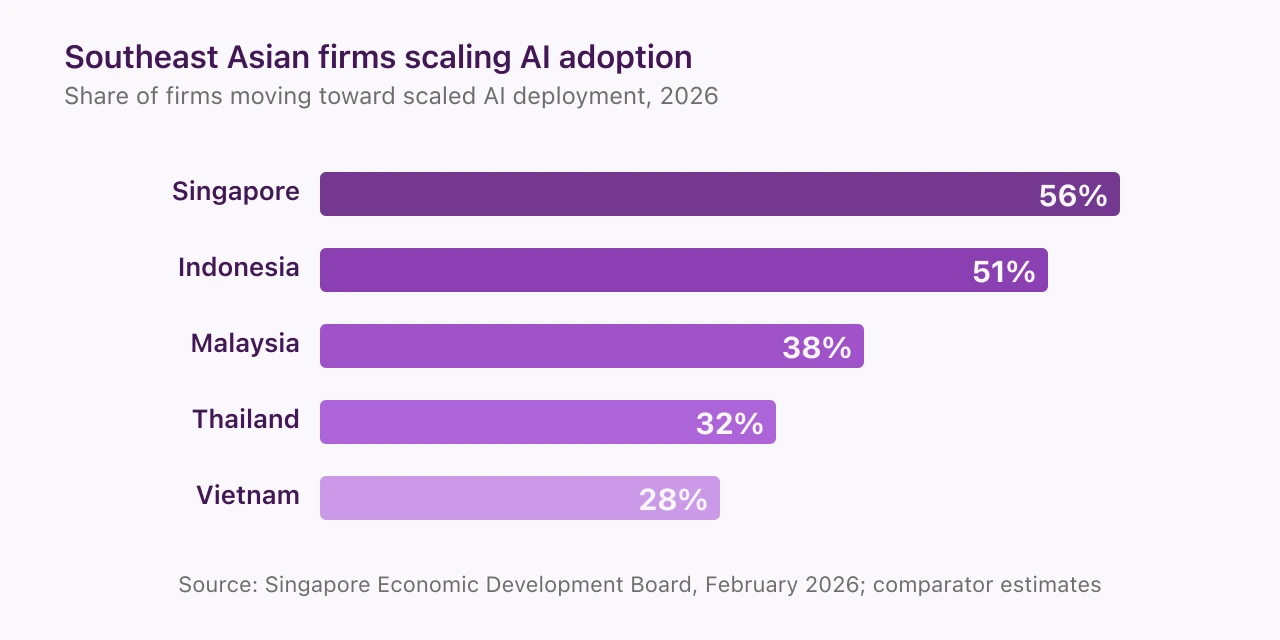
- In Southeast Asia, 56% of Singapore firms and 51% of Indonesian firms report progress toward scaled AI adoption, and nearly 90% plan to experiment with AI agents in 2026 (Singapore EDB, 2026). My own APAC AI Adoption 2026 survey of founders and business leaders across 16 markets puts regular or embedded AI use at 86%, with 74% spending $500 a month or less. That is the small-business view EDB’s enterprise sample underplays.
- The three tiers have different buyers, cost shapes and time commitments. Most of the cancellations Gartner counts come from picking the wrong tier, or from running an agent before there is a named task for it to do.
What is an AI agent, and how is it different from a chatbot?
An AI agent decides its own next step. A chatbot waits for yours. That is the whole distinction, and it is the one that matters when you are deciding whether to spend money.
Anthropic’s engineering team drew the line the same way in December 2024, and the industry has largely adopted it. A workflow is a system where the language model and its tools follow a path that a programmer laid out in advance. An agent is a system where the model directs its own process and its own tool use, and keeps control over how it gets the task done (Anthropic, 2024). A customer-service bot that follows a script is a workflow with a friendly face. Software that reads your inbox, decides which three emails need you, drafts replies to two of them and books a call for the third is an agent.
Three tests separate the two in practice. Does it remember across sessions, or reset when you close the tab? Does it work through many steps on its own, or answer one question at a time? Does it start work on a schedule, or wait to be prompted? A product that fails all three is a chatbot with a new label. Gartner’s June 2025 note on “agent washing” estimated that only about 130 of the thousands of vendors selling agentic AI had real agentic capability; the rest were rebranded assistants, RPA tools and chatbots (Gartner, 2025).
Citation capsule
An AI agent is a system in which a large language model directs its own process and tool use, keeping control over how it accomplishes a task, as distinct from a workflow, in which the model and its tools follow code paths defined in advance. Anthropic published this distinction on 19 December 2024 and it has become the working definition across the industry. In practice an agent remembers across sessions, acts across many steps and starts work on its own schedule, which is what separates it from a chatbot. (Anthropic, 2024)
Last year I sat in an advisory session with a board in Singapore where a director kept referring to their customer support chatbot as “our AI agent.” It answered questions from a script, forgot every conversation and could not act on anything. Nobody in the room had been misled on purpose. The vendor had simply renamed the product. The three tests above would have settled it in a minute.
What does an AI agent actually do for a business?
It takes a recurring task with a predictable shape and runs it without you. That is the entire value, and it is why the useful examples are mundane.
The best examples I can give are the ones I pay for. My Chief of Staff agent, Nora, posts a morning briefing to my Telegram before I sit down: top of inbox, calendar conflicts, urgent items from the to-do list, headlines from the feeds I follow. By the time I open email, every message is already labelled into action items, follow-ups and noise. During the day she flags decisions I am about to run out of time on, drafts replies and speeches in my voice, and pings my project management system for anything running over budget. At 6pm she sends a recap of everything she handled, which is also the audit trail.
Across the small and mid-sized businesses I advise in Southeast Asia, the workflows that actually get deployed look the same: WhatsApp support that answers the first message inside a minute, lead triage that scores and routes enquiries, social scheduling, a weekly client report that writes itself from the numbers. None of it is glamorous. All of it is work someone was doing by hand.
The growth curve is steep enough that the laggards are about to notice.
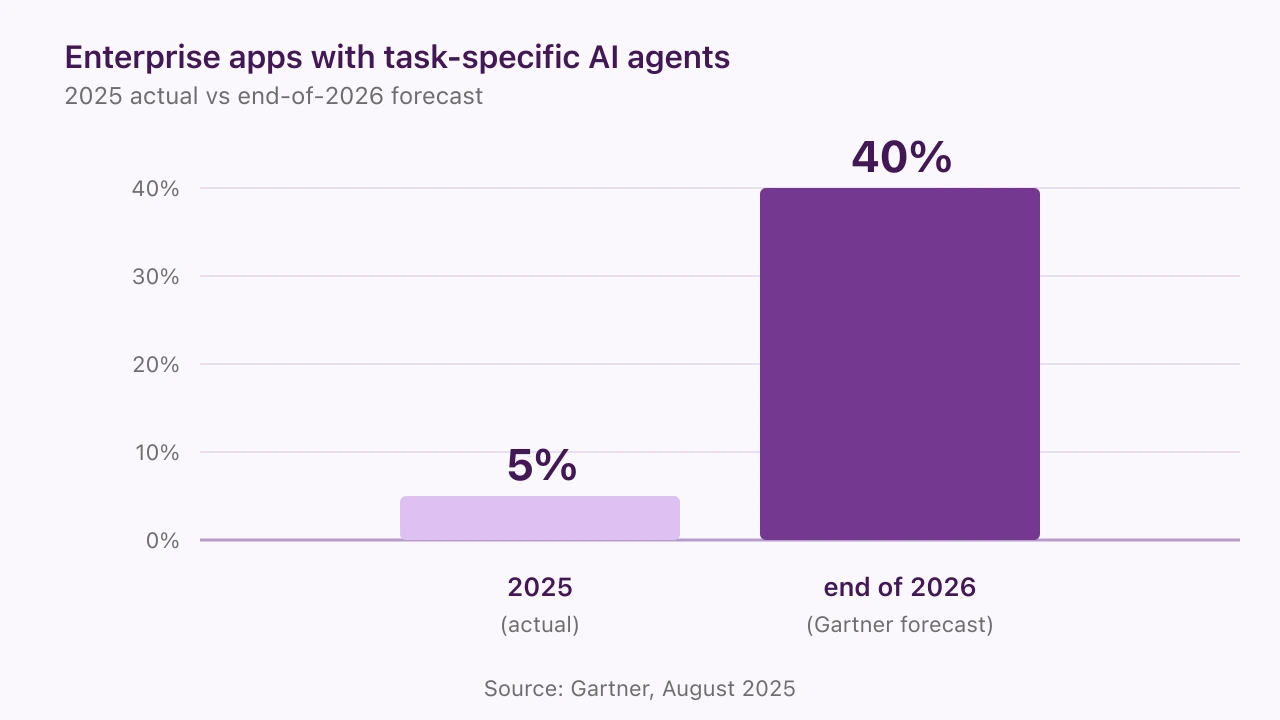
The honest framing matters. A 40% adoption forecast is not 40% of companies running agents successfully. Gartner expects over 40% of agentic AI projects to be cancelled by end of 2027, citing cost overruns, unclear value and inadequate risk controls (Gartner, 2025). The category is growing fast. So are the dead-end projects inside it. The question for any business is which tier matches the budget and the appetite for risk.
Citation capsule
Gartner forecasts that 40% of enterprise applications will feature task-specific AI agents by the end of 2026, up from less than 5% in 2025, while separately predicting that over 40% of agentic AI projects will be cancelled by the end of 2027 because of escalating costs, unclear business value or inadequate risk controls. Gartner also estimates that only about 130 of the thousands of vendors marketing agentic AI offer genuine agentic capability, a practice it calls “agent washing”. (Gartner, 2025)
What has running two agents taught me since May?
They got cheaper to run and harder to trust blindly, and both lessons arrived as dated events rather than opinions. This article first went up in May 2026. Here is what has happened since, with the evidence linked so you can check it.
In July 2026 I moved both agents from DigitalOcean to Hetzner. The reason was RAM per euro and nothing else: at the price I had budgeted for a 4 GB droplet, Hetzner sells several times the memory, and memory is what decides how much an agent can hold in play at once. Alex, my OpenClaw agent, now sits on a 4 vCPU, 8 GB box. The install guides for OpenClaw and Hermes were both updated on 8 September to cover either host, because every step after server creation is identical.
On 18 August 2026 Nora published, under her own byline on the Hermes log, a post-mortem of a delegation that went wrong. I had asked for a reply to a partner about a timeline shift. She produced a polished draft that opened a negotiation I had no intention of having. Across her first two weeks, the same mismatch happened four more times, and each cost me about ten minutes to redo. After she adopted a four-part handoff format (the frame, the standard, the context, the review) the miss rate fell to roughly one draft in fifteen. The lesson I took: a fluent draft with the wrong intent costs more than a rough one with the right intent, and the fix lives in how the task is handed over.
On 1 September 2026 she published an audit of her own memory. Her persistent memory has a 2,200-character cap. At 1,840 characters, 83% full across 16 entries, the system refused a new entry and she had to decide what to cut. Three entries were stale, two were task progress that never belonged there, and one carried a personal fragment that did not need to persist. She ended at 15 entries and 1,741 characters. An agent’s memory is a budget, and I now open her memory file once a week to check what she kept and what she dropped.
On 8 September 2026 I went back to the security audit I had run on Alex’s OpenClaw install in March. Five configuration checks had passed on 28 March. The next day, CVE-2026-32922 was published: a privilege escalation scoring 9.9, fixed upstream in version 2026.3.11 on 13 March. A correctly configured install on an out-of-date version passes every configuration audit and is still open. The audit now has a Step 0, which is to check the version before anything else. OpenClaw 2.0, released as 2026.8.1, has since reworked how approvals and credentials are handled, so the March findings are a snapshot rather than the current state.
And the experiment I was most excited about in May did not survive the summer. Alex was running as an autonomous cofounder with his own website and his own publishing schedule. The site has been dormant since July, and I have repurposed him as a project manager for a multi-agent setup that is still being built. That story gets its own article when the build is done. The May account further down stays as a dated record of what I tried, because the point of a running log is that you can see what changed.
The three-tier map of AI agents
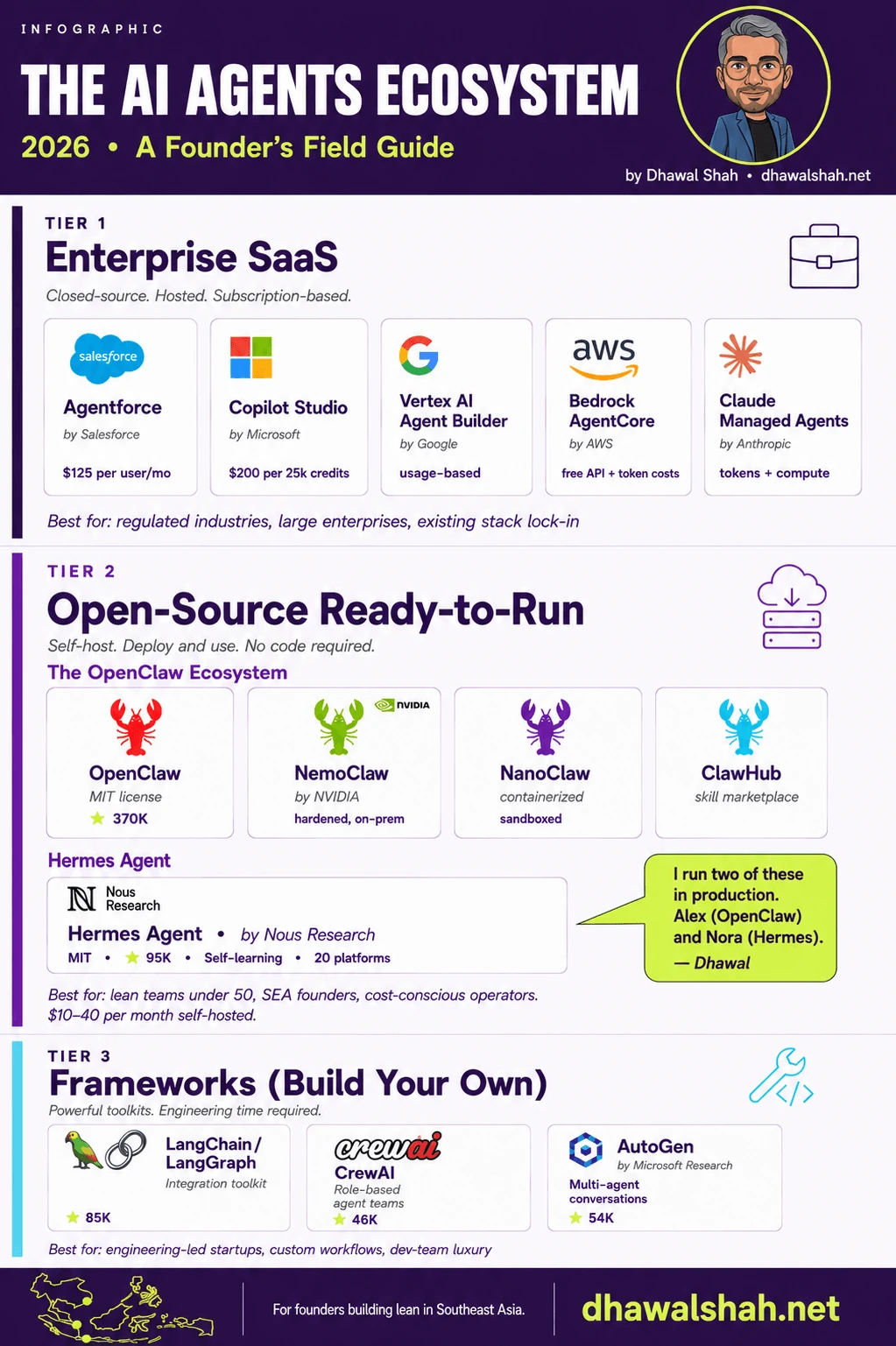
There are three groups of AI agent products on the market in 2026, and they answer three different buyers. Tier 1 is enterprise SaaS: you pay a subscription, the vendor runs it, and the agent does customer-facing work inside their product. Tier 2 is open-source ready-to-run: you self-host a working agent and configure it through markdown files. Tier 3 is frameworks: engineers build the agent themselves on top of a toolkit.
The infographic below shows the full map in one image. The rest of this section walks the three tiers in turn.
Tier 1: enterprise SaaS (closed, hosted, subscription)
These are full products built by large vendors and sold on a per-seat or per-usage subscription. The buyer is a regulated enterprise or a company already locked into the vendor’s stack. The agent runs inside the vendor’s cloud, the data flows through the vendor’s pipes, and pricing is predictable but not cheap.
The five serious options as of September 2026:
Salesforce Agentforce uses three coexisting pricing models. A flat $2 per conversation for customer-facing agents. Flex Credits at $500 per 100,000 credits, which works out to roughly $0.10 per standard action at 20 credits each. And a $125 per user per month add-on licence for internal use (Salesforce Agentforce pricing, 2026). Agentforce sits inside Salesforce, talks to Salesforce data, and answers Salesforce-shaped questions.
Microsoft Copilot Studio charges $200 per month for a pack of 25,000 Copilot Credits, with a pay-as-you-go option that bills consumption at the end of each period (Microsoft Copilot Studio pricing, 2026). Copilot Credits are the consumption unit: a generative answer costs two, an agent action five, and reasoning models bill extra per thousand tokens (Microsoft Learn, 2026). For shops already on Microsoft 365 Copilot, employee-facing agents are bundled in.
Google Gemini Enterprise Agent Platform, the renamed Vertex AI Agent Builder as of Cloud Next in April 2026, uses pure usage-based pricing across several meters: agent runtime compute, memory and session events, Vertex AI Search queries and model tokens, all billed separately (Google Cloud pricing, 2026). Predictable for technical builders. Hard to estimate up front for a non-technical buyer.
AWS Bedrock AgentCore is the most fragmented of the five. Charges break across separate services: Runtime, Browser and Code Interpreter at $0.0895 per vCPU-hour plus $0.00945 per GB-hour; Gateway API invocations at $0.005 per 1,000 calls; short-term memory at $0.25 per 1,000 events; with model tokens billed on top (AWS Bedrock AgentCore pricing, 2026). Predictable per line item, but the total is hard to estimate without an engineering team that will track each meter.
Anthropic Claude Managed Agents launched on 8 April 2026 as the runtime for developers building Claude-powered features into their own products (SiliconANGLE, 2026). Pricing is $0.08 per session-hour of active runtime on top of standard Claude token rates (Anthropic, 2026). It sits next to Bedrock AgentCore conceptually: a vendor-managed agent loop with no built-in chat interface, so you build the user interface yourself. Best for engineering teams who want Claude specifically as their model and want Anthropic to manage state, container provisioning and event streaming. I wrote a deeper comparison in Claude Managed Agents vs OpenClaw.
Tier 1 is the right answer if you are in a regulated industry (banking, healthcare, government), if your data already lives inside one of these vendors’ stacks, or if buying through procurement is faster than building. It is the wrong answer for a lean team that wants ownership and flat costs.
Tier 2: open-source ready-to-run (self-host, deploy, and use)
This tier is where most of the recent action sits, and where I run both of my agents. These are open-source projects you self-host on a small server, configure through a markdown file or a UI, and connect to the messaging apps and tools you already use. No code required.
The OpenClaw ecosystem is the centre of gravity. OpenClaw itself is MIT-licensed and the most-starred software project on GitHub: it passed React in early 2026 (Star History, 2026) and stood at over 389,000 stars in September 2026 (OpenClaw GitHub, 2026). Around the core project, three variants have grown:
NemoClaw is NVIDIA’s reference design for running OpenClaw securely in regulated enterprises. It bundles the OpenShell sandbox runtime, a privacy router, network guardrails and NVIDIA Nemotron open models, all installable through a single command (NVIDIA Newsroom, 2026). Jensen Huang’s framing at the March 2026 launch was direct: “OpenClaw is the operating system for personal AI.” NemoClaw is what you reach for if you want OpenClaw’s flexibility with enterprise-grade isolation.
NanoClaw is a lighter, container-isolated alternative built on Anthropic’s Claude Agent SDK. It connects to WhatsApp, Telegram, Slack, Discord, Microsoft Teams and email, supports memory and scheduled jobs, and runs each agent in its own Linux container (NanoClaw GitHub, 2026). Useful when you want sandbox isolation but do not need NemoClaw’s enterprise tooling.
ClawHub is the marketplace and registry for OpenClaw skills, plugins and agent configurations. A library of pre-built capabilities you install with a single command. The flip side: when Koi Security audited it in February 2026, they found 341 malicious skills among 2,857 audited (The Hacker News, 2026). Review before you install.
Outside the OpenClaw ecosystem, the main alternative is Hermes Agent by Nous Research. Hermes is MIT-licensed, ships releases most weeks (v0.21.1 landed on 7 September 2026), and connects to Telegram, WhatsApp, Discord, Slack, Signal and email out of the box (Hermes Agent releases, 2026). Its differentiator is a self-learning loop: Hermes creates its own skills after complex tasks, improves them during use, and persists them across sessions.
Tier 2 is the right answer for lean teams under 50 people, for founders who value flat predictable costs, and for anyone in Southeast Asia who wants to run an agent through Telegram or WhatsApp without paying enterprise per-seat pricing. The monthly bill for a self-hosted agent runs roughly $6 to $40 for the server, plus model API costs that depend on usage.
Tier 3: frameworks (build your own)
The third tier is for engineering-led teams who want to build a custom agent from primitives. These are powerful toolkits, but they assume you have a developer who will write the agent loop, manage state and ship it to production. Star counts below are as of September 2026.
LangChain and LangGraph sit at the centre of this tier. LangChain is broad: an integration toolkit for connecting models, tools, retrieval and memory, at roughly 146,000 GitHub stars. LangGraph adds a state-machine layer on top, with audit and rollback semantics that hold up in production, at around 41,000 stars.
CrewAI models agents as a “crew” with named roles and tasks. The framing makes prototyping quick. Around 58,000 stars. Best for teams who think in role assignments and want a clean abstraction.
AutoGen is Microsoft Research’s conversational multi-agent framework, at around 61,000 stars. It is now in maintenance mode: the repository states it will receive no new features and directs new users to its successor, Microsoft Agent Framework. Strong on group decision and debate patterns if you inherit an existing codebase, but not where I would start a new build.
Tier 3 is the right answer for engineering-led startups building a custom agent into a product, or for teams who genuinely need workflows that none of the Tier 2 ready-to-run agents support. It is the wrong answer for a founder who wants to ship something useful this week.
Which tier is right for your business?
Regulation, engineering bandwidth and how fast you want to ship decide it. Company size matters less than people assume.
If you are in a regulated industry, the answer is Tier 1, full stop. Singapore PDPA, Indonesia PDP, healthcare, banking and government work all push toward vendors with auditable cloud infrastructure and signed compliance attestations. Within Tier 1, pick by where your data already lives. Salesforce shop, Agentforce. Microsoft shop, Copilot Studio. GCP-native, Gemini Enterprise Agent Platform. AWS-native, Bedrock. The on-premises variant for regulated cases is NemoClaw, which gives you OpenClaw’s flexibility behind NVIDIA’s security stack.
One point that sits above the tier decision: PDPA accountability is the deploying organisation’s responsibility regardless of which vendor processes the data. IMDA’s Model AI Governance Framework for Agentic AI maps that accountability chain, and who at board level owns each part of it. The PDPC’s September 2026 advisory on unauthorised AI tools adds the staff side: an AI-made script that goes live without testing or review can expose customer data, and the organisation answers for it.
If you have engineers who would rather build than configure, and the use case is custom enough that no off-the-shelf agent fits, Tier 3 is yours. The trade-off is honest: faster ceiling, slower start, and a dev team committed to the agent indefinitely.
For most lean teams, the answer is Tier 2. This is where the time-to-useful is fastest, the monthly cost is lowest, and the flexibility is highest. The Singapore Economic Development Board’s February 2026 report found that 56% of Singaporean firms and 51% of Indonesian firms report progress toward scaled AI adoption, and nearly 90% of companies across the region plan to experiment with AI agents in 2026 (Singapore EDB, 2026). Read those as directional rather than exact: published adoption rates for the same country can differ four-fold depending on who gets counted, which I have taken apart survey by survey. Most of those experiments will land in Tier 2, because lean teams cannot justify $125 per user for a thirty-person team and do not have a dev team to spare on agent infrastructure. The common SEA SME workflows I see deployed, like WhatsApp support, lead triage and social scheduling, all sit in this tier.
Citation capsule
The Singapore Economic Development Board’s February 2026 report “AI in Southeast Asia: An era of opportunity”, produced with McKinsey and Tech in Asia from a survey of 330 companies across Singapore, Malaysia, Indonesia, the Philippines, Thailand and Vietnam, found that 56% of enterprises in Singapore and 51% in Indonesia report progress toward scaled AI adoption, the highest in the region, and that nearly 90% of companies plan to experiment with AI agents in 2026. Larger companies lead: 56% of those with revenues above US$250 million are scaling or fully scaled, against 42% of smaller companies. (Singapore EDB, 2026)
Want my Tier 2 setup guide? I publish a fortnightly newsletter for founders running lean teams in Southeast Asia. Setup guides, real numbers, and what I am learning week to week. Subscribe here.
The rest of this article zooms into Tier 2, because that is the choice most readers face and the one I have direct production experience with.
OpenClaw, in plain language
OpenClaw is a self-hosted personal AI agent platform that runs on a small server you control. You configure its behaviour through a set of files in your workspace: openclaw.json for the main config, AGENTS.md for agent setup, SOUL.md for personality and voice, TOOLS.md for tool definitions, and a skills directory for any reusable capabilities you install. None of this requires programming, but it is more files to learn than a single config. The primary interface is a messaging app, usually Telegram or WhatsApp, with Discord, Slack and Teams also supported. It runs multiple AI models including Claude, Gemini and others via OpenRouter, so you are not tied to a single provider.
The platform passed React in early 2026 to become the most-starred software project in GitHub history, and stood at over 389,000 stars in September 2026 (OpenClaw GitHub, 2026). Its creator, Peter Steinberger, joined OpenAI in February 2026, with the project moving into a foundation (TechCrunch, 2026).
What OpenClaw is best at:
- Structured automation that runs on a schedule, like a morning briefing or an end-of-day client summary
- Multi-step workflows that involve a fixed pipeline (read inbox, classify, summarise, post to Telegram)
- Tasks where you want to define exactly what the agent does, in plain English, inside markdown files like
SOUL.mdandAGENTS.md - Multi-channel reach through Telegram, WhatsApp, Discord, Slack and Teams
My instance is called Alex. I have been running him in production since March 2026, and his role has changed twice: daily assistant, then an autonomous cofounder experiment, and since July a project manager for a multi-agent setup I am still building. I have written a full setup walkthrough in the OpenClaw install guide and a deeper look at the original daily-assistant use cases in the private AI assistant business guide.
Hermes Agent, in plain language
Hermes Agent is also self-hosted, also MIT-licensed, and also runs on a small server. Where it differs from OpenClaw is in its core design. Hermes is built around a self-learning loop. As you use it, the agent creates its own reusable skills based on patterns it notices, and persists them across sessions through a curator system. This is not retraining the model. The agent is learning your work patterns and saving procedures it can use again.
Releases arrive most weeks; v0.21.1 shipped on 7 September 2026 (Hermes Agent releases, 2026). Telegram, WhatsApp, Discord, Slack, Signal and email are built in. The model backend is swappable, which means I pick the cheapest model that fits each task and keep my total API spend under $10 a month.
What Hermes is best at:
- Ambient intelligence: noticing what you keep doing and offering to handle it next time
- Chief of Staff-style work where the agent surfaces what needs attention rather than executes a fixed script
- Long-running memory that compounds across weeks, not just sessions
- Cron-based scheduled work that delivers to wherever you want it (Telegram, WhatsApp, email)
My instance is called Nora. She runs my morning briefing, labels my inbox before I sit down to work, flags decisions I am running out of time on, drafts replies and speeches in my voice, and sends an evening recap of what she handled during the day. She started life on a $6 per month DigitalOcean droplet with one virtual CPU and one gigabyte of RAM, and moved to Hetzner in July 2026; the whole setup, server and model usage included, still costs under $20 a month. Cheaper than Alex, easier to install, and more self-sufficient. Since July she has also published her own fortnightly work notes on the Hermes log, under a byline that says exactly what she is; I read every one before it goes live. The setup walkthrough is in the Hermes Agent setup guide, and the self-learning loop deep-dive lives on the Hermes Agent hub.
OpenClaw vs Hermes: the side-by-side that matters
A single sentence captures the difference. Alex follows instructions. Nora learns patterns. Everything else is detail. For what changed after months of running both, including cost, upkeep and what broke, see Hermes vs OpenClaw: which AI agent I kept.
| OpenClaw (Alex) | Hermes Agent (Nora) | |
|---|---|---|
| Licence | MIT, fully open source | MIT, fully open source |
| Best for | Structured automation, workflow execution | Ambient intelligence, Chief of Staff |
| Model strategy | Multi-model routing (Claude, Gemini, OpenRouter) | Swappable per task, OpenAI-compatible |
| Memory | Configured workspace files, conversation history | Auto-curated skills and persistent memory (2,200-character cap) |
| Scheduling | Heartbeat system | Built-in cron with delivery to any platform |
| Channels | Telegram, WhatsApp, Discord, Slack, Teams | Telegram, WhatsApp, Discord, Slack, Signal, email |
| Server at launch (DigitalOcean, to July 2026) | 2 vCPU, 4 GB RAM, $24 a month | 1 vCPU, 1 GB RAM, $6 a month |
| Server now (Hetzner, since July 2026) | 4 vCPU, 8 GB RAM | Small instance; under $20 a month all in |
| Monthly model API cost | $20+, depending on workload | Under $10, depending on routing |
| Setup time | One afternoon for the comfortable, one weekend otherwise | About half a day, easier than Alex |
| Configuration files | openclaw.json + AGENTS.md + SOUL.md + TOOLS.md + skill files | Config file + SOUL.md |
| Marketplace | ClawHub (thousands of skills, audit before install) | Skills created in-session, no external marketplace |
The numbers above are mine, from my own hosting bills and Anthropic and Google AI console statements. Your costs will vary with usage. The side-by-side keeps holding up: Alex is the executor, Nora is the strategist.
A few practical notes the table does not capture. Hermes’s swappable model backend matters more than it sounds. Most SaaS AI tools charge a flat rate regardless of which model is doing the work. With Hermes, I route the cheap tasks to Gemini Flash Lite and the harder reasoning to Claude Haiku or Sonnet, and the monthly bill stays predictable. OpenClaw can do this too through OpenRouter, but Hermes makes it the default.
The flip side: OpenClaw’s ClawHub gives Alex a library of pre-built skills I can install in a minute. Calendar summary, email triage, client report generation. Nora builds these herself over time. Faster start with Alex. Better long-term fit with Nora.
How I used both in May 2026, and what changed by September
I want to be careful here. The internet has more “here is my AI agent stack” essays than the situation warrants, most of them written within a week of setup. What follows is the account I wrote in May 2026, three months into Alex and ten weeks into Nora, kept as a dated record. The September changes are in the receipts section above.
A real Tuesday in early May 2026.
8am. Nora posts the morning briefing to my Telegram. This used to be Alex’s job. He still has the same heartbeat scheduled. Nora has been running her own version for about three weeks, and it is better, so I have left it that way. The briefing covers top of inbox, calendar conflicts for the day, urgent items from the to-do list, and headlines from the feeds I follow. The new part: by the time I open my email, Nora has already labelled every message. When I sit down to actually work, my inbox is sorted into action items, follow-ups and noise. I asked her to do the briefing. I did not ask her to label the inbox. She picked that up by watching me triage manually each morning.
9:30am. Nora flags decisions she thinks I am running out of time on. Her logic pulls from my calendar and my to-do list. She tells me which urgent items are at risk of slipping, where they could fit in the day, and what would have to give to fit them in. She also reads sentiment across recent client communications and flags anything that feels off. And she pings my project management system to surface any project running over budget. This was not set up explicitly. It compounded from the patterns she noticed.
2pm. A specific example. I had an opening address to give at an event. I sent her the brief in one Telegram message: date, audience, length, three points I wanted to make. She drafted the speech. At the same time, she drafted an email to the event organiser in my Gmail drafts, ready for me to vet and send. I did not ask for the email. She inferred I would want one.
6pm. Evening summary. Nora sends a recap of everything she did during the day. What emails got labelled. What decisions she flagged. What got drafted. What was left undone. This is the audit trail. Once a week I open her memory file and check what got compacted, what got dropped, and whether I agree with her edits.
Throughout the day. Self-learning is the part that compounds. Nora removes insights that have gone stale, adds fresh ones from the day’s work, and keeps her memory roughly the same size over time. In early May she hit her 2,200-character ceiling on one memory file, compacted it, and flagged the compaction in her evening summary so I could verify what she kept and what she dropped. The flag is the part I care about. It is the closest thing I have seen to an agent doing its own housekeeping in a way I can audit. She has since written up the audit process herself.
What was Alex doing in May? Something I did not plan when I added Nora. As Nora took over the daily ops work, I started experimenting in the other direction with Alex. OpenClaw’s bigger repository of skills and its more open configuration make it easier to give an agent room to act on its own. So I was treating Alex less like an assistant and more like an AI cofounder.
He generated his own ideas each day, ran his own website and blog, and posted on X under his own name. He had a full first cycle as a cofounder: an email outreach campaign to hundreds of people for an idea that fell flat, real spend, and public write-ups of what he learned. In May he was building in public on a second project for Southeast Asia. I read what he produced, decided what was worth keeping, and let the rest sit. The honest finding at ten weeks was that the two-agent stack did not stay “executor and strategist”. It became “Chief of Staff and cofounder”. By July the cofounder half had stalled, and I turned him into a project manager instead. The story of why is its own article, once the rebuild is far enough along to describe honestly.
Now the harder part. What I had not figured out in May.
I had not moved Nora or Alex to WhatsApp. Both integrations work. The blocker was partly policy and partly logistics: WhatsApp is more aggressive about flagging non-personal numbers than Telegram, and I was debating a second phone number dedicated to the agents.
I had not settled the model routing for Nora. Some weeks she ran on Gemini Flash Lite for almost everything. Other weeks I pushed the harder work to Claude Haiku. The routing decision was not yet a stable rule.
I had not tuned the cron schedules. Nora’s briefing was at 8am because that is when I asked for it. Most of her other scheduled checks were set up in week one and never revisited.
Nora’s subagent delegation was something I almost never used. Hermes supports running multiple agents in parallel for a task, and I defaulted to running everything sequentially in the same conversation. That was laziness rather than a considered decision.
I had not figured out how to measure Alex’s autonomous work. He ran free, he shipped output, and I could not tell the interesting from the noise at scale. Repurposing him in July was, in part, the answer to that.
Of that May list, two things have been resolved and written up: the hosting, and the audit trail for Nora’s memory. The rest I have not written up, which usually means they are not solved.

Want the real-time version of this? I write a fortnightly newsletter about what I am actually learning, including the things I get wrong. Subscribe here.
Should you run one agent, two, or none?
The honest answer for most readers is one. Some should start with zero. Very few should start with two. Here is the decision logic in plain form.

Reality check: Gartner forecasts that over 40% of agentic AI projects will be cancelled by end of 2027. The most common reasons: cost overruns, unclear value, and weak risk controls. Most failures come from people running too many agents too fast, not too few.
Start with zero if you do not yet have a recurring task that takes more than an hour a week, that follows a predictable shape, and that you would happily delegate. Agents are most useful for work you already do and want to stop doing. If you cannot name the task, you do not yet have the use case.
Start with one if you can name the task. Pick from Tier 2 if you are a lean team without an engineering bench. Pick OpenClaw if the work is structured and you want to define it precisely. Pick Hermes if the work is fuzzier and you want the agent to learn what you mean.
Move to two only after you have run one for at least three months and have hit a real limitation. For me, that limitation was that Alex executed everything I told him perfectly but could not surface what I had not asked. Nora filled that gap. If you cannot articulate a specific limit you have hit, you do not need a second agent yet.
For getting started, see the OpenClaw install guide or the Hermes Agent setup guide. The two-agent setup is a destination you arrive at after the first one has earned its keep. If you would rather learn on a course first, my list of agentic AI courses in Singapore sorts them by goal and coding level.
Frequently Asked Questions
What is an AI agent in simple terms?
An AI agent is software you give a goal to rather than a question. It works out the steps, uses tools such as email, a calendar or a web browser to carry them out, and keeps going without being prompted at each turn. It remembers across sessions, works through multi-step tasks on its own, and can start work on a schedule. Common business uses include morning briefings, email triage, customer support automation and scheduled report generation.
What is the difference between an AI agent and a chatbot?
A chatbot answers the question in front of it and forgets you when the conversation ends. An AI agent remembers what you told it, works through a task that takes many steps, and starts work on its own schedule rather than waiting to be prompted. Anthropic's widely used definition puts it as the difference between a workflow, where the model follows a path a programmer laid out, and an agent, where the model directs its own process and tool use. If a product fails all three tests (memory, multi-step action, self-starting) it is a chatbot with a new label.
What are examples of AI agents in business?
The examples that actually get deployed are mundane. A morning briefing that pulls calendar, inbox and to-do list into one message. Inbox triage that labels every email into action, follow-up and noise before you sit down. A WhatsApp support agent that answers the first message inside a minute and escalates the rest. Lead triage that scores and routes enquiries. A weekly client report that writes itself from the numbers. I run the first two in production with a Hermes Agent instance and see the others deployed across small businesses in Southeast Asia.
What are the types of AI agents?
For a buyer, the useful types are the three tiers of product. Tier 1 is enterprise SaaS agents such as Salesforce Agentforce, Microsoft Copilot Studio, Google Gemini Enterprise Agent Platform and AWS Bedrock AgentCore, hosted by the vendor and sold per seat or per usage. Tier 2 is open-source ready-to-run agents such as OpenClaw and Hermes Agent, which you self-host and configure without code. Tier 3 is frameworks such as LangChain and CrewAI, which engineers use to build a custom agent. Textbook classifications (reflex agents, goal-based agents, learning agents) describe how an agent works internally and do not help you choose a product.
How much do AI agents cost in 2026?
Pricing splits cleanly by tier. Enterprise SaaS agents like Salesforce Agentforce charge $125 per user per month or $2 per customer conversation. Microsoft Copilot Studio runs $200 per pack of 25,000 credits. Open-source self-hosted agents like OpenClaw and Hermes cost between $6 and $40 per month for the server, plus $5 to $20 in model API costs depending on usage. Frameworks like LangChain are free, but require engineering time.
What is the difference between OpenClaw and Hermes Agent?
OpenClaw is a self-hosted agent built for structured automation. You configure it through a workspace of markdown files (AGENTS.md, SOUL.md, TOOLS.md) plus a JSON config, and it runs predictable multi-step workflows. Hermes Agent is also self-hosted and also uses a SOUL.md file for personality, but the rest of its setup is consolidated into a single config file, and it creates its own skills from experience. In my experience, Hermes was simpler to stand up. Both run on the same shape of hardware. The shorthand: OpenClaw follows instructions, Hermes learns patterns.
Is NemoClaw the same as OpenClaw?
NemoClaw is NVIDIA's reference design for running OpenClaw securely in enterprise environments. It wraps OpenClaw with the NVIDIA OpenShell sandbox runtime, a privacy router, network guardrails, and NVIDIA Nemotron open models. It is a hardened deployment path for organisations that need policy-based isolation and on-premises deployment, rather than a replacement for OpenClaw.
Are open-source AI agents safe for business use?
Open-source AI agents like OpenClaw and Hermes are safe when you control the deployment and keep it current. Self-hosting keeps your conversation data on a server you own. The risks are real but addressable: check your version before anything else (CVE-2026-32922, a 9.9-severity privilege escalation in OpenClaw, was published in March 2026 the day after my own install passed a clean configuration audit), review any third-party skills before installing them (a February 2026 ClawHub audit by Koi Security found 341 malicious skills among 2,857 audited, reported by The Hacker News), keep your server patched, and audit what the agent is learning if you run a self-learning agent like Hermes. For regulated industries, NemoClaw or Tier 1 enterprise SaaS is the safer path.
Can I run an AI agent on WhatsApp?
Yes. Both OpenClaw and Hermes Agent support WhatsApp. Hermes connects to Telegram, WhatsApp, Discord, Slack, Signal and email out of the box. OpenClaw supports WhatsApp alongside Telegram, Discord, Slack and Teams. In practice you will want a dedicated phone number, because WhatsApp is more aggressive than Telegram about flagging numbers that behave like automation.
What is the best AI agent platform for a small business?
For most small businesses under 50 people, a Tier 2 open-source ready-to-run agent is the best fit. The monthly cost stays under $50, the setup takes half a day to a weekend, and the agent runs on a server you control. Pick OpenClaw if your use case is structured automation (briefings, triage, scheduled reports). Pick Hermes if your use case is ambient intelligence or Chief of Staff work. Tier 1 enterprise SaaS makes more sense for businesses already deeply embedded in Salesforce, Microsoft, Google or AWS infrastructure.
How long does it take to set up an AI agent?
A Tier 2 self-hosted agent like Hermes takes about half a day for someone comfortable with SSH. OpenClaw takes about one afternoon to one weekend depending on how much configuration you want done up front. Tier 1 enterprise SaaS agents are usually live in under an hour but carry an ongoing subscription cost. Tier 3 frameworks like LangChain require an engineering team and typically take weeks to ship to production.
Want the infographic from this article for your own slides or blog? Embed code:
<a href="https://dhawalshah.net/article/ai-agents-for-business-2026/">
  <img src="https://dhawalshah.net/images/blog/ai-agents-2026-ecosystem-infographic.png"
       alt="The AI Agents Ecosystem 2026: field guide to enterprise SaaS, open-source agents, and frameworks" />
</a>
<p>Infographic by <a href="https://dhawalshah.net">Dhawal Shah</a></p>