
After 14 years of building businesses — running a 40+ person digital marketing agency, launching an AI-powered advertising network, advising startups across Southeast Asia — I did not have a personal site. The designs were ready. My dev team was backed up with client work. So I tested whether AI could actually ship a professional, multi-page site from Figma designs.
It took four days. Here is exactly how it worked, what failed, and what you need to know before attempting it yourself.
This Tutorial Is Not for Everyone
WordPress powers 42.7% of all websites globally (W3Techs, 2026). It remains the best option for most marketers who need a site built, launched, and updatable without touching code. If you are a marketer, founder, or business owner without a development background, hire a developer or use WordPress. That is not a criticism of this approach — it is an honest assessment of the prerequisites.
What this tutorial assumes you have:
- A development background (not necessarily current, but enough to debug)
- Comfort with GitHub, terminal commands, and navigating file structures
- Ability to deploy from localhost to a hosting provider
- Willingness to use Markdown files as your “CMS” — no admin panel, no visual editor
My “content management system” is a folder of Markdown files. Every page’s copy — headlines, descriptions, FAQ answers, meta titles — lives in frontmatter. I edit text in a code editor and push to GitHub. Vercel deploys automatically. If that workflow sounds uncomfortable, this approach is not for you.
If you need a site built professionally, my agency 2Stallions handles website development for businesses across Asia — including the kind of projects that AI tools are not yet equipped to deliver end-to-end.
TL;DR: I built a 7-page personal site in 4 days using UIPro by Locofy (Figma-to-code), Claude Code (refinement and build), and Astro/Tailwind CSS on Vercel. Tool costs: ~SGD 157/month versus a ~SGD 4,000 agency quote. Homepage Lighthouse: 99 performance, 100 accessibility, 100 SEO. Requires a dev background — most marketers should use WordPress.
Can AI Build a Site From Screenshots?
In the 2025 Stack Overflow Developer Survey, 84% of developers reported using or planning to use AI tools in their workflow (Stack Overflow, 2025). I started as one of them — opening Claude Code, feeding it screenshots of my Figma designs, and asking it to build the site.
The result was not close.
The general structure was there — headers, sections, footers in roughly the right places. But the spacing was wrong. The typography did not match. The exact layouts — the specific padding, the precise component positioning that separates professional from amateur — were consistently off.
AI could interpret the intent of a design from a screenshot, but not the precision. It understood “hero section with image on the right” but not “48px gap between the headline and subtext, 24px border radius on the card, Sora font at 56px with 1.2 line-height.”
The gap between “roughly right” and “professionally done” is entirely in those details. Screenshots do not carry enough structured data for AI to bridge that gap. At least not yet.
What’s the Best Tech Stack for an AI-Built Site?
Astro has the highest developer retention rate — 87% — among all meta-frameworks surveyed (State of JavaScript, 2024). Claude Code recommended it alongside Tailwind CSS and Vercel as the fastest path to a static personal site. That recommendation was exactly right.
But the most important decision was one I made myself: separate content from templates completely.
Every page on this site stores its copy in Markdown frontmatter files. The Astro templates handle layout and styling. The content files handle words.
My requirements were simple:
- Fast to build with
- Easy to change content after launch
- No CMS overhead — no database, user accounts, or admin panel
Why does content separation matter? Because when I later rewrote the copy on every single page — which I did — I changed content files only. No template code was touched. When I added FAQ sections, I added data to frontmatter. When I renamed 32 images for SEO, the references updated cleanly because the architecture separated concerns from the start.
This decision saved more time than any single tool in the entire project.
How Does Figma-to-Code Actually Work?
According to Figma’s 2025 AI Report, 59% of developers now use AI for core development tasks like code generation (Figma, 2025). The screenshot approach failed because AI needs structured input, not visual interpretation. What I needed was a tool that reads actual Figma design data — layers, components, spacing values — and outputs clean code.
That tool was UIPro by Locofy.ai.
UIPro is a Figma plugin that generates HTML and Tailwind CSS directly from design files. Not from screenshots — from the design data itself. It reads the Figma layers, understands the component hierarchy, and outputs structured code that reflects the actual design intent.
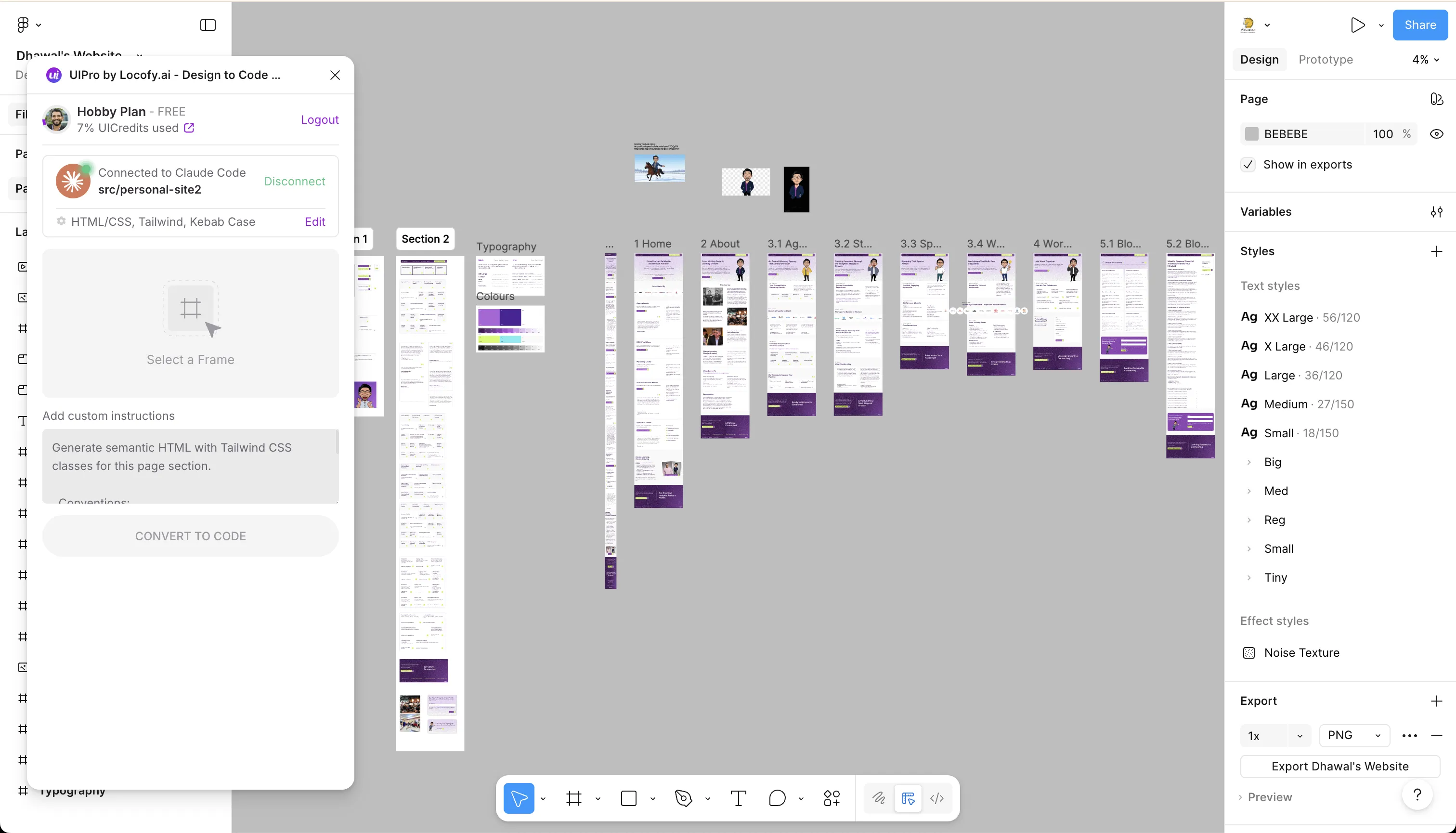
I used the free Hobby plan. For the entire site — seven pages, multiple sections per page, responsive layouts — I used only 7% of the available credits.
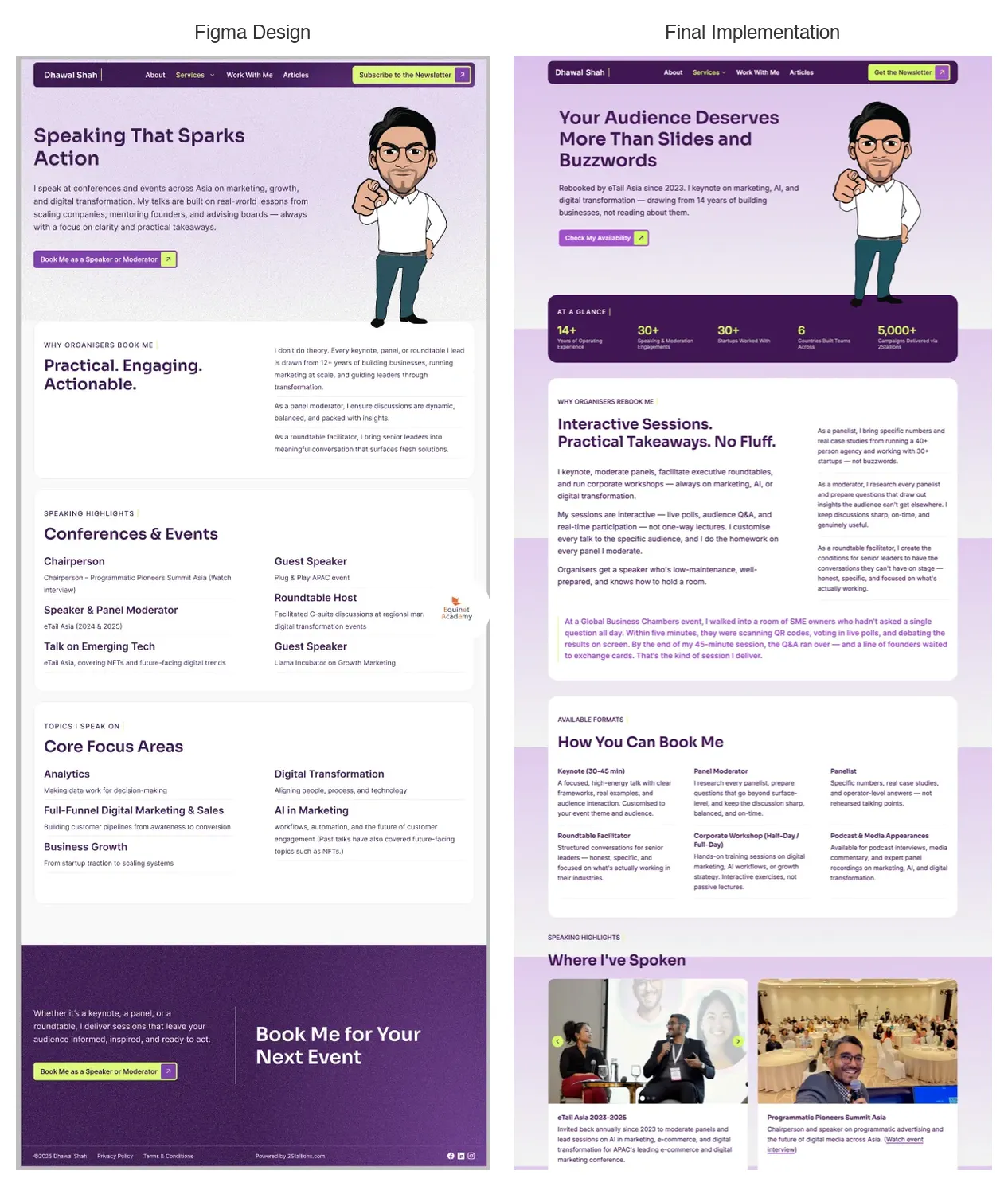
Each page exported at roughly 85-90% accuracy from the original Figma design. The layout structure, spacing, typography, and component hierarchy came through cleanly. That last 10-15% — responsive breakpoints, hover effects, interactive carousels, animations, accessibility attributes — was where Claude Code took over.
Here is how the original Figma design compares to the final implemented page:
The workflow became a loop:
- Select a page frame in Figma
- Export via UIPro — get clean HTML/Tailwind output
- Import into Claude Code
- Claude Code refines: responsive behaviour, interactions, edge cases, accessibility
Disclosure: I am an investor in Locofy. I would not have written this article if the tool had not genuinely delivered — but you should know the relationship exists.
What Does AI Handle After the Export?
A controlled study of 95 professional developers found that those using AI coding assistants completed tasks 55.8% faster than the control group (Peng et al., arXiv, 2023). In my build, Claude Code handled everything that static Figma exports cannot:
What UIPro handled well: layout structure, spacing, typography, colour values, component hierarchy — everything that lives in the design file’s data.
What Claude Code handled: responsive breakpoints that did not exist in the static design, hover states and animations, carousel and interactive component logic, accessibility markup (ARIA labels, focus management, semantic HTML), and integration with the Astro template system.
Neither tool could have done the full job alone. UIPro did generate responsive layouts, but they did not work smoothly across all breakpoints — elements overlapped at certain screen widths, spacing collapsed unpredictably on tablets, and interactive states were missing entirely. Claude Code without UIPro would have produced pages that looked approximately right but missed the design precision. The combination took each page from Figma design to deployed and responsive in hours, not days.
How Do You Optimise AI-Built Content for Search?
Pages with structured data rich results have an 82% higher click-through rate than standard listings, based on a Nestlé case study cited by Google Search Central. With the design and templates done, the site looked right. But looking right and working right are different things.
I shifted focus to content and SEO using third-party Claude Code skills — specialised plugins for copywriting and AI-driven SEO. These are not built into Claude Code by default. I sourced and installed them separately.
Here is what changed across the site:
- Generic meta titles became keyword-rich titles targeting actual search queries
- Missing FAQ sections were added to every service page — with FAQPage schema markup so generative AI engines could surface answers directly
- Vague hero copy (“helping businesses grow”) became proof-first copy with specific numbers
- 32 image filenames (IMG_4523.png) were renamed to SEO-friendly names in a single pass
- Structured data was added: Service schema, Person schema, Organisation schema, Article schema with JSON-LD
- 83 unused images were deleted, and remaining PNGs converted to WebP
I ran Lighthouse audits on every page. The results:
| Page | Performance | Accessibility | Best Practices | SEO |
|---|---|---|---|---|
| Homepage | 99 | 100 | 100 | 100 |
| Agency Leader | 98 | 100 | 100 | 100 |
| About | 97 | 100 | 100 | 100 |
| Articles | 91-94 | 95 | 100 | 100 |
Key metrics behind those scores: 0ms Total Blocking Time across all pages (zero client-side JavaScript), 0 Cumulative Layout Shift, and font payloads reduced from 778KB to 255KB through subsetting — a 67% reduction.
What Did the Entire Build Actually Cost?
The median freelancer web project costs USD 2,500-5,000 (Web Designer Academy, 2025). My agency’s basic website development package — which includes design and development — would have cost approximately SGD 4,000. Here is what I actually spent on tools:
| Tool | Monthly Cost | Notes |
|---|---|---|
| Claude Max | SGD ~135 | Pro plan (~SGD 27/mo) would also work |
| Figma Pro | SGD ~20 | Professional seat for one user |
| UIPro by Locofy | Free | Hobby plan — used only 7% of credits |
| Vercel | Free | Free tier for personal sites |
| GitHub | Free | Public or private repos |
| Domain | SGD ~16/year | ~SGD 1.30/month amortised |
| Total tools | ~SGD 157/month |
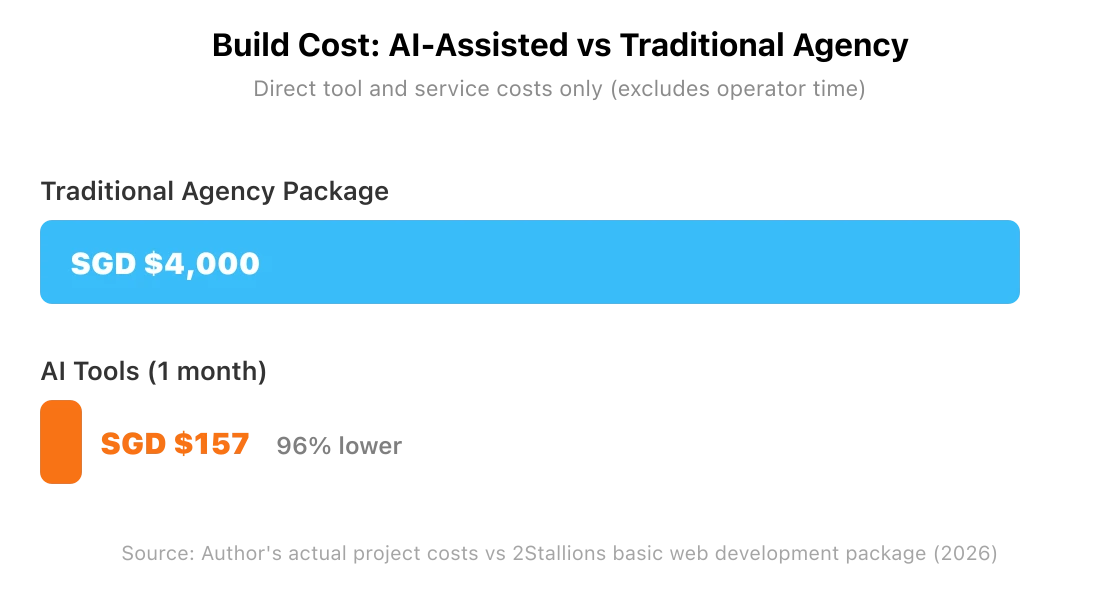
The biggest savings were not in money — they were in time. Post-design, the site went from Figma mockups to live deployment in four working days: 2.5 days for development, 1.5 days for copywriting, SEO, and deployment. A traditional agency timeline for a comparable project would be 4-6 weeks.
The caveat: those four days involved roughly 10-12 hours per day of focused work, and my dev background meant deployment, API integrations (Kit for newsletters, Resend for email), and DNS configuration were not obstacles. A non-developer attempting this would need help with those layers — or significantly more time.
Five Things I Would Tell You Before Starting
1. AI suggests approaches that do not always work.
Claude recommended the screenshot-to-code approach. It failed. The next suggestion — Astro + Tailwind — was exactly right. But the content separation architecture? That was my decision, based on years of managing CMS-driven projects. AI gave me the stack. Experience told me how to structure it. Treat AI recommendations like any advisor’s: useful starting points, not finished thinking.
2. The right combination of tools matters more than any single tool.
The stack that shipped this site: Figma (design) → UIPro by Locofy (Figma-to-code) → Claude Code (refine, build, integrate) → third-party skills (content + SEO). No single tool did everything. The value was in the workflow between them.
3. Separate content from code early.
Markdown-driven architecture meant I could rewrite every page’s copy without touching a single template file. Adding an FAQ section was adding data, not writing code. This is where long-term speed comes from — not in the initial build, but in every update after, which is what eventually grew into running the whole marketing operation from one terminal.
4. AI is excellent at tedious precision work.
Renaming 83 images with SEO-friendly filenames. Generating JSON-LD structured data for every page. Converting PNGs to WebP in batch. Adding alt text to every image. This is where AI saves days of work that a human would find mind-numbing but a machine handles in minutes.
5. AI fixes what you point at, but struggles to diagnose.
A CSS bug — a layout issue that only appeared at specific breakpoints — took five-plus attempts to resolve. Claude Code kept treating symptoms: adjusting padding here, changing a flex property there. The fix only landed when I identified the root cause myself (a conflicting max-width inherited from a parent container) and told Claude exactly what to change. The human still drives the diagnosis.
Should You Build Your Site This Way?
For most marketers, business owners, and founders — no.
WordPress powers nearly 43% of the web for good reason. It has visual editors, plugin ecosystems, managed hosting, and an enormous talent pool of developers. If you need a site that someone on your team can update without opening a terminal, WordPress remains the right choice.
One more thing worth saying plainly: based on what Claude produced from screenshots alone, I would take a human-designed site over a generic AI-generated version any day. The screenshot-to-code output looked like a template — not a brand. The reason this site does not look AI-generated is because a human designer created every layout in Figma first. AI built what was designed. It did not design.
This approach works for a specific profile: someone with a dev background who wants full control, maximum performance, and is comfortable treating Markdown files and GitHub as a content workflow. That profile describes a small minority of people who need websites.
AI did not replace thinking on this project. It replaced the time between thinking and shipping. Every strategic decision — the architecture, the content separation, the positioning, the copy direction — was human. Every hour of tedious execution — the image conversion, the schema markup, the responsive refinements, the file renaming — was AI.
For operators who know what they want built: the bottleneck is no longer development capacity. It is clarity about what you actually need. If you can define it precisely, AI can build it fast. If you cannot, no tool will save you. I teach this workflow in a vibe coding workshop.
Need a professional website? My agency 2Stallions builds websites for businesses across Asia — from personal brands to enterprise platforms. Whether you choose AI-assisted or traditional development, the outcome should be the same: a site that works as hard as you do. Talk to our team →
Can AI build a professional website from scratch?
Yes, but with significant caveats. AI tools like Claude Code can build and refine a multi-page site when paired with structured input from Figma-to-code tools like UIPro. The 2025 Stack Overflow survey found 84% of developers now use AI tools. However, AI still struggles with pixel-perfect design interpretation from screenshots and requires human oversight for architecture and debugging decisions.
How long does it take to build a website with AI?
This 7-page site took four working days — 2.5 days for development and 1.5 days for content, SEO, and deployment. Traditional agency timelines for comparable projects run 4-6 weeks. The time savings come primarily from AI handling repetitive tasks: responsive code, image optimisation, schema markup generation, and bulk file operations.
What does an AI-built website cost?
Tool costs for this build were approximately SGD 157 per month — Claude Max (SGD 135), Figma Pro (SGD 20), and a domain (SGD 16/year). UIPro, Vercel, and GitHub were free. By comparison, a traditional agency package for a similar site would cost SGD 4,000-8,000. The trade-off is your own time and technical ability.
Do you need coding experience to build a site with AI?
For this workflow, yes. You need comfort with GitHub, terminal commands, file structures, and deploying from localhost. The “CMS” is Markdown files edited in a code editor — there is no admin panel or visual editor. Marketers and business owners without a development background should use WordPress or hire a professional developer.
Is Astro better than WordPress for personal sites?
Astro excels at performance — this site scores 99 on Lighthouse mobile performance with 0ms Total Blocking Time and 0 Cumulative Layout Shift. WordPress offers easier content management, a visual editor, and a larger plugin ecosystem. Choose Astro if you prioritise speed and are comfortable with Markdown. Choose WordPress if you need a visual editor and non-technical team access.