


Key Takeaways
- Five ad platform MCPs (Google Ads, GA4, Meta, LinkedIn, TikTok) connect to Claude via GCP Cloud Run. Not one had a community MCP that worked in production without forking and extending first.
- Full API access across all five platforms took us 18 days. TikTok alone required a 7-day manual review. Credential setup takes longer than the code.
- Anthropic’s stated policy against training on API and paid plan data was our deciding factor. We’re running on our own accounts only until client ToS and privacy reviews are complete.
I run 2Stallions, a full-service digital marketing agency based in Singapore. Every week, my team pulls performance data from five different ad platforms, tabs between five different UIs, and manually assembles a picture of what’s working across a client’s full media mix.
The data isn’t the problem. It’s all there. The problem is no single tool gives you the synthesis across it.
MCPs fix that. This post covers how I built it, what broke, and what the output actually looks like.
What Is an MCP Server, and Why Does It Matter for Ad Platforms?
Searches for “google ads mcp” grew 17x in twelve months, from 50 per month in March 2025 to 880 by February 2026 (DataForSEO, 2026). The interest is real. The tooling hasn’t caught up yet, which is part of why this post exists.
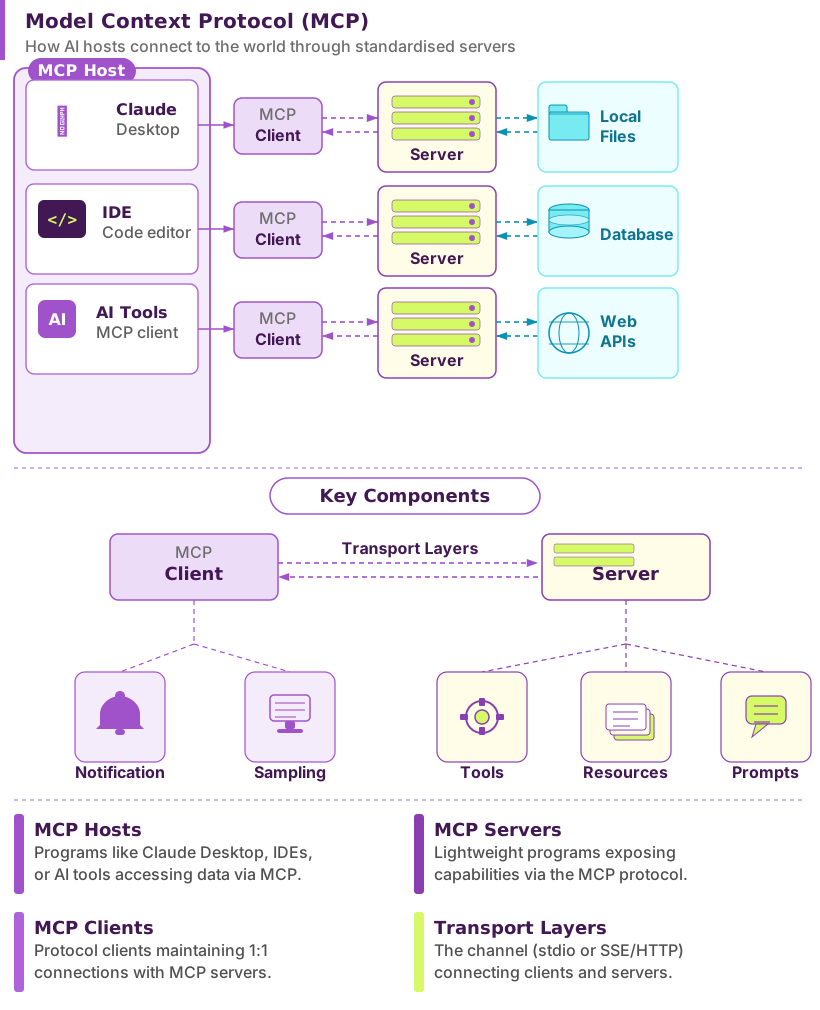
An MCP (Model Context Protocol) server is a standardised bridge between an AI model and an external data source. Anthropic released the protocol as an open standard in November 2024 (Anthropic, 2024). Rather than every tool needing a custom integration, any MCP-compatible AI can talk to any MCP server using the same protocol.
For advertising, this means Claude can query your Google Ads account directly in real time, using the same API your reporting tools use. No CSV exports, no copy-pasting. Ask a plain-English question and get an answer backed by live data from your actual accounts. Wired together, those same MCPs feed a live marketing dashboard that refreshes on its own.
The GitHub Hunt: No Single Reliable Source for Marketing MCPs
We evaluated over a dozen GitHub repos across five platforms. Not one worked in production without forking and extending. There is no central registry for production-ready marketing MCPs. The options are scattered across GitHub, npm packages, and a handful of discovery sites (MCPMarket, MCPServers.org, MCP Manager), with quality that varies wildly. Some repos are maintained by a single developer. Many haven’t been updated in months.
What I found for each platform, and where it fell short:
Google Ads MCP
Google publishes an official MCP server, but it’s built for single-user use and doesn’t support team deployments with per-user authentication. Our version (dhawalshah/google-ads-mcp) fixes that. Key additions: a multi-user HTTP server mode where each team member authenticates once via OAuth and tokens persist in Firestore across container restarts; domain-restricted access so only your company’s Google accounts can authenticate; raw GAQL query support for custom reporting beyond the preset tools; and 10 additional tools covering search terms, device and geographic breakdowns, asset performance for responsive search ads, conversion actions, and a keyword planner. The three-layer auth model (OAuth credentials from Google Cloud, a developer token from inside Google Ads, and an MCC Manager Account ID) is the hardest part to configure. Getting all three in sync, and diagnosing silent failures when one was misconfigured, took most of a working day.
Google Analytics MCP (GA4)
Google hasn’t published one for Analytics. The community base covered basic reporting. Our version (dhawalshah/google-analytics-mcp) adds two deployment modes the original doesn’t have: a local STDIO mode with a one-shot setup_local_auth.py script (no Firestore or GCP project needed, useful for solo analysts) and a shared team server with per-user Firestore token storage. On top of that, three tools the original lacks: live visitor counts via the Realtime API, property metadata discovery (so you can see all available dimensions and metrics before writing a query), and funnel analysis for multi-step drop-off tracking. GA4’s API quotas are aggressive. Every version of this MCP hits limits quickly on multi-property queries. We added query batching to stay within limits.
Meta Ads MCP
Meta hasn’t published one either. The community base covered campaigns, ad sets, ads, and basic insights. Our version adds FB_ACCESS_TOKEN environment variable support for team deployments and Streamable HTTP transport for hosted servers. The more meaningful additions are 20 new tools. The ones we use most: audience reach estimator (model the size of a targeting spec before launching a campaign), ad preview renderer (see how a creative renders across every placement from Facebook Feed to Reels), and the activity log (see who changed what and when across the account). The full additions cover custom audiences, saved audiences, delivery estimates, targeting research, pixels, custom conversions, image library, ad rules, lead gen form submissions, and Page insights.
LinkedIn Ads MCP
Same story for LinkedIn. The most important distinction from the other four: this is the only one of our five MCPs that goes beyond reporting. Our version (dhawalshah/linkedin-ads-mcp) supports write operations: creating, updating, and deleting campaign groups, campaigns, and creatives, uploading images, and creating sponsored content ads directly from Claude. The additions also include Streamable HTTP transport for team deployments, Ad Library search (competitive research on any advertiser’s public LinkedIn ads, filterable by country, targeting category, and impression volume), and a token persistence strategy for Cloud Run using LINKEDIN_TOKENS_JSON so tokens survive container restarts without re-authenticating.
TikTok Ads MCP
TikTok follows the same pattern. We started with an open-source base that shipped 6 tools covering core campaign and ad group reporting. Our version (dhawalshah/tiktok-ads-mcp) extends that to 14 tools. The additions that matter most for TikTok: video performance metrics (2-second and 6-second view rates, completion rates, average watch time) that no generic reporting MCP covers; creative fatigue scores with per-ad refresh recommendations; benchmark comparisons showing how your CTR, CVR, CPM, and CPC compare against industry averages; and Smart+ campaign support, which TikTok’s standard reporting endpoints exclude. We also added a one-command Cloud Run deploy script so setting up a shared team instance takes under 10 minutes.
Google Search Console MCP (Bonus)
Not an ad platform — but if you’re pulling paid performance data across five channels, the next question is always how organic search is performing alongside it. That includes whether your content is appearing in AI-generated answers — a discipline covered in depth in how SEO is becoming AI engine optimisation. Our Google Search Console MCP (dhawalshah/gsc-mcp) connects Claude directly to your GSC data via OAuth 2.0, using the same Cloud Run deployment model as the ad platform MCPs above.
The 22 tools span five areas: site properties, search analytics, URL inspection, sitemaps, and composite analysis. The standouts:
identify_quick_wins: surfaces pages where small CTR or ranking improvements would have the highest traffic impactget_keyword_cannibalization: flags pages competing for the same queryexport_full_dataset: bypasses GSC’s 1,000-row UI limit and pulls up to 100,000 rows for bulk analysisbatch_url_inspection: inspects up to 20 URLs simultaneously for index status and coverage issuesanalyze_site_health: single-call audit combining crawl errors, sitemap status, and search performance
Deployment follows the same pattern as the five ad platform MCPs: GCP Cloud Run, Firestore token storage, domain-restricted OAuth. If you’ve already set up the ad platform stack, adding GSC takes under an hour.
Our finding: None of the five ad platforms had a community MCP that worked cleanly in production without modification. Google had the most mature official option, but it didn’t fit our team deployment model. For GA4, Meta, LinkedIn, and TikTok, every starting point required meaningful extension. We added transport layers, toolsets, and deployment infrastructure in each case. Useful foundations, but not finished products.
Getting API Access: The Part Nobody Documents Properly
Getting full API access across all five platforms took us 18 days end-to-end. TikTok accounted for 7 of those. This was the slowest part of the entire project, and there is no single guide that covers all five platforms together.
Every platform uses a different access model:
| Platform | Access Method | Typical Wait | Key Gotcha |
|---|---|---|---|
| Google Ads | Developer token via Google Ads account | 1-5 days | Needs a Manager (MCC) account |
| Google Analytics | Service account via Google Cloud IAM | Minutes | Service account must be added as GA4 viewer |
| Meta Ads | Facebook Developer App + System User token | Minutes | System User tokens expire; use long-lived tokens |
| LinkedIn Ads | Marketing Developer Platform app | 1-3 days | Requires Campaign Manager admin access |
| TikTok Ads | TikTok for Business API application | 5-7 days | Manual review; business verification required |
The biggest time-sink wasn’t the wait times. It was figuring out which credentials each MCP actually needs. Most GitHub repos list the required environment variables but don’t explain where to get them or what permission levels to grant. We spent more time on credential setup than on any single piece of code.
Google Ads was the worst offender. It has a three-layer authentication model: OAuth credentials from Google Cloud, a developer token from inside your Google Ads account, and an optional Manager account customer ID. Getting these three in sync, including understanding why the MCP was silently failing when one was misconfigured, took most of a working day.
Why I Deployed on GCP Instead of Running Locally
Each of our five MCP servers runs as a separate Cloud Run service at under $5 per month. That’s the full infrastructure cost for a 24/7 agency-grade multi-platform reporting system, accessible by the whole team from anywhere in the world.
Running MCPs locally works for testing. For an agency setup where you want MCPs running continuously, accessible by the whole team, and not dependent on a single machine staying on, cloud infrastructure is the right call.
I chose Google Cloud Platform for three reasons: our agency already runs on Google Workspace, GCP’s IAM integrates cleanly with Google Ads and Analytics credentials, and Cloud Run lets you run containerised MCP servers without managing VMs.
Each MCP runs as a separate Cloud Run service. Claude connects to them over HTTPS via the MCP protocol. I used Claude Code as both the interface for querying data and the coding partner for building the MCPs. That tightened the iteration loop significantly compared to switching between a separate IDE and test environment.
Why We Chose Claude: The Data Privacy Decision
Anthropic’s stated policy for API and paid Claude.ai plans is that data submitted to Claude is not used to train their models (Anthropic Privacy Policy, 2025). That single clause was the deciding factor for our agency. Everything else in the evaluation was secondary.
When you connect an ad account to an AI model, you’re sending real campaign data to an external service: spend levels, audience sizes, creative performance, targeting parameters. Before doing this at scale for clients, we needed a clear answer to what happens to that data.
We evaluated several AI providers. Anthropic’s policy is the most defensible for an agency handling client marketing data. It’s also the answer we’d give a client who asked about it. And they will ask. That’s a position we can stand behind.
A policy statement is only worth something if the company holds to it under pressure. In February 2026, the Pentagon demanded Anthropic remove acceptable-use clauses that prohibited Claude from being used for autonomous weapons or domestic mass surveillance. The DoD threatened to declare Anthropic a supply chain risk and cut them off from all defence contracts if they didn’t comply. Anthropic refused. The Pentagon followed through. OpenAI signed a deal with the DoD shortly after. The dispute is still in the courts, but the decision Anthropic made is not in dispute: they gave up a $200 million contract rather than remove clauses their own clients rely on (Anthropic statement, Feb 2026; CNN, Feb 2026). That’s relevant context for any agency deciding which AI provider to trust with client data.
We’re also doing two things before extending this to any client account: reviewing each ad platform’s API Terms of Service to confirm that third-party AI processing of account data is permitted, and updating our own privacy policy and client-facing Terms of Service to disclose that AI tools are used in our reporting workflow.
If you’re an agency considering something similar: don’t treat this as an afterthought. The technical build takes two weeks. The legal and policy groundwork should take at least as long. Skipping it is how agencies create problems with clients.
What the Cross-Platform Reporting Actually Looks Like
A cross-platform performance review that used to take our team 90 minutes now runs in 25. Weekly anomaly identification dropped from 45 minutes to 12. Monthly report compilation went from 3 hours to 50 minutes. Those numbers come from our own 2Stallions accounts, measured over several weeks of use.
With all five MCPs live, a query looks like this in Claude Code:
“Compare 2Stallions’ last 30 days across Google Ads, Meta, and LinkedIn. Flag any campaigns with CPL above $80. Which platform is delivering the lowest cost per qualified lead right now?”
Claude queries all three MCPs simultaneously, joins the data, and returns a structured answer with the actual numbers, not a pointer to where you should find them yourself.
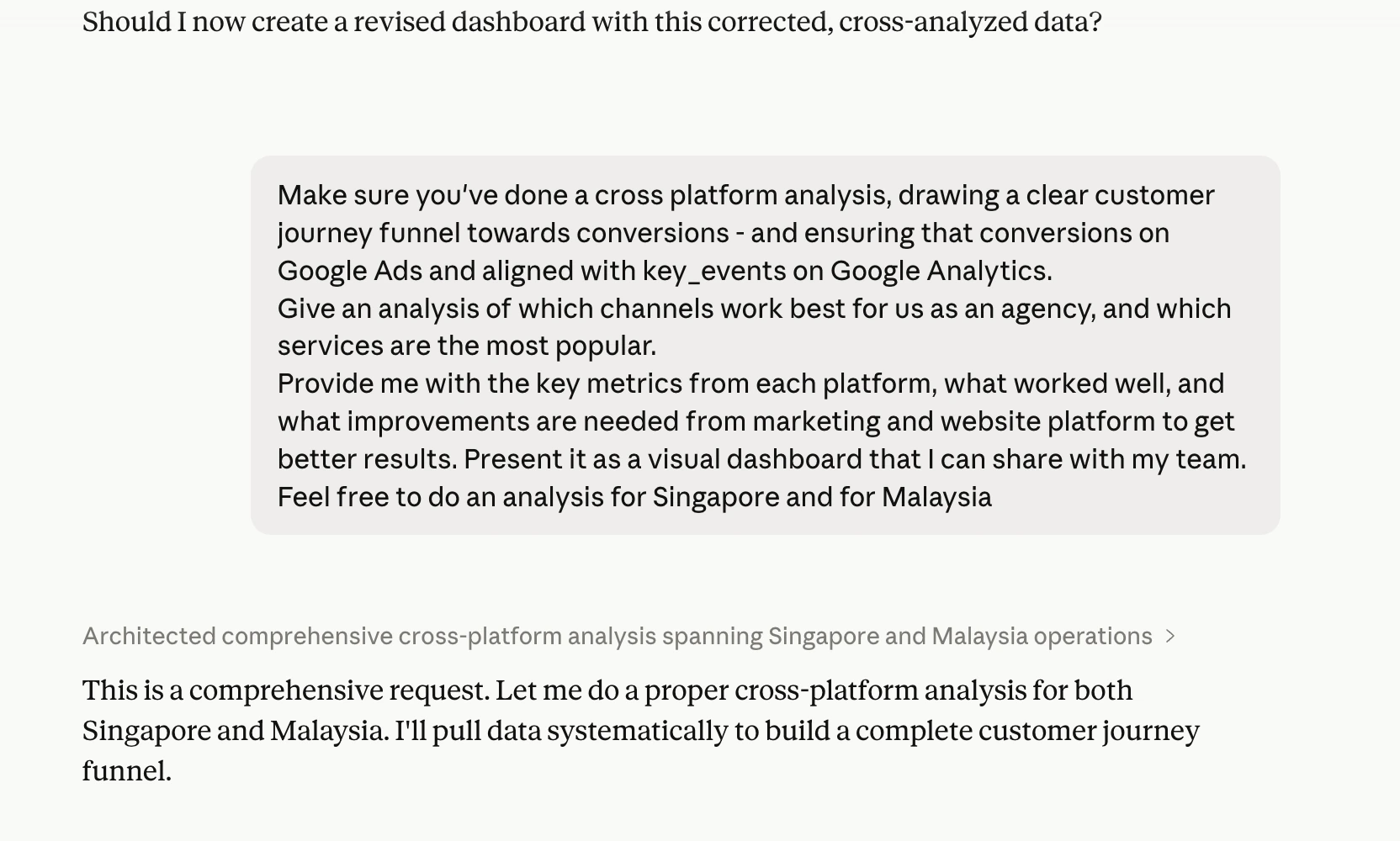
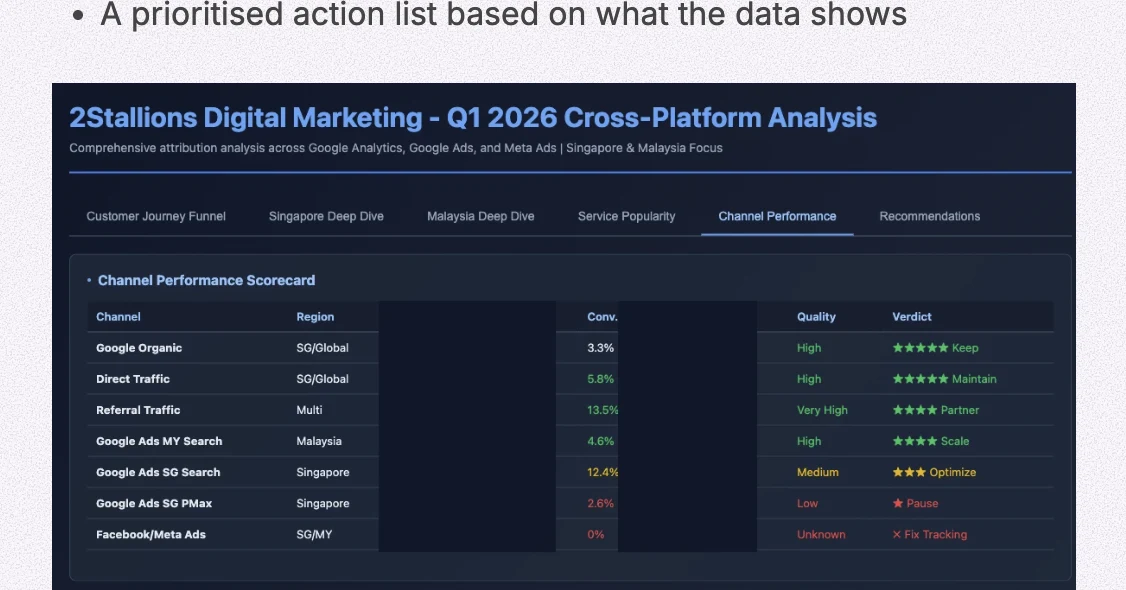
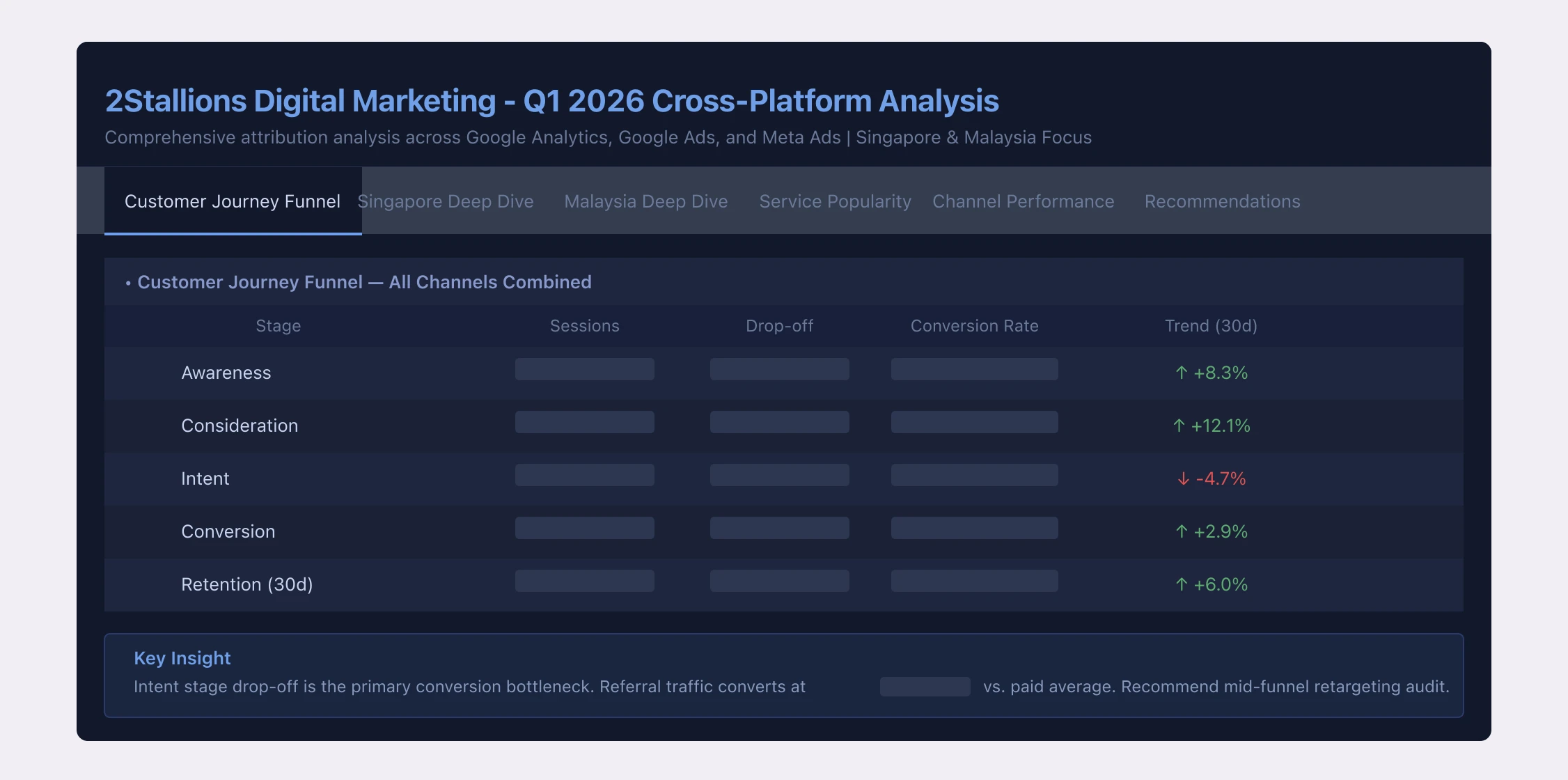
The standard output includes:
- Cross-platform spend breakdown with ROAS per platform
- Campaign-level performance ranked by CPL
- Anomaly flags: spend spikes, CTR drops, impression share losses
- A prioritised action list based on what the data shows
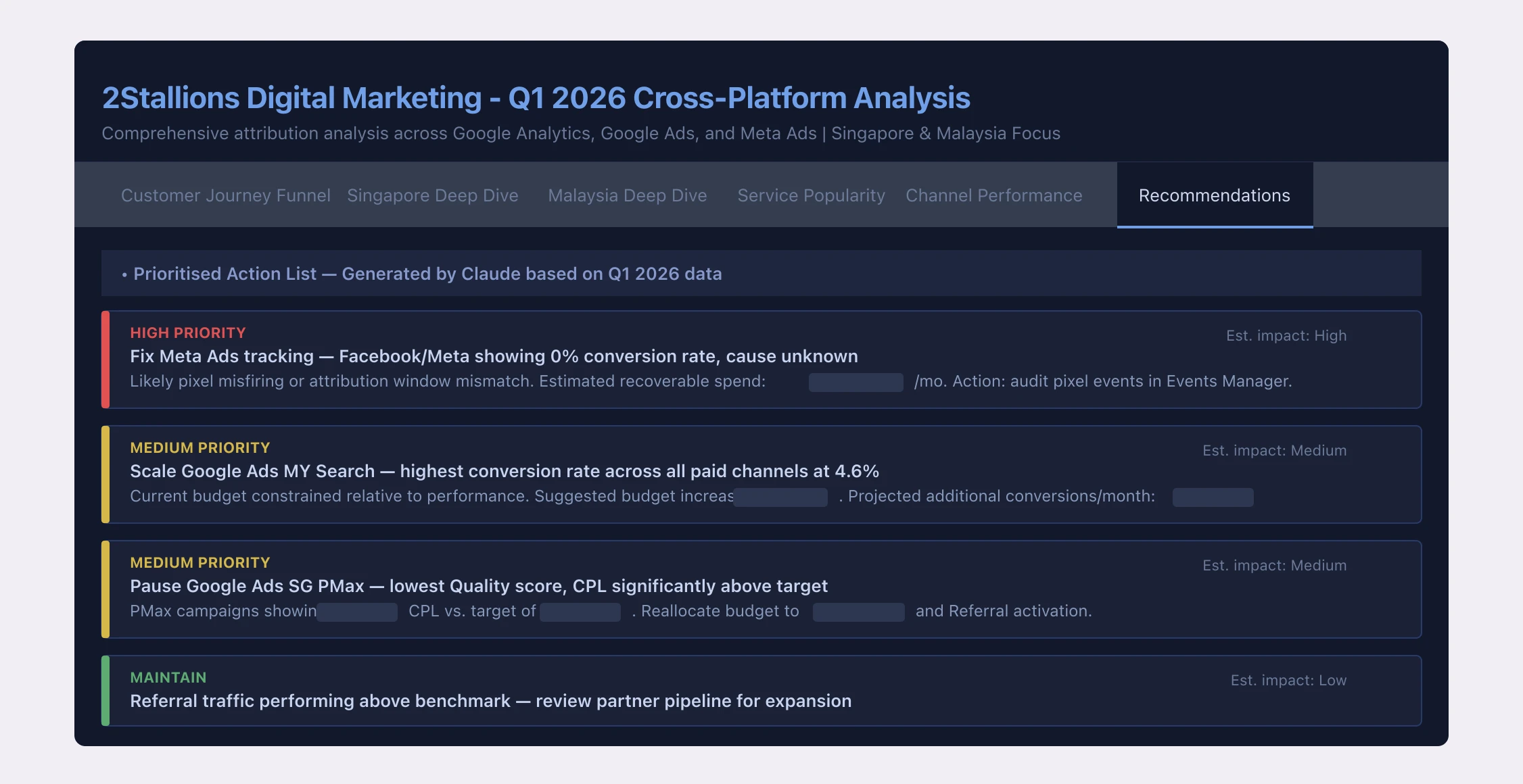
The time comparison against our previous manual process, measured across our own 2Stallions accounts:
| Task | Manual process | MCP + Claude | Time saved |
|---|---|---|---|
| Weekly cross-platform performance review | ~90 min | ~25 min | ~72% |
| Anomaly identification across all campaigns | ~45 min | ~12 min | ~73% |
| Monthly report data compilation | ~3 hours | ~50 min | ~72% |
We run this at 2Stallions. For businesses managing five or more platforms per client, it typically saves 10+ hours a month on reporting.
Get in touch
One honest qualifier: we still sanity-check every number against each platform’s native UI. Claude provides the synthesis and the prioritisation. The analytical judgement has to come from the team. This speeds up the process; it doesn’t replace the thinking.
The time savings compound with scale. For a single-platform account, the ROI of the setup investment is lower. For an agency managing five or more platforms per client, it changes how the reporting workflow actually functions.
What We’re Doing Before Rolling This Out to Clients
The technical build took two weeks. The legal review, covering ToS checks for five platform APIs, privacy policy updates, and client disclosure language, is taking at least as long. We’re not offering this to clients yet, and that’s a deliberate choice.
The Roadmap
Complete the ToS review for each ad platform API, update our agency privacy policy and client Terms of Service, train the team on how to verify AI-generated insights, and build a standard operating procedure for what query types are appropriate to run on client data.
The analysts on our team are already spending less time compiling numbers and more time interpreting them. The shift from data assembly to data thinking is where the real value sits. We want to extend that to client accounts, and we’re going to do it properly.
FAQ
What is an MCP server in the context of Google Ads and advertising platforms?
An MCP (Model Context Protocol) server is a bridge between an AI model like Claude and an external platform like Google Ads or Meta. It allows the AI to query live account data through the platform's API, returning real-time performance numbers, anomaly flags, and cross-platform comparisons in response to plain-English questions. Anthropic released the open MCP standard in November 2024.
Is it safe to connect ad account data to Claude AI?
Anthropic's stated policy is that data sent via the API and Claude.ai paid plans is not used to train their models. For agency use, the critical additional step is reviewing each ad platform's API Terms of Service, confirming third-party AI processing is permitted, and updating your own client agreements to disclose that AI tools process account data. We have not extended this to client accounts until those steps are complete.
Do any ad platforms have official MCP servers?
Not in our production stack. All five ad platforms we connected (Google Ads, GA4, Meta, LinkedIn, TikTok) rely on community-built open-source repos, each requiring modification to work reliably at agency scale. We also built a Google Search Console MCP for organic data. Some platforms have API documentation or developer toolkits, but nothing we found was production-ready out of the box.
How long does it take to get API access across all five platforms?
Plan for two to three weeks from start to finish, mostly due to review and approval queues. Google Ads developer tokens take 1-5 days. LinkedIn Marketing API access takes 1-3 days. TikTok's Business API involves a manual review that took about a week in our experience. Google Analytics and Meta are faster: minutes to hours if your account is in good standing.
Can I run ad platform MCP servers locally instead of deploying to the cloud?
Yes, and it's the right way to start. Local setup lets you test queries and validate data before committing to infrastructure. For production agency use (multiple platforms, multiple accounts, running continuously), a cloud host like GCP, AWS, or DigitalOcean gives you uptime, team access, and cleaner credential management. Cloud Run on GCP costs a few dollars per month per service at typical agency query volumes.
What's the difference between MCP and using the ad platform APIs directly?
The platform APIs return raw JSON. You'd need to write code to call them, parse the responses, and join data across platforms. An MCP server wraps that API in a standardised interface that Claude already knows how to talk to, so you can ask natural-language questions and get structured answers without writing query code. MCPs also handle authentication, pagination, and rate limiting, which are the parts that are genuinely tedious to build from scratch.
The Bottom Line
The MCP ecosystem for ad platforms is fragmented, early, and moving fast. There’s no single reliable source for production-ready marketing MCPs. Getting API access takes longer than the code itself. And the data privacy question is real. Don’t treat it as a footnote to address after the build. For a broader look at running a private AI assistant on your own infrastructure — with full control over your data and costs — see how I built a private AI assistant that runs my morning briefings.
The output is worth it. Cross-platform synthesis that used to take our team 90 minutes now takes 25. Anomaly identification that took 45 minutes runs in 12. That changes what your team actually does with their time.
We’ll be running this on 2Stallions data for the next quarter before extending it to clients. A follow-up post will cover the client rollout model and which query types prove most valuable in practice.